• Hi and welcome to the Studio One User Forum!

    Please note that this is an independent, user-driven forum and is not endorsed by, affiliated with, or maintained by PreSonus. Learn more in the Welcome thread!

Track bounce does not include side chain input

Hi,

I've finally reached CPU usage of 100% and need to bounce tracks to wave but when I bounce them the side chain input on the plugins don't react to my kick that is supposed to send the signal. How do I get the sidechain to work?

It works fine when playing the track
 
I realised now that NONE of the automation renders either! I used "Bounce to New Track (Keep speaker format)".
 
One way is to select the track and and choose export stems. In the popup choose channels and select the track and the busses you want to export. You can also choose "Import to track" which will place the stems in your project. You will end up with a audio/instrument track for the track you exported and a track for each buss you exported. You will also have the stems saved in a folder in your project.

Another way is to solo the track and busses and export song. You end up with just one track that way.

Gregor made a script for this but I cannot get it to work the way I want.
 
All I want is the audio of the track as it exits the channel. I don't want buss effects or master effects on it. All channels that enter a bus (with compression on for instance) affect each other in the bus. If I render just that channel with the bus compression, then the sound is not what I want. The remaining channels become different as well without the channel going to the bus.
 
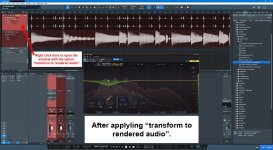
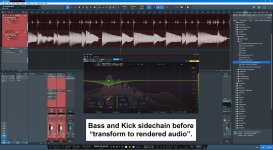
So you want to render down a track that contains inserts that is sidechained to another track? If that is the case, choose the "transform to rendered audio" option. That will retain the routing but render down your plugins for that track. Unless I'm misunderstanding you again. It also works when a buss is sidechained.


01.jpg02.jpg
 
Last edited:
That seems like what I want to achieve. Only question now. Do I still retain the original synths and interts for incase I want to change something? Does it create another track with the rendered audio or replace the instrument?

I basically want to render the track, disable the synths and inserts and have the WAV audio run it's normal route.
 
Last edited:
When you select "transform to rendered audio" a popup will appear with the option to "preserve realtime state" which you enable. It should default to being enable. After clicking okay to transform to rendered audio if you want to go back to the previous track state, right click in the same spot for transform to rendered audio and a popup will appear. Select "transform to realtime audio" and the track reverts to its previous state.

ETA. It doesn't create a new track but it does preserve the previous state so you can go back.
 
Have you tried to 'Bounce to New Track"? This creates a new track to a new clean (no inserts etc.) channel, including all processing from the old channel, and disables the old track. So the old track is still there in full but is not processed any longer.
 
When you select "transform to rendered audio" a popup will appear with the option to "preserve realtime state" which you enable. It should default to being enable. After clicking okay to transform to rendered audio if you want to go back to the previous track state, right click in the same spot for transform to rendered audio and a popup will appear. Select "transform to realtime audio" and the track reverts to its previous state.

ETA. It doesn't create a new track but it does preserve the previous state so you can go back.
I tried this. It renders my SUB track WITHOUT taking into account the side chain input that affects the ducking from the kick
 
Has anyone figured out how to get a track with a VST sidechain input to render within the DAW? It seems the lack of inclusion of sidechaining is because other tracks are muted during the bounce/render. So it is not including the other track (sidechain) during the render/bounce/mixdown because it is muted.
 
Has anyone figured out how to get a track with a VST sidechain input to render within the DAW? It seems the lack of inclusion of sidechaining is because other tracks are muted during the bounce/render. So it is not including the other track (sidechain) during the render/bounce/mixdown because it is muted.
If you use the stem export it`s working for me. Tested it minutes ago. But i need to mention i use the Devious Duck 2 and duck with a simple unassigned Miditrack while having the Midi option enabled. Usually i use it on my Submixes and not on the track itself like i did with compressors. You need to set the miditrack to solo safe (Solo Button turns into Green) and i am sure it will even work if you set the Duck 2 to Sidechain-Input instead of Midi-input. This makes me believe that it should work with a normal compressor too if you use the stem export function.
 
Back
Top