• Hi and welcome to the Studio One User Forum!

    Please note that this is an independent, user-driven forum and is not endorsed by, affiliated with, or maintained by PreSonus. Learn more in the Welcome thread!

Solved Thin weird black line changing instrument *SOLVED*

Nighthawk

New member
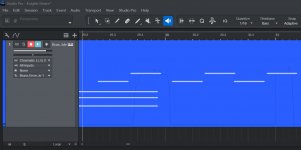
I got this thin weird squiggly black line that is changing instrument. How did it happen, and how do I get rid of it?
See picture.
Thank you.
 

Attachments

  • Studio One Screenshot.jpg
    Studio One Screenshot.jpg
    89,3 KB · Views: 23
Aftertouch / MPE-Data? Have a look on your Notecontroller in the Note-Editor.
 
I have no clue is there a way to turn it off manually now?
The thing is if I move the note away from that spot with the squiggly line it sounds good.
 
I have no clue is there a way to turn it off manually now?
The thing is if I move the note away from that spot with the squiggly line it sounds good.
As Sebastian describes in the post above, edit your MIDI event (double click is the default) then click to "show/hide automation lanes" at the bottom, then see what you have. The example here is modulation (recorded from a mod wheel). You can highlight and edit (or delete) this data.
Edit modulation data (or Note controller/Pitch bend/After touch data).
 
You can stop recording Aftertouch Data coming from Keyboard Controllers like this:
To view this content we will need your consent to set third party cookies.
For more detailed information, see our cookies page.
 
I am such a noob here, that I didn't understand what you guys were taking about. But it gave me a starting point to search and you were all right and the problem is fixed.
thank you all for the help.
Much appreciated, I could have not have figured this out by myself.
 
Back
Top