• Hi and welcome to the Studio One User Forum!

    Please note that this is an independent, user-driven forum and is not endorsed by, affiliated with, or maintained by PreSonus. Learn more in the Welcome thread!

The Automation Reduction Setting for MPE

dkaimone

Member
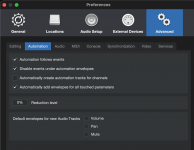
I'm running 7.2 on a Mac, and discovered the Automation Reduction setting that needs to be set to 0 (default is 50) in the advanced settings for MPE pitch to work accurately.

Now I'd like to find a way to have a macro or some sort of way to easily switch between those two settings without having to visit the advanced settings dialogue. I'm not too familiar with S1 macros or scripts.

Can this be done?
 

Attachments

  • Screenshot 2025-10-25 at 3.06.31 PM.png
    Screenshot 2025-10-25 at 3.06.31 PM.png
    168,5 KB · Views: 6
Short answer: No, can't be done.

Why do you even need to change the reduction level? I’ve had mine set to 0% since 2012 🙂
I figured it wouldn't an easy thing. I've been told to set it back to the default of 50 when not using it to save computer resources, as it's one part of the CPU processing and latency mix.
 
I've been told to set it back to the default of 50 when not using it to save computer resources
You're running 7.2 on a Mac. So your Mac can't be so old that you will ever notice any CPU problems because of some automation points.

The Automation Reduction is nice to prevent old MIDI devices from being overloaded by too many MIDI controller messages. If you have a reasonably modern computer, you don't need that.
 
Last edited:
Good to know that the automation points don't add much to the load. I have a two year old Mac Studio M2 and I've had a few load issues, but none that I couldn't resolve with a few tweeks to the settings or bouncing a track and effects to audio.

Right now, the system really does work well for me in general. A few plugins seem to freeze things up if I'm not careful, but I'm the only one affected and I just reboot S1.
 
Back
Top