• Hi and welcome to the Studio One User Forum!

    Please note that this is an independent, user-driven forum and is not endorsed by, affiliated with, or maintained by PreSonus. Learn more in the Welcome thread!

Solved Sustain pedal detected but not working

Bastiaan

New member
Hi all, since a couple of days I have a problem where my MIDI sustain pedal is not working any more. Some quick specs:

Studio One 7.2.2.107056
Windows x64 (Ryzen 3900X, 64 GB RAM)
MIDI keyboard: Studio Logic SL88 Grand (pedal plugged into port 1 "switch")

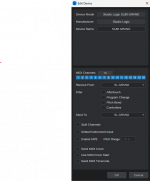
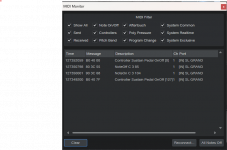
The funny thing is that when I press the sustain pedal, it is seen by Studio One (see first screenshot) but it simply does not work. The note I play is not sustained.

Any ideas?
 

Attachments

  • Screenshot 2025-10-27 200905.png
    Screenshot 2025-10-27 200905.png
    31,4 KB · Views: 16
  • Screenshot 2025-10-27 201607.png
    Screenshot 2025-10-27 201607.png
    31,1 KB · Views: 16
In your second screen shot, put a tik in the <controllers> box, save & restart S1. [Might want to tik <Pitch Bend> also.]
Sustain (by the MIDI standard) defaults to CC64 which is a "Continuous Control".
The setting in the screen shot is correct. Checked boxes mean that the MIDI message is filtered / blocked. So without any of them checked, all MIDI data should be passed through.

To me the settings all look correct. Can you make a test and record some note + sustain pedal data on an instrument track? Then open the part in the Note Editor and check if there's an automation lane for "Sustain" or "Sustain Pedal" or similar (the exact name can vary depending on the instrument plug-in assigned to that track).

If you see automation points for this parameter, then it must be a problem with the instrument plug-in.
 
The setting in the screen shot is correct. Checked boxes mean that the MIDI message is filtered / blocked. So without any of them checked, all MIDI data should be passed through.

To me the settings all look correct. Can you make a test and record some note + sustain pedal data on an instrument track? Then open the part in the Note Editor and check if there's an automation lane for "Sustain" or "Sustain Pedal" or similar (the exact name can vary depending on the instrument plug-in assigned to that track).

If you see automation points for this parameter, then it must be a problem with the instrument plug-in.
I'm sorry, it seems that in my sleep-deprived state, I didn't finish my thought process on last post. (if TL/DR, no problem)
Several months ago I attached an old Yamaha SO-3 keyboard to my system via 5p DIN MIDI. MIDIOX and the SO MIDI monitor showed that it was passing Pitch Bend, Mod Wheel, Expression pedal, and Sustain pedal through, but would NOT operate any functions on a Presence piano patch (which worked with my NI KK-S61 Mk1) and so I ticked the filters, saved and restarted S1, then unticked the filter, and BINGO, everything worked. I had just assumed that it was a minor glitch in the way that S1 saved over the system settings file.
I'm apologize for the incomplete/incorrect posting. My bad.
 
The setting in the screen shot is correct. Checked boxes mean that the MIDI message is filtered / blocked. So without any of them checked, all MIDI data should be passed through.

To me the settings all look correct. Can you make a test and record some note + sustain pedal data on an instrument track? Then open the part in the Note Editor and check if there's an automation lane for "Sustain" or "Sustain Pedal" or similar (the exact name can vary depending on the instrument plug-in assigned to that track).

If you see automation points for this parameter, then it must be a problem with the instrument plug-in.

Just tried this with 2 different instruments (Kontakt, and a VSL Synchron Player) on seperate tracks). In both cases the MIDI event did not record automation for a sustain pedal.
 
Then the only possible reason is that you haven't added your MIDI keyboard as Keyboard and you need to watch my MIDI setup tutorial again:

To view this content we will need your consent to set third party cookies.
For more detailed information, see our cookies page.
 
I'm sorry, it seems that in my sleep-deprived state, I didn't finish my thought process on last post. (if TL/DR, no problem)
Several months ago I attached an old Yamaha SO-3 keyboard to my system via 5p DIN MIDI. MIDIOX and the SO MIDI monitor showed that it was passing Pitch Bend, Mod Wheel, Expression pedal, and Sustain pedal through, but would NOT operate any functions on a Presence piano patch (which worked with my NI KK-S61 Mk1) and so I ticked the filters, saved and restarted S1, then unticked the filter, and BINGO, everything worked. I had just assumed that it was a minor glitch in the way that S1 saved over the system settings file.
I'm apologize for the incomplete/incorrect posting. My bad.

Thanks for your reply, and it was worth a shot. Unfortunately, I did not have any success with this.

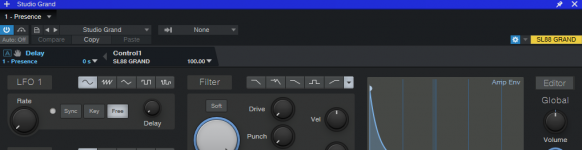
It just baffles me Studio One sees the CC inside the MIDI monitor but the instruments seem not to apply it. For example, in this screenshot you can see me using a new Studio One project with just Presence using the Studio Grand preset. As you can see by the "Control 1 SL88 GRAND" with a value of 100 - this is me holding the sustain pedal down.

Yet, it does not have any effect in the instrument itself when playing a note.
 

Attachments

  • Untitled.png
    Untitled.png
    52 KB · Views: 6
Then the only possible reason is that you haven't added your MIDI keyboard as Keyboard and you need to watch my MIDI setup tutorial again:

To view this content we will need your consent to set third party cookies.
For more detailed information, see our cookies page.

It actually was, but decided to remove it and just add it back. Only takes a minute. Also watched your vid btw - using Studio one for 6 years but it was still good to hear about the different profiles and how that actually works - you learn something new every day it seems :)

Anyway.. so I added it back and restarted Studio One. Problem solved! I have actually no clue as to why, but it works so I am happy I can continue writing music.

Thanks!
 
Back
Top