

Surf.Whammy
Active member
BACKGROUND
After working on computers for over half a century, I am an ADHD/OCD fanatic on archiving and the art of freezing time; and last year in 2025, I described and explained several strategies in vast detail in one the volumes in my series of books on “The Art of Digital Music Production” (Kindle ebooks).
The clue comes from Computer Science and its fascinating history.
Another clue comes from the existence of a complete working replica of the recording studio of Sun Records.
Yet another clue comes from the discovery and analysis of the Antikythera Mechanism.
Every record company keeps extensive archives of the original studio platters and electromagnetic tapes of their musical groups and artists going back to the days of Edison wax cylinders, although the latter probably are in museums along with the mechanical equipment used nearly 125 years ago.
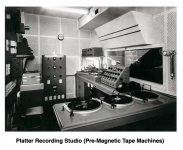
Until sometime after the Second World War, recordings were done using platters, which then were mastered to make "pressing" platters that were used to mass produce records for sale to the public.
At the end of the Second World War, US soldiers discovered the Germans had electromagnetic tape machines as early as 1927 and were using them to record NAZI Minister of Propaganda, Joseph Goebbel's speeches for broadcast to the "Volkswagen" analog of official NAZI radio receivers.
This led to Bing Crosby financing Ampex to upgraded and improve magnetic tape recording technology, which included manufacturing magnetic recording tapes made by BASF tape (salvaged from pre-war Germany), 3M, and Orradio Industries.
From the late-1940's, archiving switched to cataloguing and storing magnetic tapes, which was done for all the popular musical groups and singers at the time, and continues today.
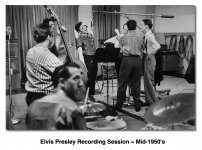
The original Elvis Presley and Beatles tapes and are kept carefully stored, often in underground temperature and humidity controlled salt mines, along with paper documents for a virtual festival of government agencies.
The clue is found in YouTube when you see an old album of songs has been "remastered", which is done using the original studio tapes or carefully made copies of them.
STRATEGIES
There really several ways to create archives of recording sessions; but the ultimate strategy is to "freeze time", which includes keeping original equipment, as well as in more recent times, older computers, recording software, and effects plug-ins, as well as racks of external signal processors, electric guitars, basses, drumkits, microphones, and so forth; some of which is done when older recording studios close and become working museums.
Focusing on more recent times where the primary equipment is a combination of computers, Digital Audio Workstation (DAW) applications like Apple computers, VST effects plug-ins, and so forth, a few things are very important when freezing time:
(1) You need at least one of the specific computers, preferably with some replacement parts or a second computer.
(2) You need all the relevant and necessary software specifically licensed so that using it in the period-specific computer does not require an Internet connection, where one of the primary requirements is no subscriptions.
(3) If some of the software requires an iLOK security dongle, then there is a way to authorize the software specifically to the period-specific computer and its relevant operating system.
(4) You will want to create full bootable backups, which on Apple computers is done with Super Duper! (Shirt Pocket), and then you need to verify the backups in fact are bootable and can restore the relevant computer to its condition at the tomr you did the ultimate archiving. There are similar backup programs for Windows, and whether they work in restoring without an Internet connection is another matter; but if not, then keeping the original DVD or other installation media probably will work, so long as it comes from Microsoft.
(5) As observed by other folks, you can make audio copies of tracks (colloquially called "rendering", and other names, depending on whether it's only the audio or is the complete Channel configuration (Inserts, Track Lane Automation, and all that stuff). You can print relevant information, as well.
(6) In the extreme, you can save actual electric guitars, bases, drumkits, synthesizers, microphones, external signal processors, and all that stuff, where this is one of the strategies IK Multimedia uses when creating their highly-accurate emulations of old recording equipment, synthesizers, and other instruments, effect pedals, amplifiers, microphones, and so forth, which certainly includes creating sampled-sound libraries where trained musicians play period-specific instruments, where the "Fab Four" collection from EastWest is an example of Beatles instruments used on a representative selection of Beatles songs.
The keys to the "Ultimate Song Archiving Strategy" are (a) that it needs to be complete in every specific respect and (b) it needs to run without being connected to the Internet.
FINANCIAL CONSIDERATIONS
So long as you have non-subscription licenses for all the software, the primary costs will be the computer and its replacement parts which you plan to use to "freeze time".
One easy test is to disconnect your computer from the Internet and then see if everything works. If everything works, then you have the required licenses, at least so long as none of the software has hidden "call home" trickery.
Even then, there probably are ways to avoid "call home" trickery, which might be so simple as getting permission from the manufacturer, although this can be expensive and sometimes is done via intermediate "license vault" services, but more for certain types of mission-critical business software.
For example, I get a used Apple computer from Other World Computing (Macsales) every few years and then "freeze" the now retired Apple computer, complete with all the software (DAW, VSTi virtual instruments, VST effects plug-ins, and so forth). It's all licensed without subscriptions; and for a while I run the retired machine and the new machine in tandem in case I need something from the soon-to-be retired system.
Regarding the "not connected to the Internet" requirement, the key question is whether you can record, mix, and master songs when the Internet is not connected or is is unavailable, which so long as the computer is authorized usually will be the case.
If you are doing this professionally for clients, then you can offer it as a paid option. Determine how much its costs, and then make it profitable, which certainly might include having the customer buy all the equipment, software, and then store it themselves.
Record labels do this with magnetic tapes, equipment, and all associated stuff or their musical groups, but not so much because they are thoughtful historians.
They do it, because they can make money selling the same entertainment over-and-over in different formats and new mastering techniques.
Continuing with the examples here in the sound isolation studio, I have a 2008 Mac Pro that has everything from perhaps 10 years ago; and if I want to revisit something, I can do it without needing to be connected to the Internet.
OTHER STRATEGIES (APPLE COMPUTERS)
(1) If the goal is to be able to rollback the clock a while, then you can create a bootable backup using SuperDuper! (Shirt Pocket) for historical use but also do another bootable backup to be able to roll the clock forward. This requires a LaCie external storage device, and perhaps two of them depending on how much software and data exists, which here in the sound isolation studio for the current 2019 iMac is approximately 3.8TB and takes nearly a day to backup, but so what.
(2) If it's important to preserve actual performances, for example a real lead guitar solo, then record it without effects if possible. You can add effects later, where the rule is that it's easy to add effects but nearly impossible to remove them once they are part of the recorded audio.
Keeping effects (guitar pedals) separate is not so difficult, since you can split the output of the electric guitar and record it separately while also running it through the guitar pedal rig, where depending on the specific set of effect pedals, amplifiers, and all that stuff, it might be something the lead guitar player needs to use and to hear when playing the lead guitar solos, rhythms, and so forth. In this strategy, you will have a track of the raw electric guitar and a track (monaural or two-channel) for the electric guitar and its effect pedals. Anything you add onboard can be kept separate as well, although recorded effect pedals become an intrinsic part of the recorded audio and cannot be separated, at least easily.
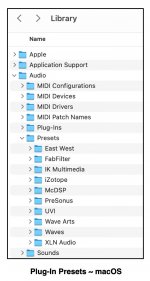
(3) You also can save a copy of the session (a.k.a.,"song") via "Save As . . ."; but remember to make a copy of all the VST effect plug-in presets, including all of your user-defined custom presents. Usually, the presets are kept in a specific folder of the Library; although presets can be stored in other locations; so do a few experiments to discover where all the presets are stored on your Apple computer.
Lots of FUN
After working on computers for over half a century, I am an ADHD/OCD fanatic on archiving and the art of freezing time; and last year in 2025, I described and explained several strategies in vast detail in one the volumes in my series of books on “The Art of Digital Music Production” (Kindle ebooks).
The clue comes from Computer Science and its fascinating history.
Another clue comes from the existence of a complete working replica of the recording studio of Sun Records.
Yet another clue comes from the discovery and analysis of the Antikythera Mechanism.
Every record company keeps extensive archives of the original studio platters and electromagnetic tapes of their musical groups and artists going back to the days of Edison wax cylinders, although the latter probably are in museums along with the mechanical equipment used nearly 125 years ago.
Until sometime after the Second World War, recordings were done using platters, which then were mastered to make "pressing" platters that were used to mass produce records for sale to the public.
At the end of the Second World War, US soldiers discovered the Germans had electromagnetic tape machines as early as 1927 and were using them to record NAZI Minister of Propaganda, Joseph Goebbel's speeches for broadcast to the "Volkswagen" analog of official NAZI radio receivers.
This led to Bing Crosby financing Ampex to upgraded and improve magnetic tape recording technology, which included manufacturing magnetic recording tapes made by BASF tape (salvaged from pre-war Germany), 3M, and Orradio Industries.
From the late-1940's, archiving switched to cataloguing and storing magnetic tapes, which was done for all the popular musical groups and singers at the time, and continues today.
The original Elvis Presley and Beatles tapes and are kept carefully stored, often in underground temperature and humidity controlled salt mines, along with paper documents for a virtual festival of government agencies.
The clue is found in YouTube when you see an old album of songs has been "remastered", which is done using the original studio tapes or carefully made copies of them.
STRATEGIES
There really several ways to create archives of recording sessions; but the ultimate strategy is to "freeze time", which includes keeping original equipment, as well as in more recent times, older computers, recording software, and effects plug-ins, as well as racks of external signal processors, electric guitars, basses, drumkits, microphones, and so forth; some of which is done when older recording studios close and become working museums.
Focusing on more recent times where the primary equipment is a combination of computers, Digital Audio Workstation (DAW) applications like Apple computers, VST effects plug-ins, and so forth, a few things are very important when freezing time:
(1) You need at least one of the specific computers, preferably with some replacement parts or a second computer.
(2) You need all the relevant and necessary software specifically licensed so that using it in the period-specific computer does not require an Internet connection, where one of the primary requirements is no subscriptions.
(3) If some of the software requires an iLOK security dongle, then there is a way to authorize the software specifically to the period-specific computer and its relevant operating system.
(4) You will want to create full bootable backups, which on Apple computers is done with Super Duper! (Shirt Pocket), and then you need to verify the backups in fact are bootable and can restore the relevant computer to its condition at the tomr you did the ultimate archiving. There are similar backup programs for Windows, and whether they work in restoring without an Internet connection is another matter; but if not, then keeping the original DVD or other installation media probably will work, so long as it comes from Microsoft.
(5) As observed by other folks, you can make audio copies of tracks (colloquially called "rendering", and other names, depending on whether it's only the audio or is the complete Channel configuration (Inserts, Track Lane Automation, and all that stuff). You can print relevant information, as well.
(6) In the extreme, you can save actual electric guitars, bases, drumkits, synthesizers, microphones, external signal processors, and all that stuff, where this is one of the strategies IK Multimedia uses when creating their highly-accurate emulations of old recording equipment, synthesizers, and other instruments, effect pedals, amplifiers, microphones, and so forth, which certainly includes creating sampled-sound libraries where trained musicians play period-specific instruments, where the "Fab Four" collection from EastWest is an example of Beatles instruments used on a representative selection of Beatles songs.
The keys to the "Ultimate Song Archiving Strategy" are (a) that it needs to be complete in every specific respect and (b) it needs to run without being connected to the Internet.
FINANCIAL CONSIDERATIONS
So long as you have non-subscription licenses for all the software, the primary costs will be the computer and its replacement parts which you plan to use to "freeze time".
One easy test is to disconnect your computer from the Internet and then see if everything works. If everything works, then you have the required licenses, at least so long as none of the software has hidden "call home" trickery.
Even then, there probably are ways to avoid "call home" trickery, which might be so simple as getting permission from the manufacturer, although this can be expensive and sometimes is done via intermediate "license vault" services, but more for certain types of mission-critical business software.
For example, I get a used Apple computer from Other World Computing (Macsales) every few years and then "freeze" the now retired Apple computer, complete with all the software (DAW, VSTi virtual instruments, VST effects plug-ins, and so forth). It's all licensed without subscriptions; and for a while I run the retired machine and the new machine in tandem in case I need something from the soon-to-be retired system.
Regarding the "not connected to the Internet" requirement, the key question is whether you can record, mix, and master songs when the Internet is not connected or is is unavailable, which so long as the computer is authorized usually will be the case.
If you are doing this professionally for clients, then you can offer it as a paid option. Determine how much its costs, and then make it profitable, which certainly might include having the customer buy all the equipment, software, and then store it themselves.
Record labels do this with magnetic tapes, equipment, and all associated stuff or their musical groups, but not so much because they are thoughtful historians.
They do it, because they can make money selling the same entertainment over-and-over in different formats and new mastering techniques.
Continuing with the examples here in the sound isolation studio, I have a 2008 Mac Pro that has everything from perhaps 10 years ago; and if I want to revisit something, I can do it without needing to be connected to the Internet.
OTHER STRATEGIES (APPLE COMPUTERS)
(1) If the goal is to be able to rollback the clock a while, then you can create a bootable backup using SuperDuper! (Shirt Pocket) for historical use but also do another bootable backup to be able to roll the clock forward. This requires a LaCie external storage device, and perhaps two of them depending on how much software and data exists, which here in the sound isolation studio for the current 2019 iMac is approximately 3.8TB and takes nearly a day to backup, but so what.
(2) If it's important to preserve actual performances, for example a real lead guitar solo, then record it without effects if possible. You can add effects later, where the rule is that it's easy to add effects but nearly impossible to remove them once they are part of the recorded audio.
Keeping effects (guitar pedals) separate is not so difficult, since you can split the output of the electric guitar and record it separately while also running it through the guitar pedal rig, where depending on the specific set of effect pedals, amplifiers, and all that stuff, it might be something the lead guitar player needs to use and to hear when playing the lead guitar solos, rhythms, and so forth. In this strategy, you will have a track of the raw electric guitar and a track (monaural or two-channel) for the electric guitar and its effect pedals. Anything you add onboard can be kept separate as well, although recorded effect pedals become an intrinsic part of the recorded audio and cannot be separated, at least easily.
(3) You also can save a copy of the session (a.k.a.,"song") via "Save As . . ."; but remember to make a copy of all the VST effect plug-in presets, including all of your user-defined custom presents. Usually, the presets are kept in a specific folder of the Library; although presets can be stored in other locations; so do a few experiments to discover where all the presets are stored on your Apple computer.
Lots of FUN
Attachments
Last edited: