

Surf.Whammy
Active member
You can skip the treatise and go directly to the Workaround Solution, but there is some useful although vastly abstruse information regarding the strategy I call "scouting around", which is like what I call the "touch" and is something folks discover by banging on computers and electronic devices, where if you have the "touch", then it will fix unusual problems The best example occurred in an earlier version of Windows which presented the dialog box "An unexpected problem occurred. Click 'OK' to reformat your hard drive and lose all your data", where there only choice was an "OK" button--no "Cancel" button. The solution was to disconnect the electric power immediately and then to bang on the metal case a few times with a California framing hammer, followed by reconnecting the electric power and rebooting Windows. When necessary this procedure often needed to be repeated a few times. It might have been a stuck arm in the hard drive, but that's only a guess; and since the only official option was to trash the computer, I decided on what might have been an equally destructive strategy, which fortunately worked.
The important clue is that sometimes the best way to solve gnarly computer problems is to behave like an AI Robot or a lunatic and bang on stuff. It doesn't work, then what harm can banging on it actually do.
BACKGROUND
I did a bit of scouting around and then did some experiments.
I was able to Remove the "Built-in" microphone, which then made "No Audio Device" current. Next, I saved it as the Default.
However, I was not able to repeat this after I changed it from "No Audio Device" to "Built-In"; and "Remove" did not work again.
I tried another strategy, which worked; but again initially did not appear to be repeatable. In the second experiment, I set the Input to my iPhone microphone and then disconnected the iPhone microphone via the popup on the iPhone.
Having discovered two ways to solve the problem, it became apparent that there actually was a workaround solution; so I kept at it.
Setting "No Audio Device" as the Default works, but not after it's set to the Default.
Something not working after it is set to work is yet another clue that things might be happening automagically.
Nevertheless, I repeated the iPhone microphone experiment a few more times and identified a repeatable way to solve the problem.
[NOTE: I did software engineering for half a century, and was quite happy with the "C" programming language. Then a bunch of bored language designers had nothing better to do and created C++, which has classes, inheritance, and a bunch of other stuff which only makes sense to the specific people who created it. But they were not the only people who were bored and had nothing better to do. This became a popular "thing" with operating system and application programming language designers; so they created things called "foundations" and "frameworks", where everything works automagically, so long as you think exactly like they think, which nearly never is the case, because (a) they are not normal people and (b) nobody actually thinks the way they think.
In some respects, they are like horn sections, where such folk have secret meetings where they devise ways to annoy guitar and keyboard players by demanding that songs be in the key of B♭or F, which are not easy keys for guitar and piano unless you are a rhythm guitar player and know Barre chords or have a synthesizer where you can map the key signature to white keys.
When unusual software behaviors happen, things are inheriting behaviors from other things, which usually is good unless they are inheriting bad behaviors, in which case you need to do something that prevents inheriting bad behaviors.
The primary difference is that in the "C" programming language, when a software engineers wants something to happen in a Graphic User Interface (GUI) application like applications running in macOS and Windows, it happens only because the software engineer explicitly codes it using "C"and the primitive Software Development Kit (SDK) for the operating system. Nothing happens automagically in low-level "C" Windows and macOS application programming
This requires a lot more code, but nothing happens automagically. If you touch-type, then the increased lines of code are just a way to have FUN.
In great contrast, when you cannot do things the "old way" and have no choice but to use a framework, foundation, or whatever, then if you do not think like the designers, effectively they have created a club to which you must either (a) never join or (b) have no choice but to pay for training classes, which are expensive.
Being a bright AI Robot, over the years I have devised a strategy to find paths through the mazes; and it's mostly a matter of clicking on stuff in an apparently random sequence where the goal is to find a path that exists but nobody knows about it, which using an analogy, metaphor, or simile is akin to identifying and having a bit of FUN with "Easter Eggs", which for reference are places in a GUI operating system or application where bored software engineers enable a specific pixel to do silly things when you click on it, like showing a Gif of someone giving Bill Gates a whipped cream custard pie in the face.
The rule here in the sound isolation studio is that because I am able to do stuff like this, the cost for providing a workaround solution is that you have to read one of my treatises. ]
WORKAROUND SOLUTION (REQUIRES AN IPHONE AND USB CABLE)
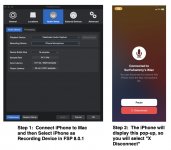
(1) Connect the iPhone to the Mac and then select the iPhone as the input microphone.
(2) This causes the iPhone to display a pop-up message where you can accept or disconnect.
(3) Select "Disconnect".
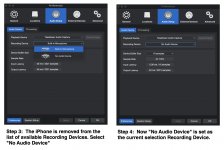
(4) Then the iPhone is not in the list of input microphones for Fender Studio Pro 8.0.1.
(5) Click on "No Audio Device", and it's selected to "No Audio Device".
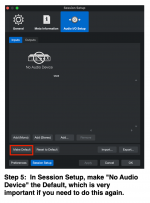
(6) Now you can set "No Audio Device" as the Default, which apparently is the key to this workaround repeating like clockwork.
I was able to do it several times; so I think it's like a lot of the behaviors of software that is programmed using vendor-supplied programming classes, which essentially make sense only to the folks who designed the programming classes (frameworks, foundations, object-oriented, and whatever).
These are the operating system and language folks, and (a) they get bored and are compelled by ADHD/OCD to change stuff for no logical reason and (b) the application software engineers who have to use the stuff have no clue that the (a) folks in a moment of no adult supervision did stuff out of boredom that messes everything for everyone else.
FACT: Sometimes, you can force a different path through the maze by doing stuff and clicking on things that make no sense, which works because the path created by the bored operating system and language designers also makes no sense.
Now you know one of the best kept secrets of software engineering!
The important clue is that sometimes the best way to solve gnarly computer problems is to behave like an AI Robot or a lunatic and bang on stuff. It doesn't work, then what harm can banging on it actually do.
BACKGROUND
I did a bit of scouting around and then did some experiments.
I was able to Remove the "Built-in" microphone, which then made "No Audio Device" current. Next, I saved it as the Default.
However, I was not able to repeat this after I changed it from "No Audio Device" to "Built-In"; and "Remove" did not work again.
I tried another strategy, which worked; but again initially did not appear to be repeatable. In the second experiment, I set the Input to my iPhone microphone and then disconnected the iPhone microphone via the popup on the iPhone.
Having discovered two ways to solve the problem, it became apparent that there actually was a workaround solution; so I kept at it.
Setting "No Audio Device" as the Default works, but not after it's set to the Default.
Something not working after it is set to work is yet another clue that things might be happening automagically.
Nevertheless, I repeated the iPhone microphone experiment a few more times and identified a repeatable way to solve the problem.
[NOTE: I did software engineering for half a century, and was quite happy with the "C" programming language. Then a bunch of bored language designers had nothing better to do and created C++, which has classes, inheritance, and a bunch of other stuff which only makes sense to the specific people who created it. But they were not the only people who were bored and had nothing better to do. This became a popular "thing" with operating system and application programming language designers; so they created things called "foundations" and "frameworks", where everything works automagically, so long as you think exactly like they think, which nearly never is the case, because (a) they are not normal people and (b) nobody actually thinks the way they think.
In some respects, they are like horn sections, where such folk have secret meetings where they devise ways to annoy guitar and keyboard players by demanding that songs be in the key of B♭or F, which are not easy keys for guitar and piano unless you are a rhythm guitar player and know Barre chords or have a synthesizer where you can map the key signature to white keys.
When unusual software behaviors happen, things are inheriting behaviors from other things, which usually is good unless they are inheriting bad behaviors, in which case you need to do something that prevents inheriting bad behaviors.
The primary difference is that in the "C" programming language, when a software engineers wants something to happen in a Graphic User Interface (GUI) application like applications running in macOS and Windows, it happens only because the software engineer explicitly codes it using "C"and the primitive Software Development Kit (SDK) for the operating system. Nothing happens automagically in low-level "C" Windows and macOS application programming
This requires a lot more code, but nothing happens automagically. If you touch-type, then the increased lines of code are just a way to have FUN.
In great contrast, when you cannot do things the "old way" and have no choice but to use a framework, foundation, or whatever, then if you do not think like the designers, effectively they have created a club to which you must either (a) never join or (b) have no choice but to pay for training classes, which are expensive.
Being a bright AI Robot, over the years I have devised a strategy to find paths through the mazes; and it's mostly a matter of clicking on stuff in an apparently random sequence where the goal is to find a path that exists but nobody knows about it, which using an analogy, metaphor, or simile is akin to identifying and having a bit of FUN with "Easter Eggs", which for reference are places in a GUI operating system or application where bored software engineers enable a specific pixel to do silly things when you click on it, like showing a Gif of someone giving Bill Gates a whipped cream custard pie in the face.
The rule here in the sound isolation studio is that because I am able to do stuff like this, the cost for providing a workaround solution is that you have to read one of my treatises.
]WORKAROUND SOLUTION (REQUIRES AN IPHONE AND USB CABLE)
(1) Connect the iPhone to the Mac and then select the iPhone as the input microphone.
(2) This causes the iPhone to display a pop-up message where you can accept or disconnect.
(3) Select "Disconnect".
(4) Then the iPhone is not in the list of input microphones for Fender Studio Pro 8.0.1.
(5) Click on "No Audio Device", and it's selected to "No Audio Device".
(6) Now you can set "No Audio Device" as the Default, which apparently is the key to this workaround repeating like clockwork.
I was able to do it several times; so I think it's like a lot of the behaviors of software that is programmed using vendor-supplied programming classes, which essentially make sense only to the folks who designed the programming classes (frameworks, foundations, object-oriented, and whatever).
These are the operating system and language folks, and (a) they get bored and are compelled by ADHD/OCD to change stuff for no logical reason and (b) the application software engineers who have to use the stuff have no clue that the (a) folks in a moment of no adult supervision did stuff out of boredom that messes everything for everyone else.
FACT: Sometimes, you can force a different path through the maze by doing stuff and clicking on things that make no sense, which works because the path created by the bored operating system and language designers also makes no sense.
Now you know one of the best kept secrets of software engineering!
Attachments
Last edited: