
-
Hi and welcome to the Studio One & Studio Pro User Forum!
Please note that this is an independent, user-driven forum and is not endorsed by, affiliated with, or maintained by Fender. Learn more in the Welcome thread!
You are using an out of date browser. It may not display this or other websites correctly.
You should upgrade or use an alternative browser.
You should upgrade or use an alternative browser.
Studio Pro 8 won't see the macros I had in Studio One 7
- Thread starter PinkGene
- Start date
Assuming you have the correct directory selected and it contains the subdirectory with your macros, they should be working the same between Studio One and Studio Pro.
Can you post a screenshot of the Preferences window showing the path you have selected, as well as a screenshot of the contents of that folder?
Can you post a screenshot of the Preferences window showing the path you have selected, as well as a screenshot of the contents of that folder?
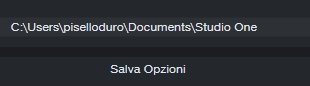
Your file structure is correct. Are you able to access or save plugin presets in Studio Pro without any similar error messages?
If these errors are isolated to macro files only, close Studio Pro and rename the 'commandbar-v3' file to something else, then launch Studio Pro and check again.
If these errors are isolated to macro files only, close Studio Pro and rename the 'commandbar-v3' file to something else, then launch Studio Pro and check again.
I tried saving both native and third-party presets and it works fine; I renamed 'commandbar-v3', but nothing happened. I deleted it, and it recreated it, of course, but it still doesn't work. Another strange thing I noticed, of which I'm attaching a screenshot, is that the pitch lists in the Instrument track's Edit view are double, but in the folder they're single. Thanks!

Not sure what the macro issue could be at this point unfortunately. Probably best to contact Fender support if it persisted after installation of the recent 8.0.1 update.
I had a similar issue with duplicate Musical Scales, the duplicates went away after using the 'Re-Index Presets' option on the Home tab of the Browser.
I had a similar issue with duplicate Musical Scales, the duplicates went away after using the 'Re-Index Presets' option on the Home tab of the Browser.

OutrageProductions
Active member
I had a similar issue long ago where Sound Variations in the SV edit window context menu would appear duplicated, with only one instance in the Explorer file tree.Another strange thing I noticed, of which I'm attaching a screenshot, is that the pitch lists in the Instrument track's Edit view are double, but in the folder they're single.
<Re-index Presets> fixed that as well.
OutrageProductions
Active member
If you go to the top of the thread... your original post... at the right top (desktop version) there is a [Watch] button and to the right of that is a [...v] menu; pop that open and there is [Prefix] item prior to the title of the post. In that you can mark it "Solved".Thanks so much! At least the duplicates problem was solved with Re-index Presets.