Surf.Whammy
Active member
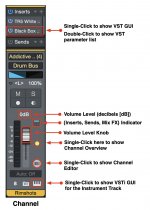
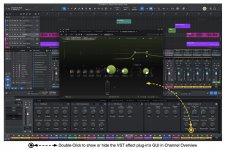
It was double-click in PreSonus Studio One 7 (S1); but now in Fender Studio Pro 8 (FSP8), it's single-click, while double-click displays the tiny drop-down list of parameters for the VST effect plug-in, which is the reverse of the way it worked in S1.hi i am new here one question hope somebody knows when we will have a gui on vst plugins when we double click on a tracks for now its just for studio one plugins
In FSP8, VSTi virtual instruments behave the same way as in S1; but double-clicking on the Channel to the right-middle of the LED volume level indicator knob, will show the Channel Overview where there also is a tiny "Instrument Track" icon you can click to see the GUI for the VSTi virtual instrument.
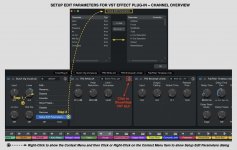
The Channel View has iconic controls (knobs) for each VST effect plug-in; and you can select which knobs to display in the same way you select parameters for Automation, which makes Channel Overview a handy way to see and edit the eight parameters you prefer to use, if there are eight parameters, of course.
It's very nice!