Follow along with the video below to see how to install our site as a web app on your home screen.
Note: This feature may not be available in some browsers.
Hi and welcome to the Studio One User Forum!
Please note that this is an independent, user-driven forum and is not endorsed by, affiliated with, or maintained by PreSonus. Learn more in the Welcome thread!
Ah yes....the one where he pronounces Hue like Huey! While this video is great, the "Advanced" bit he discusses is no longer relevant. The option he has you check is now automatic. No more option to check it or uncheck it. It just shines the grid through events now, period.
All this conjecture and hand wringing reminds me of when Apple bought Emagic/Logic. The same outcries, anger filled posts and predictions of disaster occurred.
All this conjecture and hand wringing reminds me of when Apple bought Emagic/Logic. The same outcries, anger filled posts and predictions of disaster occurred. After the smoke cleared the reality was that Logic did change, in some ways for the better and in some ways for the worst for us long term Emagic customers. But in the long term, everything worked out OK. In reality, nothing we say or do is going to change anything…Fender is going to do what they think is best since they own Presonus…we will just have to go with the flow and make the best of the changes…or move on to another DAW.
Ah yes....the one where he pronounces Hue like Huey! While this video is great, the "Advanced" bit he discusses is no longer relevant. The option he has you check is now automatic. No more option to check it or uncheck it. It just shines the grid through events now, period.
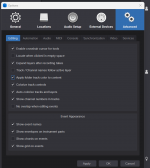
That's not the case. They've renamed the option to "Show grid on events", and it's the last option in Options\Advanced\Editing. This applies to Studio One Pro 7.2.3 and Studio Pro 8.
Unfortunately, this has been an issue since before v8. I think it has to do with Dropout protection. Turn it off and see if that fixes it. ALSO, if you do have it on, the tracks that aren't playing...make sure they aren't being monitored. Turn off the monitoring. For some reason, that makes them not work sometimes for me.
I do not use Drop-Out protection and I don't Monitor through FSP. These issues did not occur in previous versions for me. It seems to be caused by some sort of combination of different plugins (from different developers) in one song. When these plugins are used alone, there is no problem, but in a busy song with a variety of plugins, they seem to cause trouble.
That's not the case. They've renamed the option to "Show grid on events", and it's the last option in Options\Advanced\Editing. This applies to Studio One Pro 7.2.3 and Studio Pro 8.
So the fact that it was 'Studio One Pro' for the last several versions of the program didn't count, but put 'Fender' in front of it and it becomes intimidating?
You got me there. I upgrade so infrequently and look at the title so infrequently I didn't even notice the word Pro, just thought I was updating Studio One!
In my defense, the V6 version I'm on boots to a screen that spells out Studio One and the word Professional (not Pro!) is underneath it, about a fifth the size of the words Studio One, making it easy to miss. Also, once V6 is launched, in the upper left hand corner, all that's spelled out is Studio One—no Pro or Professional.
But technically you're correct which I acknowledge.
I don't believe I've ever had Pro+. Then again, I don't know what it is, so I may have it without knowing it. I'm still on V6 but I don't recall ever seeing the words Pro+. I imagine things have changed since the video came out. But seeing the grid lines so legibly was certainly a big help.
I was also one of the Windows users at that time who lost use of Logic unless I moved to a Mac computer. I was so into the Wintell platform that I used to build all my computers from scratch, tune them for audio production and maintain them…which was a lot of work. That is when I made the move to Mac computers and I have never looked back. So, in the long run I think this is one of the positive things that came from Apple buying Emagic.
I'm new here but I have a serious problem. Suddenly FSP8 stopped recognizing my audio interface - Roland V-Studio 100 - at start-up and reverts to Windows audio. I also tried with a Focusrite Scarlett 2i4 and it was the same. After I upgraded to FSP8 for a few days everything worked fine so I wonder what to problem might be. I checked the cables etc. and in other apps my interfaces work just fine.
Application Studio Pro 8.0.0.110141 Win x64
System Microsoft Windows 11 Home
Version 10.0.26100
CPU Model Intel64 Family 6 Model 158 Stepping 10
CPU Speed 2.59 GHz
CPU Cores 12
RAM 32.00 GB
Disk INTEL SSDPEKKW010T8L
I am enjoying the new features! Today I spent some time experimenting with "extract drums". It's an impressive feature that I hope will continue to be developed/improved...My experience has been that some extracts go better than others...I've had a range of results (good to bad) on a variety of drum patterns, tempos, and kits... I can't at this moment with any certainty say it works better on traditional drum kits over, say, DnB or hiphop breaks.
Historically, I haven't used Impact much at all the last few years, so it's been interesting to dig into it. I know for some producers, impact/sample one is a major part of their Studio Pro workflow. I now better understand some of the complaints/requests coming from folks who actively use those tools. But I also appreciate the features included in this latest version and think I will be using those more than I have in the past (for example, dragging certain hits/fx into sample one vs. straight to the arranger).
I am thinking about changing the drum sounds in the impact preset "drum extraction" ...assuming I can update the impact preset. I don't see why that wouldn't work. I think it would be a neat feature to have some kit options to choose from when extracting. Drums appear to extract to general drum midi mapping, so I also played around with changing the midi assignments in Addictive Drums 2 and other drum instruments so the kit instruments line up with the extracted drums. Thinking about repeatable processes I do once drums are extracted and brainstorming macros.
I'm new here but I have a serious problem. Suddenly FSP8 stopped recognizing my audio interface - Roland V-Studio 100 - at start-up and reverts to Windows audio. I also tried with a Focusrite Scarlett 2i4 and it was the same. After I upgraded to FSP8 for a few days everything worked fine so I wonder what to problem might be. I checked the cables etc. and in other apps my interfaces work just fine.
Application Studio Pro 8.0.0.110141 Win x64
System Microsoft Windows 11 Home
Version 10.0.26100
CPU Model Intel64 Family 6 Model 158 Stepping 10
CPU Speed 2.59 GHz
CPU Cores 12
RAM 32.00 GB
Disk INTEL SSDPEKKW010T8L
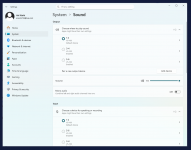
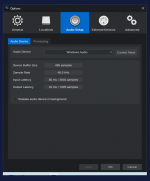
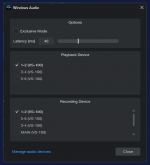
The V-Studio driver has been rock solid so far and it works perfectly in other apps. Attached you will find how it looks in Windows settings, in FSP8 : Configure audio device and in Control panel,
The V-Studio driver has been rock solid so far and it works perfectly in other apps. Attached you will find how it looks in Windows settings, in FSP8 : Configure audio device and in Control panel,
The driver is V-STUDIO 100 (VS-100) Driver Ver.2.0.2 - the latest version available and I haven't had any problems with it in Win 11. The only options in the audio device dialogue are "Windows audio" and "No audio device".
In my memory Cubase VST 5 and SX1 had annoying Audio/Midi Sync problems.. i think until SX 2 or 3 if I remember correctly.. but yeah, it was of course better than to stay on Logic 5.5 forever and ignore progress.
The driver is V-STUDIO 100 (VS-100) Driver Ver.2.0.2 - the latest version available and I haven't had any problems with it in Win 11. The only options in the audio device dialogue are "Windows audio" and "No audio device".
Have you tried to uninstall and then reinstall the driver?
If you upgraded to Studio Pro 8 (from Studio One 7) - there is a chance that your Audio Setup may not have transferred over to the new version flawlessly. I had this happen with my S61 keyboard a few years back - reinstalling it made all the difference.
Also - your device is discontinued, not common and highly unlikely it would have ever been tested in v8 so it should come as no surprise that there may be a few bumps in the road here.