
-
Hi and welcome to the Studio One & Studio Pro User Forum!
Please note that this is an independent, user-driven forum and is not endorsed by, affiliated with, or maintained by Fender. Learn more in the Welcome thread!
You are using an out of date browser. It may not display this or other websites correctly.
You should upgrade or use an alternative browser.
You should upgrade or use an alternative browser.
Studio Pro 8.1.2 - Discussion Thread
- Thread starter Lukas
- Start date


OutrageProductions
Active member
I've been mixing in Atmos 7.1.4 for a couple years and the transition from v7.x to v8.x was seamless and still works perfectly. There must be an issue with your system setup.I think it’s crazy and at the same time great, that changes have been made to the Dolby Atmos engine. I actually had to switch to Pro Tools for Dolby Atmos Mixing because the LFE was causing the whole session to crackle. I had pointed that out previously.
Also works perfectly in my PT rig.


madFloyd
Active member
I hope it's OK to post this question here:
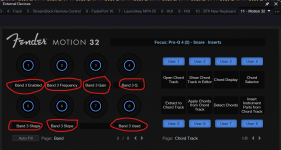
In v8.1.2, when using the new Fender Motion Controller 32, I cannot find a way to rename the custom plugin knob assignments I've made.
I can rename the pages (banks) but not the buttons themselves. Because Studio Pro has its way of condensing names to fit (think track names in the Console) I prefer to use smaller names that fit.
Perhaps it's not possible, but I'm hoping it is and I'm just missing something!

In v8.1.2, when using the new Fender Motion Controller 32, I cannot find a way to rename the custom plugin knob assignments I've made.
I can rename the pages (banks) but not the buttons themselves. Because Studio Pro has its way of condensing names to fit (think track names in the Console) I prefer to use smaller names that fit.
Perhaps it's not possible, but I'm hoping it is and I'm just missing something!
Attachments
After installing this update, I am unable to mix down to whatever format. The dialog box seems unresponsive for a long time (seconds count, but the blue bar does not show, so it doesnt hang) - then all of a sudden its full blue bar and dialog closes. There are files on my drive, but they can't be played back.
This is just with 5 tracks (3 audio, two vst3). Will do some further testing with just two audio tracks and no inserts.
EDIT: new song, single audio track with 5 seconds spoken word - no plugins, no instruments. Same stuff.
EDIT 2: a fresh new day, a fresh new reboot and this problem is no more.. no idea how or why, but hey, it works again.
This is just with 5 tracks (3 audio, two vst3). Will do some further testing with just two audio tracks and no inserts.
EDIT: new song, single audio track with 5 seconds spoken word - no plugins, no instruments. Same stuff.
EDIT 2: a fresh new day, a fresh new reboot and this problem is no more.. no idea how or why, but hey, it works again.
Last edited:

Henrik
Member
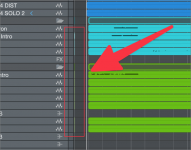
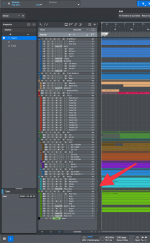
I've noticed some weird colored areas on some of the tracks in various sessions in Editor view. It is not events or small clips of audio. They stay the same size regardless of zoom. Do you know what they are or mean? Have you noticed yourself? Looks like a bug to me:
Attachments
Last edited:
Looks indeed like a graphic glitch: they are thesame color as your clips, but they shouldn't exist in the level meter.I've noticed some weird colored areas on some of my tracks in various sessions in Editor view. It is not events or small clips of audio. They stay the same size regardless of zoom. Do you know what they are or mean? Have you noticed yourself? Looks like a bug to me:

freddiphin
Active member
I replied here to this "ALT issue" and believe it is intended behavior, sorry to say.No updates on the ALT issue that we've been reporting weeks ago. I think that should have been a priority, so I can't hide my disappointment.
Two things which drives me nuts a little bit... This new freeze button is completely random for me in terms of when it's blue or not. In older sessions with frozen instrument tracks it stays gray/white all the time and in fresh projects sometimes it turns into blue and sometimes it just does not. But it feels random when it does so. I can un-freeze the tracks by the menu item, that's no problem, but this button is a bit chaotic for me.
And if I freeze instrument tracks, the instruments are stated as "unused" in the instument list of the console. Yes okay, they are not used right now cause the tracks are frozen, but I've checked "keep instrument state". So they look exaktly the same as instruments which are really not used any more can be removed.
And if I freeze instrument tracks, the instruments are stated as "unused" in the instument list of the console. Yes okay, they are not used right now cause the tracks are frozen, but I've checked "keep instrument state". So they look exaktly the same as instruments which are really not used any more can be removed.

Noxa
New member
Fender Studio Pro 8 — UI lag / scrolling & zooming performance regression vs Studio One 7 (Apple Silicon)
Hi everyone, hope you're all doing well
I want to leave feedback about a performance issue I've noticed, and I'd really appreciate it if other Mac (or Windows also) users could test this on their own systems when they get a chance. The test uses PreSonus's own demo project, so there are no third-party plugins involved, the project itself isn't heavy, and everyone has access to this demo for testing — it should be easy to reproduce (or rule out) on a wide range of machines.
To be clear, this isn't meant as hate toward the DAW. Quite the opposite — I genuinely like this DAW for how convenient it is to work in. I just want issues like this one to get proper attention and get fixed, because this specific problem is the reason I still haven't switched over to Fender Studio after i bought it, even after what I believe has been two major updates since its release and it has features i would like to use..
The issue: When playing back a project in Fender Studio Pro 8, scrolling and zooming through the timeline is noticeably laggy — choppy, delayed, uncomfortable to work with. The exact same project, on the exact same hardware, with the exact same audio interface and buffer settings, is smooth in Studio One 7. This is a comparative test, so the difference is very obvious side by side, even if it's less obvious testing Fender Studio in isolation.
How to reproduce it:
No third-party plugins are involved — this happens with the stock demo project, with no additional VSTs loaded, NOT rosetta mode, usual Studio One launch.
On support: I opened a support ticket with PreSonus about this. After providing system reports (SPX files) from three different setups (RME UCX II, MOTU interface with M1 Pro, and a clean Mac Mini with this audiouinterfaces), the response amounted to "find settings that work best for your computer" and that they don't have access to older M-series hardware to test with (only an M4). I understand hardware access is limited on their end , but the suggestion to just adjust settings misses the point: identical settings, identical hardware, identical project — one version of the software runs fine, the newer one doesn't. I'd appreciate any feedback and any help spreading the word on this, so the issue gets fixed as soon as possible
  .
.
Hi everyone, hope you're all doing well
I want to leave feedback about a performance issue I've noticed, and I'd really appreciate it if other Mac (or Windows also) users could test this on their own systems when they get a chance. The test uses PreSonus's own demo project, so there are no third-party plugins involved, the project itself isn't heavy, and everyone has access to this demo for testing — it should be easy to reproduce (or rule out) on a wide range of machines.
To be clear, this isn't meant as hate toward the DAW. Quite the opposite — I genuinely like this DAW for how convenient it is to work in. I just want issues like this one to get proper attention and get fixed, because this specific problem is the reason I still haven't switched over to Fender Studio after i bought it, even after what I believe has been two major updates since its release and it has features i would like to use..
The issue: When playing back a project in Fender Studio Pro 8, scrolling and zooming through the timeline is noticeably laggy — choppy, delayed, uncomfortable to work with. The exact same project, on the exact same hardware, with the exact same audio interface and buffer settings, is smooth in Studio One 7. This is a comparative test, so the difference is very obvious side by side, even if it's less obvious testing Fender Studio in isolation.
How to reproduce it:
- Open the official demo project "Rhythm of the Night" (found under menu bar Studio One → Studio One Installation → Available Downloads → Demo).
- Load it in Studio One 7, then separately in Fender Studio Pro 8, using the same audio interface and buffer size (I tested 32, 64, looks like even on 128 there is some lag)
- Set Dropout Protection to Off or Low in both apps, and play around with 16 - 64 buffer setting.
* (I disabled efficiency cores usage cause this feature usually performs badly.
- Press play, position the cursor around the chorus, and scroll/zoom through the project while it's playing.
- Compare smoothness between Studio One 7 and Fender Studio Pro (you will notice that SO 7 performs well at ANY of this settings combinations with no lag) .
- MacBook Pro M1 Pro, 32 GB RAM, 6 performance + 2 efficiency cores, running macOS Sequoia. Tested with trackpad.
- Mac Mini M2, 4 performance + 4 efficiency cores, 8 GB RAM, running macOS Tahoe. Tested with mouse (no trackpad connected to this machine).
Motu Microbook IIc and RME UCX II audiointerfaces , all connected directly to macbook no doc stations.
No third-party plugins are involved — this happens with the stock demo project, with no additional VSTs loaded, NOT rosetta mode, usual Studio One launch.
On support: I opened a support ticket with PreSonus about this. After providing system reports (SPX files) from three different setups (RME UCX II, MOTU interface with M1 Pro, and a clean Mac Mini with this audiouinterfaces), the response amounted to "find settings that work best for your computer" and that they don't have access to older M-series hardware to test with (only an M4). I understand hardware access is limited on their end
, but the suggestion to just adjust settings misses the point: identical settings, identical hardware, identical project — one version of the software runs fine, the newer one doesn't. I'd appreciate any feedback and any help spreading the word on this, so the issue gets fixed as soon as possible .
Last edited:

Vocalpoint
Well-known member
Fender Studio Pro 8 — UI lag / scrolling & zooming performance regression vs Studio One 7 (Apple Silicon)
The issue: When playing back a project in Fender Studio Pro 8, scrolling and zooming through the timeline is noticeably laggy — choppy, delayed, uncomfortable to work with. The exact same project, on the exact same hardware, with the exact same audio interface and buffer settings, is smooth in Studio One 7. This is a comparative test, so the difference is very obvious side by side, even if it's less obvious testing Fender Studio in isolation.
Windows 11 user here - my gear in my sig.
While I no longer have Studio One 7 installed - I did the test with the demo project here on v8.1.2 - and all scrolling, zooming - basically any motion of any kind on the timeline is crisp, accurate and instant.
The other kicker here is I do not even use a graphics card. All my visuals (now in 4K) are driven by the iGPU contained within my Intel Core i5 chip.
Also - given the nature of my main pro work in this DAW (commercial voiceover) - where I spend countless millennia editing audio which is nothing but one long series of zooming, scrolling, jumping here and there - every minute of every day - if there were even the slightest signs of a problem - you would see reams of thread action from me.
I will also add - that up to the end of July 2026 - my main rig was still Windows 10 22H2 and I thought that experience was as fast as humanly possible. But as soon as I moved to Windows 11 AND upped my game with a new 4K monitor - the editing/scrolling/zooming speed seemed to jump past another level that I was not quite ready for.
I know this does not help your use case - but I have seen this condition with other Mac users and the fixes ranged from changing options in the OS to dropping hardware acceleration in FSP to other tweaks that I cannot recall at this exact moment.
FWIW - there are tons of Mac users here on the forums - if this was a thing - across the board - pretty sure we would have some spirited (ongoing) threads about it.
VP
Noxa
New member
VP, thanks for the detailed reply — and especially for actually testing it on the demo project in 8.1.2.Windows 11 user here - my gear in my sig.
While I no longer have Studio One 7 installed - I did the test with the demo project here on v8.1.2 - and all scrolling, zooming - basically any motion of any kind on the timeline is crisp, accurate and instant.
The other kicker here is I do not even use a graphics card. All my visuals (now in 4K) are driven by the iGPU contained within my Intel Core i5 chip.
Also - given the nature of my main pro work in this DAW (commercial voiceover) - where I spend countless millennia editing audio which is nothing but one long series of zooming, scrolling, jumping here and there - every minute of every day - if there were even the slightest signs of a problem - you would see reams of thread action from me.
I will also add - that up to the end of July 2026 - my main rig was still Windows 10 22H2 and I thought that experience was as fast as humanly possible. But as soon as I moved to Windows 11 AND upped my game with a new 4K monitor - the editing/scrolling/zooming speed seemed to jump past another level that I was not quite ready for.
I know this does not help your use case - but I have seen this condition with other Mac users and the fixes ranged from changing options in the OS to dropping hardware acceleration in FSP to other tweaks that I cannot recall at this exact moment.
FWIW - there are tons of Mac users here on the forums - if this was a thing - across the board - pretty sure we would have some spirited (ongoing) threads about it.
VP
By the way, there was also a message from lokeyfly in this same thread — not quite on this topic, but also something about lag.
It does look like this is genuinely an isolated issue tied to macOS and/or Mac hardware. I'd be inclined to think it was something on my end if the same thing showed up consistently in both Studio One 7 and Studio One 8, or if, say, my laptop had lags while a Mac mini didn't. But in this specific case, it looks like a developer-side issue.
I know not many people run with low buffer settings, so this issue might not have surfaced right away for most users
Disabling graphic acceleration in general tab in settings makes this only worse
Last edited:
Vocalpoint
Well-known member
I know not many people run with low buffer settings, so this issue might not have surfaced right away for most users
Been rocking this app since 2011 - using RME hardware the whole time (with it's outstanding Direct Monitoring) - still do not understand the need for ultra low buffer settings.
I have been at 128 for 15+ years - and I record everything over here. Never had a single issue to speak of. Or any need to use anything lower than 128.
I do know that getting down into the realm of 32 etc - will cause pretty much cause any machine to start acting odd eventually.
VP
Noxa
New member
VP, totally fair, and I'm not saying low buffers are "necessary" in general — I get that 128 works fine for you and plenty of others. That's just not really my point of what i tried to tell.
For me it's simpler: whatever buffer I set, the software should just work correctly. If it breaks below 128, that's a basic function not behaving as it should, not really a question of whether I "need" it, I bought both perpetual licanses, SO7 works good and - FS8 - doesn't.
As for why I actually want to run low latency: it's not about chasing a number. I use amp sims rather than analog gear, and even at 64 I can sometimes feel a slight hit to responsiveness on guitar — at 128 I notice it more often. My system can comfortably handle lighter projects at low buffer, so I don't see why I shouldn't be able to use that headroom. I also can't always rely on RME — that's more of a stationary setup for me, and when I travel with my laptop I'm on a MOTU interface, where the latency at 64 through Studio One is clearly noticeable.
So I'm not pushing back on your experience, just hoping the actual issue gets looked at rather than "use 128" being the answer.
Checked recently on RME and yes 128 less but still laggy. Only at 256 i can't see this issue. Or if i set dropout protection to low or higher
For me it's simpler: whatever buffer I set, the software should just work correctly. If it breaks below 128, that's a basic function not behaving as it should, not really a question of whether I "need" it, I bought both perpetual licanses, SO7 works good and - FS8 - doesn't.
As for why I actually want to run low latency: it's not about chasing a number. I use amp sims rather than analog gear, and even at 64 I can sometimes feel a slight hit to responsiveness on guitar — at 128 I notice it more often. My system can comfortably handle lighter projects at low buffer, so I don't see why I shouldn't be able to use that headroom. I also can't always rely on RME — that's more of a stationary setup for me, and when I travel with my laptop I'm on a MOTU interface, where the latency at 64 through Studio One is clearly noticeable.
So I'm not pushing back on your experience, just hoping the actual issue gets looked at rather than "use 128" being the answer.
Checked recently on RME and yes 128 less but still laggy. Only at 256 i can't see this issue. Or if i set dropout protection to low or higher
Vocalpoint
Well-known member
I use amp sims rather than analog gear, and even at 64 I can sometimes feel a slight hit to responsiveness on guitar — at 128 I notice it more often.
Well - you and I appear to be brothers from another mother and being a guitar player - this is me too.
However - I guess you would need to explain to how you actually record your guitars in FSP - using your amp sims.
Over here - I fire up an audio track, route my Analog 3 (Hi-Z) input from the UCX-II to it - "insert" my sim of choice on that channel and then with "D" monitoring (via the RME in FSP) the latency = 0. Like being plugged into an amp right by my ear. No delay. No nothing. Ever. So it simply does
not matter what buffer size is in play.
The huge bonus to this method is that my actual guitar performance is recorded bone dry - allowing me to switch between any sim I want - when I want and then print the result if I like what I hear.
I can even come back 3 years later and add a sim that could completely change the vibe to the whole track with the click of a mouse - without ever committing to the original sim I used the day of recording.
For me - it's all capturing that original performance and to have flexibility with it - long AFTER the recording is complete. All with no muss, no fuss and especially - no latency.
Your method is clearly different - yes?
VP
Last edited:
Noxa
New member
Sorry, I didn't want to steer this into a side discussion. The real point is the issue I originally wanted to flag — it's actually what's keeping me from moving over to Fender Studio in the first place. And I do want to move over now, even for one reason because they finally fixed how plugin windows open from the mixer by single click. I'm worried that core point gets buried under a pile of replies, which lowers the odds it actually gets seen, tested, and gains any traction.Well - you and I appear to be brothers from another mother and being a guitar player - this is me too.
However - I guess you would need to explain to how you actually record your guitars in FSP - using your amp sims.
Over here - I fire up an audio track, route my Analog 3 (Hi-Z) input from the UCX-II to it - "insert" my sim of choice on that channel and then with "D" monitoring (via the RME in FSP) the latency = 0. Like being plugged into an amp right by my ear. No delay. No nothing. Ever. So it simply does
not matter what buffer size is in play.
The huge bonus to this method is that my actual guitar performance is recorded bone dry - allowing me to switch between any sim I want - when I want and then print the result if I like what I hear.
I can even come back 3 years later and add a sim that could completely change the vibe to the whole track with the click of a mouse - without ever committing to the original sim I used the day of recording.
For me - it's all capturing that original performance and to have flexibility with it - long AFTER the recording is complete. All with no muss, no fuss and especially - no latency.
Your method is clearly different - yes?
VP
At this point it's probably on me to record a proper video, edit it well, and put it up on YouTube — something like what James Zhan did testing different DAWs, where he showed how badly some daws included S1 handled efficiency cores compared to Cubase and Reaper. They basically weren't participating in project processing at all, and only after this video something begun to move. Realization is poor but it is what it is.
As for my own setup — it's not that different from what you described, honestly. For one, I don't use "D" because i don't use FS8
 (in Studio One 7 it was called Low-Z monitoring) — I never really used it, because it seems to change the sound of the project. As I understand it, it's supposed to work by bypassing plugins that add more than ~2ms of latency, and it cause changes in sound but it feels like it sometimes changes even the amp sim sound, in empty projects which throws me off. So instead I just run minimal/low dropout protection with a low buffer and monitor straight off the channel, to get as close as possible to RME's actual latency — plus 48kHz sample rate reduce latency a bit too.
Vocalpoint
Well-known member
As for my own setup — it's not that different from what you described, honestly. For one, I don't use "D" because i don't use FS8
Fair enough. Do not want to take a side trip either - but regardless of what version of Studio One is in play - for me anyway - this guitar method has worked flawlessly for me - with my RME. This does not specifically apply to FSP 8 either
And if you are actually hearing "changes in sound" - using Blue Z/Green Z/"D" with S1/FSP AND any RME (w/TotalMix) - I know some dedicated engineers in Germany that would like a word

My only comment on this is to say - I am about as huge as "stickler" (with the lowest tolerance one could have) for anything that would affect my guitar vibe - and if this process did that - I would be all over these guys.
Again - completely different hardware and different tolerances of expectation I guess.
Cheers,
VP

SwitchBack
Well-known member
LowZ/D is for when you can't have your cake and eat it too, or in this case a full-featured and at the same time low enough latency cue mix. For recording you want your monitor signal to have as little latency as possible, which is more important than getting the nicest mix possible. So if the full-featured cue mix has too much latency on it then use Low-Z during recording (even if it makes your monitor mix 'less nice'), and after recording you switch it off again for the full-featured playback mix.
It can't. It just can't. Technically impossible. What Z monitoring does is simply installing a second buffer alongside the larger one - the bytes themselves come in and out of the buffer just as with the larger buffer. Regarding the buffers themselves - the technique is using a double buffer. One is played by the audio interface while the other is filled with bytes. A buffer size of 32 means 32 samples are stored. At 32 bit resolution this means 4 bytes per sample = 128 bytes buffer. This buffer lasts 0.67 milliseconds - not even one full millisecond. Due to multiple buffer reads, the total latency is more around 2 ms. Human perception threshold for extremely trained ears is 10 ms.For one, I don't use "D" because i don't use FS8
For this alone, 32 is never really needed. 128 still sits under the threshold with 9 ms total latency.
But to the point: With a sample buffer of 32, you force your DAW to mixdown all of your tracks every 0.67 ms. Even on most recent hardware, running some hundred billion instructions per second, this is demanding a lot! (For reference, one float-multiplication needs around 4 processor cycles - and multiplication is one of the cheapest instructions).
That's why the Z monitoring is so brilliant. It reduces this load to just a few tracks of your hole project, allowing more time for the DAW to do other things. And what are those other things? Well, drawing the UI is one of it. And every daw in existence prioritizes the audio thread. Which means, everything else is only done when there is time left. You sense it as a sluggish UI.
There might be more to do in the version 8 UI versus version 7, which would explain the differences. However, I migrated directly from v6 and didn't notice anything negative with v8's UI.