sonicdiscovery
New member
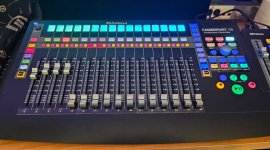
Just something I have setup in my studio to not have to remember what my shift+assigned buttons. I use a label maker with clear tape and white lettering. I used in on my avid hardware and it worked well, so I tried it on my Faderport 16 and it's a big time saver for my brain. The labels don't look as nice in the photo, but they look very good on the hardware. I also numbered my tracks at the bottom. Sometimes I do not want to always have to look up at the screen. Also, for the midi mode functions, it helps divide up my 16 faders a lot better.
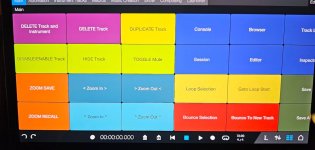
I also attached a screen shot for my remote app that sits in my avid Dock. It's great because I can go back and forth between DAW's using the same hardware. The remote app shortcuts are what works for me, in combination with the Faderport assigned button commands I set. (The ZOOM buttons are for micro-zooming.) I also still use my single Faderport, just to have a physical dedicated fader just for the master.
Just sending this out if it helps anybody or helps with ideas. (Also posted in Fender Community.)
I also attached a screen shot for my remote app that sits in my avid Dock. It's great because I can go back and forth between DAW's using the same hardware. The remote app shortcuts are what works for me, in combination with the Faderport assigned button commands I set. (The ZOOM buttons are for micro-zooming.) I also still use my single Faderport, just to have a physical dedicated fader just for the master.
Just sending this out if it helps anybody or helps with ideas. (Also posted in Fender Community.)