
OP
OP

Doc McCoy
Member
SongLens 1.0.7 is now available
SongLens 1.0.7 is a substantial usability and metadata-viewing update. It adds more ways to inspect Studio One songs, improves Advanced Search, expands snapshots and exports, and streamlines several everyday workflows.A note to any interested Mac folks: The port from Windows is going slowly, but going nonetheless.
Downloads:
- Windows installer: SongLens-Setup-1.0.7.exe
- Portable version: SongLens-single-file-win-x64.zip
Advanced Search improvements
Advanced Search is now easier to build and manage:
- Add and remove rules directly within each search row.
- Match either all rules or any rule.
- Save frequently used searches.
- Clear the current search from the dialog.
- Search text, numbers, dates, notes, tracks, instruments, folders, and other metadata.
- Create a snapshot of the current Advanced Search results.
- Visible columns
- Column order
- Current sorting
- All matching rows
New Groups and Mixer details
A new Groups tab displays Studio One group or folder names together with their assigned tracks.The Mixer tab now has separate sections for:
- Main
- Inserts
- Sends
Track instrument detection has been improved so SongLens is more likely to show the actual routed instrument instead of repeating the track name.
Snapshot and export improvements
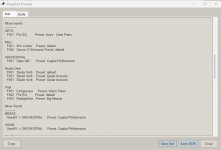
Snapshots now support:- Groups
- Mixer Main, Inserts, and Sends
- Text and JSON previews
- Advanced Search result grids
- The current “With Events” track filter
CSV exports can also include Groups and the expanded mixer information.
Faster song-grid workflow
Several frequently used controls now sit directly above the song grid:- Recently Viewed
- Change Columns
- Snapshot or Snapshot Results
Recently Viewed tracks songs you intentionally select while avoiding unnecessary entries caused by automatic folder loading.
Folder and date filtering
The song filter now supports:- Showing all songs
- Songs older or newer than a specified number of days
- Songs between two dates
- Filtering by Created or Modified date
Preferences and interface updates
The Preferences dialog has been reorganized with:- Clear descriptions beneath each option
- A dedicated Startup Options section
- Light and Dark theme choices
- Independent font-size controls
- Options to restore the previous filter, view, or Advanced Search
You can also choose which detail tabs are visible and use Sticky Tabs to keep the current detail tab selected while moving between songs.
This release also includes:
- Improved theme consistency
- Cleaner Attributes labels
- Friendlier Studio Version names
- Better dialog sizing and alignment
- Expanded documentation and wiki pages
- Numerous smaller layout and workflow refinements
Attachments
Last edited: