• Hi and welcome to the Studio One & Studio Pro User Forum!

    Please note that this is an independent, user-driven forum and is not endorsed by, affiliated with, or maintained by Fender. Learn more in the Welcome thread!

Solved SOLVED - Mastering The Mix VST not detected

MorenoZ

New member
Hello everybody,
updating to the latest version 8.1.2.113407 I'm having a problem with detecting a bunch of Mastering the Mix VST3, including the BASSROOM plugin.
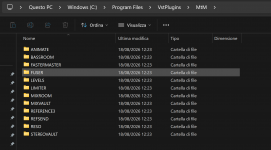
Beside the S1 update, I've changed the install directory of MtM plugins, making a complete uninstall and install process, updated the plug-in folder list, made blocklist reset and scan after reboot, but nothing changed.
In the plugin manager windows, I've also checked that there are no plugin in blocklist, and other VSTs are correctly displayed.
Made multiple blocklist reset and "remove plug-in settings" for a deep rescan, as suggested in another other thread, but still nothing.

Seems those plugins are completely ignored... I don't have a clue πŸ€·β€β™‚οΈ

Anyone having a similar problem?
 

Attachments

  • 2026-08-18 133236.png
    2026-08-18 133236.png
    123,5 KB · Views: 5
  • 2026-08-18 133749.png
    2026-08-18 133749.png
    779,8 KB · Views: 5
  • 2026-08-18 134955.png
    2026-08-18 134955.png
    205,9 KB · Views: 5
I use custom folders only for VST2 plugins. All my VST3s are in the default directory "C:\Program Files\Common Files\VST3". Installers usually only ask and copy VST2s in the custom folder, VST3s are automatically installed in the default location.

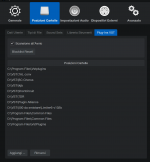
I don't know whether SP expects VST3s only in the default directory. You don't need to enter that path in the Plug-Ins VST list (third image), it's automatically scanned because it's part of the VST3 specification.
 
THANK YOU!
Moved the plugins to C:\Program Files\Common Files\VST3 folder, now they are back in the list.
This is realy a strange behaviour indeed.
 
If I'm not mistaken the install location for VST3 is obligatory by the standard, not possible to alter. StudioPro is rather strict in following those standards as I understand it. I think that's a good thing πŸ˜ƒ
 
I'm having a problem with detecting a bunch of Mastering the Mix VST3, including the BASSROOM plugin.
Beside the S1 update, I've changed the install directory of MtM plugins
This is indeed not a valid thing to do. VST3 plug-ins MUST be located in one of these two possible VST3 locations:

C:\Program Files\Common Files\VST3
%LOCALAPPDATA%\Programs\Common\VST3

(This is for Windows, obviously.)

Other locations may be accepted by other hosts, but Studio Pro will scan VST3 plug-ins only in these locations. That's also why you don't have to add the VST3 folder to the VST search path in the Options. That setting is only for VST2 (or other plug-in formats).
 
"Once you know, you know".
Now I know, but this should not be mandatory - many users (like me) choose to install everything else than OS on another drive, to leave the C:\ drive free, you know... windows...
Currently my FSP is installed on drive D, i should try to put a VST3 in "D:\Program Files\Common Files\VST3" to see if it works correctly.
 
You could also keep the expected VST3 path on C: and use a symbolic link to point it to D:. Windows and the DAW think they are accessing C:\Program Files\Common Files\VST3, but the files can live somewhere like D:\VST3.

That way installers and hosts can continue using the standard VST3 location without you actually having to store the plugins on C:. It’s probably a cleaner workaround than relying on every DAW to scan a custom VST3 path.
 
Back
Top