I asked for help on Reddit, but there I got only a discussion about why I would fantasize, because what I experienced first-hand would be impossible. To avoid that, please, only answer, when you can actually help. Thank you.
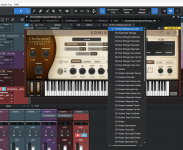
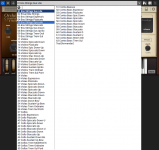
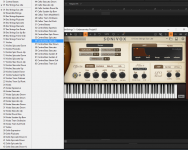
VST2 plugins natively support getNumPrograms() and getProgramName() from the VST API, which the DAWs use to show the plugin's embedded presets in their native header. This is especially helpful for me, because one instrument I use has aged badly in that its GUI is not fully working anymore (Sonivox orchestral series). Everything is available except - of all things - the preset menu. This was of no issue for me, because of the exposed presets in the native DAW header.
This works in all DAWs I have, like Fl Studio, Mixcraft, Waveform, Cakewalk Sonar and Studio One 6.
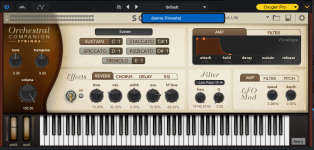
But recently I updated to Fender Studio Pro 8.1, and there the preset header stays empty. I ask for help to switch on or off things to enable it again. It was working prior and there is no reason to remove a working function, nor is there any update log that reports a removal of the functionality, so there must be something that I did (or did not), that leads to the empty preset header. I attached screenshots of S1 6, Mixcraft, Sonar and Fender Studio Pro in the hope, that this prevents the discussion, wether it generally works or not. I'm really just interested in tips or tutorials that lead me to enable this functionality again. And to repeat it, this functionality is only natively available for VST2, not VST3.
Thanks a lot in advance!
VST2 plugins natively support getNumPrograms() and getProgramName() from the VST API, which the DAWs use to show the plugin's embedded presets in their native header. This is especially helpful for me, because one instrument I use has aged badly in that its GUI is not fully working anymore (Sonivox orchestral series). Everything is available except - of all things - the preset menu. This was of no issue for me, because of the exposed presets in the native DAW header.
This works in all DAWs I have, like Fl Studio, Mixcraft, Waveform, Cakewalk Sonar and Studio One 6.
But recently I updated to Fender Studio Pro 8.1, and there the preset header stays empty. I ask for help to switch on or off things to enable it again. It was working prior and there is no reason to remove a working function, nor is there any update log that reports a removal of the functionality, so there must be something that I did (or did not), that leads to the empty preset header. I attached screenshots of S1 6, Mixcraft, Sonar and Fender Studio Pro in the hope, that this prevents the discussion, wether it generally works or not. I'm really just interested in tips or tutorials that lead me to enable this functionality again. And to repeat it, this functionality is only natively available for VST2, not VST3.
Thanks a lot in advance!