
The GUI of S1/SP has been buggy for a long time. The shared copies display bug is especially confusing.
Initial setup:
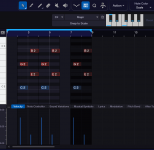
- A first two bars event with two C5/E5 chords with different velocities.
- A shared copy of this event is placed at the last position.
- The middle shared copy is created by dragging to the right.
Event/Chord bugs:
1. The score view doesn't display the middle event at all.
2. The current chord is not displayed for the middle event.
Velocity based rectangle selection bug:
1. Last event selection dragged from right to left misses the velocities of the first 2 events.
2. First event selection dragged from left to right misses all velocities and notes.
There's a lot of confusing variety: Selecting the last velocity of the middle event properly selects all notes and velocities. Starting the rectangle selection inside an event might also work. Moving the mouse to the track section after selection suddenly highlights the missing velocities.
Bonus scale based velocity coloring bug:
1. Switching scales and enabling scale based coloring works only for notes and not velocities.
Forcing a redraw by scrolling left/right updates only the velocities that need to be redrawn.
Initial setup:
- A first two bars event with two C5/E5 chords with different velocities.
- A shared copy of this event is placed at the last position.
- The middle shared copy is created by dragging to the right.
Event/Chord bugs:
1. The score view doesn't display the middle event at all.
2. The current chord is not displayed for the middle event.
Velocity based rectangle selection bug:
1. Last event selection dragged from right to left misses the velocities of the first 2 events.
2. First event selection dragged from left to right misses all velocities and notes.
There's a lot of confusing variety: Selecting the last velocity of the middle event properly selects all notes and velocities. Starting the rectangle selection inside an event might also work. Moving the mouse to the track section after selection suddenly highlights the missing velocities.
Bonus scale based velocity coloring bug:
1. Switching scales and enabling scale based coloring works only for notes and not velocities.
Forcing a redraw by scrolling left/right updates only the velocities that need to be redrawn.
Attachments


Last edited:


