
-
Hi and welcome to the Studio One User Forum!
Please note that this is an independent, user-driven forum and is not endorsed by, affiliated with, or maintained by PreSonus. Learn more in the Welcome thread!
You are using an out of date browser. It may not display this or other websites correctly.
You should upgrade or use an alternative browser.
You should upgrade or use an alternative browser.
Settings folder and dial assignment discussion (merged)
- Thread starter Number6
- Start date
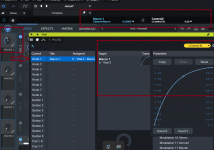
Feature requests to those who care:
- Save external instrument configurations to Fender account so it has a backup. Switching to new devices requires a whole new setup of these external instrument mappings.
- make external instruments repositionable from this screen:
- Make these area's renamable because at the moment, you have to delete the entire thing to rename it.
- Currently, when I reposition an external instrument from the following screen, it doesn't always keep the new position. Make it keep the order forever, until changed again by the user.
- Please allow KEYBINDINGS to be stored in your Fender account so when you log into another user's system at another studio, you can load your keybindings by simply logging in (Or any better more optimal solution to the problem that YOU can think of because you're a genius, you genius you)
OP
OP

Number6
Active member
See below I can't find this anywhere.
That dial icon only comes with certain effects plugins.
Last edited:
OP
OP
Number6
Active member
Feature requests to those who care:
- Save external instrument configurations to Fender account so it has a backup. Switching to new devices requires a whole new setup of these external instrument mappings.
- make external instruments repositionable from this screen:
View attachment 3342
- Make these area's renamable because at the moment, you have to delete the entire thing to rename it.
View attachment 3343
- Currently, when I reposition an external instrument from the following screen, it doesn't always keep the new position. Make it keep the order forever, until changed again by the user.
View attachment 3344
- Please allow KEYBINDINGS to be stored in your Fender account so when you log into another user's system at another studio, you can load your keybindings by simply logging in (Or any better more optimal solution to the problem that YOU can think of because you're a genius, you genius you)
Please put this in the feature requests forum so we can vote on it.
Ah I seeSee below I can't find this anywhere.
That dial icon only comes with certain effects plugins.
View attachment 3364
 now i know why you wanted to get at the AtomSQ surface script. Sorry for misunderstanding.
In my defence...
The video below should help as it gives all the info as to what I did.
Credit to Marcus H for outlining how to go about it.
Kindest regards.

freddiphin
Member
My plugin > ATOM SQ user/custom assignments are all in the "PreSonus ATOM SQ.surfacedata" file in that Surface Data[1] folder. Files with that "factory" string in their title are (I believe) the factory default mappings and not user mappings.OK, so
C:\Users\posti\AppData\Roaming\Fender\Studio Pro 8\Surface Data[1]\PreSonus ATOM SQ.factory.surfacedata
C:\Users\posti\AppData\Roaming\Fender\Studio Pro 8\Surface Data[1]\PreSonus UCNET Remote.factory.surfacedata
Does not contain any info on the Arturia ACID V plugin I mapped with control link with Atom SQ.
None of the files in this folder have any mapped controller data for this plugin.
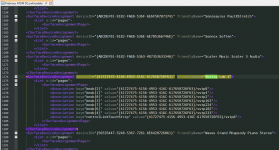
Here is Notepad++ showing that file and a mapping I had just made in Arturia's Analog Lab V plugin...
Attachments
OP
OP
Number6
Active member
Thanks.
As stated I could not find this info in that file, I've checked again and now I've found the XML. I cannot understand why I didn't find this before.
EDIT- it appears these settings only get saved to file when Studio One is closed. Maybe that's it.
As stated I could not find this info in that file, I've checked again and now I've found the XML. I cannot understand why I didn't find this before.
<SurfaceDeviceAssignment deviceID="{41727475-4156-4953-5433-303350726F63}" friendlyName="Acid V">
<List x:id="pages">
<SurfaceAssignmentPage>
<Association key="knob[2]" value="{41727475-4156-4953-5433-303350726F63}/vstp6"/>
<Association key="knob[3]" value="{41727475-4156-4953-5433-303350726F63}/vstp7"/>
<Association key="knob[5]" value="{41727475-4156-4953-5433-303350726F63}/vstp13"/>
<Association key="knob[6]" value="{41727475-4156-4953-5433-303350726F63}/vstp12"/>
<Association key="knob[1]" value="{41727475-4156-4953-5433-303350726F63}/vstp5"/>
<Association key="knob[4]" value="{41727475-4156-4953-5433-303350726F63}/vstp8"/>
<Association key="controlLinkTouchStrip" value="{41727475-4156-4953-5433-303350726F63}/vstp4"/>
<Association key="knob[7]" value="{41727475-4156-4953-5433-303350726F63}/vstp14"/>
<Association key="knob[0]" value="{41727475-4156-4953-5433-303350726F63}/vstp4"/>
</SurfaceAssignmentPage>
<SurfaceAssignmentPage/>
EDIT- it appears these settings only get saved to file when Studio One is closed. Maybe that's it.
Last edited:
OP
OP
Number6
Active member
Ah I see
In my defence...
The video below should help as it gives all the info as to what I did.
Credit to Marcus H for outlining how to go about it.
Kindest regards.
That video is helpful.
As stated there is no Knob button that will take me to that Macro button icon (I do get this with effects however).
However.... clicking on the ACID V plugin and then pressing F11 on the keyboard WILL show me a Macro button assignment! (I really don't understand why I can't get it via any other method, anyways...).
But it isn't what I need to do. I can change the response curve so it's logarithmic, that means when I turn the pot the value will increase faster in some positions, and then slower in others. That isn't what I want, I need the values to be linear, I just need the increasing/decreasing values reacting faster across the board, in other words for it to be far less sensitive. I don't want to turn the pot all the way around in order to achieve the max value, I just want a quick response.
Another thing that happens is if I close the window with all the macro buttons, it no longer works (turn the pot, ACID 5 dials do nothing). Clicking on the yellow triangle does nothing either. Pressing F11 and bringing up that Macro button window, bingo it all works again.
The other method (Control link, just clicking that yellow arrow icon) will work if I set it up via this more traditional method (as stated in my previous posts), dials will work with other windows closed, but again I can't make the pots more or less sensitive either.
freddiphin
Member
Yes, this is true. I meant to point that out. They get written when closing FSPEDIT- it appears these settings only get saved to file when Studio One is closed. Maybe that's it.
OP
OP
Number6
Active member
That video is helpful.
As stated there is no Knob button that will take me to that Macro button icon (I do get this with effects however).
However.... clicking on the ACID V plugin and then pressing F11 on the keyboard WILL show me a Macro button assignment! (I really don't understand why I can't get it via any other method, anyways...).
But it isn't what I need to do. I can change the response curve so it's logarithmic, that means when I turn the pot the value will increase faster in some positions, and then slower in others. That isn't what I want, I need the values to be linear, I just need the increasing/decreasing values reacting faster across the board, in other words for it to be far less sensitive. I don't want to turn the pot all the way around in order to achieve the max value, I just want a quick response.
Another thing that happens is if I close the window with all the macro buttons, it no longer works (turn the pot, ACID 5 dials do nothing). Clicking on the yellow triangle does nothing either. Pressing F11 and bringing up that Macro button window, bingo it all works again.
The other method (Control link, just clicking that yellow arrow icon) will work if I set it up via this more traditional method (as stated in my previous posts), dials will work with other windows closed, but again I can't make the pots more or less sensitive either.
View attachment 3371
To add, there would be two ways to do this I guess, first way is in software, and second way would be Atom SQ itself.
Both options are not available.
I notice in the Presonus Feature requests website (since been deleted) people are begging for this feature. One person on Reddit sold their SQ because they decided this makes the SQ unusable, I'm fairly sympathetic with this statement.
Velocity sensitivity, or changing the resolution of the rotary encoders either on the SQ controller itself (or Faderports it seems) or the backend seems to be a essential feature completely overlooked by Fender/Presonus. This should be basic included functionality, I can't believe nothing has been done about it.
There is a similar sort of issue (but technically unrelated) when moving the playhead across the timeline whereby you cannot adjust the movement by bars or resolution (and there are common complaints with this and other Presonus hardware such as the faderport).

Atom SQ and playhead positioning
I'm revisiting the Atom SQ to see if things have changed, and I've pretty much forgotten everything. In Studio One and Atom SQ if I hold SHIFT + Dial 5 the playhead will move by one bar at a time. I have 4 beats to a bar, I would like it to move a beat at a time (4 times shorter distance). Any...
 studiooneforum.com
Maybe they replace it with these new "Fender Motion" controllers, but somehow I doubt it. I'm not sure Atom users would want to get bitten twice.
Last edited: