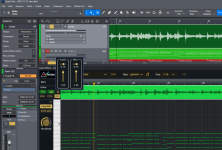
So I use Prism for Audio to midi. It is a ARA effect and you simply drag it to the audio track and it creates midi file data. You drag that data to an Instrument track.
But once I've created the midi file I want to remove Prism from the Audio track because for some reason it is silent.
In Sonar the audio track is not silent even while Prism midi track is playing. And you can preview the midi and the audio using the built in controls shown in the screenshot. This also is not working in Studio Pro. 8
The Render button closes Prism but the audio track is still silent. Obviously Render does not remove Prism.
I don't see a remove Prism, region effect, or ARA option anywhere like in Sonar? There is only this option for Melodyne.
The only work around I found was to make a copy of the audio track first and then apply Prism.
Thank you.
But once I've created the midi file I want to remove Prism from the Audio track because for some reason it is silent.
In Sonar the audio track is not silent even while Prism midi track is playing. And you can preview the midi and the audio using the built in controls shown in the screenshot. This also is not working in Studio Pro. 8
The Render button closes Prism but the audio track is still silent. Obviously Render does not remove Prism.
I don't see a remove Prism, region effect, or ARA option anywhere like in Sonar? There is only this option for Melodyne.
The only work around I found was to make a copy of the audio track first and then apply Prism.
Thank you.