• Hi and welcome to the Studio One User Forum!

    Please note that this is an independent, user-driven forum and is not endorsed by, affiliated with, or maintained by PreSonus. Learn more in the Welcome thread!

recording wrecked by what??

GotZillaProd

New member
Hi everybody, I have recorded a choir, live in a church - using Studio one 5.5.0, a presonus revelator interface, two ake condesator mics - everything was fine during all rehearsals, but the actual recording is totaly wrecked. I do not understand what happend, as I believe I have not changed any setting after rehearsal. I'm sure You pros listen to the example and can tell in seconds what happend. Im quite sure the recording is wasted - but if there are any miracle tips how to repair it I would be extrelmly grateful!!

Recording Problems Example.wav
 
That could be from a number of factors.
It sounds like RF interference.
A room full of Cell phones? Bluetooth, air conditioning?

But what seems weird is that it only seems to happen when the organ plays? Was the organ connected directly to your audio interface? It’s sort of way too loud anyway.

If it was a laptop Ive had that due to using the power supply and ground issues. The RF was getting into the USB system. Using the battery or a ground lift usually works.

Another thing comes to mind is the mikes were probably needing better voltage for the phantom power. If your interface is bus powered this is a common issue. There might not be enough juice.

Did you record it multi track?

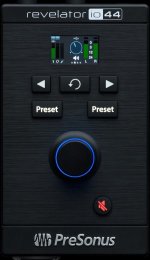
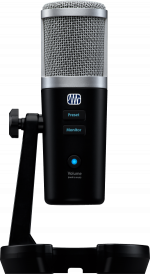
It’s not clear what a Presonus Revelator is? There's 3 items, which one is yours. One of them is not even listed with Presonus. Only available trough Best Buy? And you must have meant AKG mikes.
 

Attachments

  • c20c9075c5939cd11e35a1057995dcbd.image.500x500.jpg
    c20c9075c5939cd11e35a1057995dcbd.image.500x500.jpg
    22,5 KB · Views: 3
  • 2777700303_pre_int_frt_1_nr.jpg
    2777700303_pre_int_frt_1_nr.jpg
    46,3 KB · Views: 2
  • 2777300201_pre_mic_frt_1_nr.png
    2777300201_pre_mic_frt_1_nr.png
    299,2 KB · Views: 1
Last edited:
Maybe the organ's air pump motor was sparking? That would insert a lot of noise into the mains, which is extra bad when you use the same outlet for the recording gear. As John already noticed the noise seems to modulate with the organ's volume, not with the level from the choir.
 
Last edited:
What might help is to have more details about how you were set up. Like what exactly was the interface. What type of computer, mixer’s etc. And a little more detail about what mikes were used. Balanced XLR cables?
 
Hi everybody, I have recorded a choir, live in a church - using Studio one 5.5.0, a presonus revelator interface, two ake condesator mics - everything was fine during all rehearsals, but the actual recording is totaly wrecked. I do not understand what happend, as I believe I have not changed any setting after rehearsal. I'm sure You pros listen to the example and can tell in seconds what happend. Im quite sure the recording is wasted - but if there are any miracle tips how to repair it I would be extrelmly grateful!!

Recording Problems Example.wav
I did a few experiments with Pro-Q3 (FabFilter) to see if I could identify the clicks; but after a while I realized the clicks occur at several frequencies rather than at a handful of frequencies, where perhaps an ideal scenario is where the clicks are at 60-Hz, which would be typical for fluorescent light or something interfering from nearby electric power (for example 120V at 60-Hz, which in the US is what it's supposed to be but is not so precise all the time, hence having a line conditioner can be helpful).

The next thing I tried was Google AI; and it suggested a few VST effects plug-ins that claim to remove clicks.

One is "X-Click" (Waves), and the other is iZotope RX, which has a de-clicker module.

(1) Pro-Q3 (FabFilter) is good when clicks are consistent, but I was not able to get good results with it.

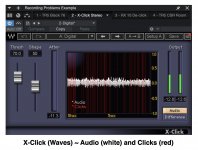
(2) X-Click (Waves) is good for showing the clicks but did not do a very good job removing the clicks.

(3) RX De-click v10 (iZotope) worked the best, and with more steps and additional techniques it might be part of a good solution.

The YouTube video shows RX De-click v10 removing clicks in a fixed setting on one-pass. A section of the YouTube video plays the clicks, which is an option, but then it goes back to playing the de-clicked audio.

THOUGHTS

Everything is important; but one way to explain how this stuff works is to consider that it's recording made by Elvis Presley or John Lennon on a home recording device that has a lot of clicks, wow, flutter, and other annoyances. Whether a VST effects plug-in can correct all that stuff is another matter; and it might be necessary for a software engineer or audio-engineer to examine each microsecond to remove clicks, which could be cost effective and probably was the way Beatles were able to create the last song with John Lennon, which includes one of George Harrison's last performances. It used a home recording John Lennon made on a cassette player; and although I have no inside information, I am confident suggesting that a team of audio experts worked on John Lennon's singing on the cassette tape.

IDEA

If I were working on this choral performance, intuition suggests adding strings to mask the clicks that remain after iZotope RX De-click v10 does it's work, which from a practical perspective is an arranging activity and is what George Martin did when he arranged and composed the double-string quartet for "Eleanor Rigby" (Beatles), which is Paul McCartney's singing plus the strings,

ANALYSIS

Adding to the suggestions and ideas from everyone else and using some of the information I discovered in my de-clicking experiments, I do not think the clicks are all from fluorescent lights, electric motors, or things like that, because the clicks are more random than steady, where for example even if it was caused by a variable speed electric motor, one would expect the clicks to track the speed of the electric motor in a way similar to a series of glissandi and similar to the way a engine sounds when it' revved.

The organ is a bit loud and the choir is not sufficiently loud; and this suggests an improvement in the future will be to focus more on where the microphones are placed relative to the choir, as well as the levels of the microphones recording the choir.

If the microphones are wireless, BlueTooth, or not XLR microphones, then that can be a source of the problems.

Anything is possible, and there are high-quality wireless microphones that singers use in concerts; but that's another matter.

If possible, I would use XLR condenser microphones run with XLR audio cables to an external digital and MIDI interface like a MOTU 828m3 Hybrid, which then would be connected to the computer, thereby ensuring there will be no interference clicks from whatever the audience and everything else is doing (fluorescent lights, electric motors, cellphones, and no telling what else).

If the organ really was loud, then I would ask the organist to lower the volume so people can hear the choir; but depending on where the microphones were placed, the organ volume might be good, which makes it more of a matter of where the microphones are placed relative to the choir.

This is what comes to mind at the moment. :)

To view this content we will need your consent to set third party cookies.
For more detailed information, see our cookies page.

To view this content we will need your consent to set third party cookies.
For more detailed information, see our cookies page.
 
Last edited:
Hi everybody, I have recorded a choir, live in a church - using Studio one 5.5.0, a presonus revelator interface, two ake condesator mics - everything was fine during all rehearsals, but the actual recording is totaly wrecked. I do not understand what happend, as I believe I have not changed any setting after rehearsal. I'm sure You pros listen to the example and can tell in seconds what happend. Im quite sure the recording is wasted - but if there are any miracle tips how to repair it I would be extrelmly grateful!!

Recording Problems Example.wav

I had something similar happen a couple days ago on Studio One 7. I was recording a piano and it was super glitchy, similar to your recording. I’ve never had this happen before after years and years of recording. After restarting my system I was able to record normally. I thought it was a sample rate issue but I checked and verified that everything was at the correct sample rate. Very strange.

Here’s one of the glitchy files:
https://www.dropbox.com/scl/fi/g1bz...ey=rbh8f4l1m6a9icn3z0cdp91qj&st=75kzt2y0&dl=0
 
I did a few experiments with Pro-Q3 (FabFilter) to see if I could identify the clicks; but after a while I realized the clicks occur at several frequencies rather than at a handful of frequencies, where perhaps an ideal scenario is where the clicks are at 60-Hz, which would be typical for fluorescent light or something interfering from nearby electric power (for example 120V at 60-Hz, which in the US is what it's supposed to be but is not so precise all the time, hence having a line conditioner can be helpful).

The next thing I tried was Google AI; and it suggested a few VST effects plug-ins that claim to remove clicks.

One is "X-Click" (Waves), and the other is iZotope RX, which has a de-clicker module.

(1) Pro-Q3 (FabFilter) is good when clicks are consistent, but I was not able to get good results with it.

(2) X-Click (Waves) is good for showing the clicks but did not do a very good job removing the clicks.

(3) RX De-click v10 (iZotope) worked the best, and with more steps and additional techniques it might be part of a good solution.

The YouTube video shows RX De-click v10 removing clicks in a fixed setting on one-pass. A section of the YouTube video plays the clicks, which is an option, but then it goes back to playing the de-clicked audio.

THOUGHTS

Everything is important; but one way to explain the way this stuff works is to consider that it's recording made by Elvis Presley or John Lennon on a home recording device that has a lot of clicks, wow, flutter, and other annoyances. Whether a VST effects plug-in can correct all that stuff is another matter; and it might be necessary for a software engineer or audio-engineer to examine each microsecond to remove clicks, which might be cost effective and probably was the way Beatles were able to create the last song with John Lennon, which includes one of George Harrison's last performances. It used a home recording John Lennon made on a cassette player; and although I have no inside information, I am confident suggesting that a team of audio experts worked on John Lennon's singing on the cassette tape.

IDEA

If I were working on this choral performance, intuition suggests adding strings to mask the clicks that remain after iZotope RX De-click v10 does it's work, which from a practical perspective is an arranging activity and is what George Martin did when he arranged and composed the double-string quartet for "Eleanor Rigby" (Beatles), which is Paul McCartney's singing plus the strings,

ANALYSIS

Adding to the suggestions and ideas from everyone else and using some of the information I discovered in my de-clicking experiments, I do not think the clicks are all from fluorescent lights, electric motors, or things like that, because the clicks are more random than steady, where for example even if it was caused by a variable speed electric motor, one would expect the clicks to track the speed of the electric motor in a way similar to a series of glissandi and similar to the way a engine sounds when it' revved.

The organ is a bit loud and the choir is not sufficiently loud; and this suggests an improvement in the future will be to focus more on where the microphones are placed relative to the choir, as well as the levels of the microphones recording the choir.

If the microphones are wireless, BlueTooth, or not XLR microphones, then that can be a source of the problems.

Anything is possible, and there are high-quality wireless microphones that singers use in concerts; but that's another matter.

If possible, I would use XLR condenser microphones run with XLR audio cables to an external digital and MIDI interface like a MOTU 828m3 Hybrid, which then would be connected to the computer, thereby ensuring there will be no interference clicks from whatever the audience and everything else is doing (fluorescent lights, electric motors, cellphones, and no telling what else).

If the organ really was loud, then I would ask the organist to lower the volume so people can hear the choir; but depending on where the microphones were placed, the organ volume might be good, which makes it more of a matter of where the microphones are placed relative to the choir.

This is what comes to mind at the moment. :)

To view this content we will need your consent to set third party cookies.
For more detailed information, see our cookies page.

To view this content we will need your consent to set third party cookies.
For more detailed information, see our cookies page.

I added a few instruments and used both de-clickers, which worked better; but for a few measures I had to add a Cuban conga ensemble to mask the clicks.

The primary purpose of the second experiment is to provide an example of using instruments to mask residual clicks and noise.

It's mixed for headphone listening, but it sounds OK when played through the iMac loudspeakers.

It's not perfect; but I worked on it for several hours, which was interesting.

For reference, the de-clickers are processor hogs; and at first I was using Instrument Tracks exclusively, but doing the display and audio capture with Screenflow (Telestream) was too much for the iMac to handle; so I disabled the Instrument Tracks, except two at a time, and recorded the generated audio to Audio Tracks, after which I disabled the two Instrument Tracks and repeated for two more Instrument Tracks; and during this time I also disabled the de-clickers, since they buffer a few thousand samples before the audio actually starts, which when recording Instrument Tracks to Audio Tracks slows the work. After all the Instrument Tracks were recorded to Audio Tracks, I enabled the de-clickers and then worked on mixing for a while.

The de-clickers have a long "lookahead" time, during which they look for clicks and then remove them before the de-clicked audio is played.

The "lookahead" part of the de-clicking algorithm takes a while, which maps to a lag time when you first start playing the song and is a few seconds during which time the de-clickers are looking at the audio to determine which things are clicks and can be removed.

The attached image shows the audio (white) and clicks (red) detected by X-Click (Waves).

The Apple iMac (Retina 5K, 27-inch, with 4TB internal hard drive, 2019) is sufficiently peppy for what I need to do; and I have a set of rules for how many Instrument Tracks Studio One can handle at one time; but doing the de-clickers and capturing the video and audio with Scrrenflow is too much; so when something like that happens, I find a way to have the smallest processing footprint and do the work in smaller steps.

De-clicking requires a fast computer; and I think getting the fastest available Apple computer is not optional; but I don't need to de-click things, so I can continue to run everything nicely on the 2019 iMac, which two years ago cost approximately $1,200 at MacSales, including a two-year OWC warranty, which makes sense because they are the ones who certified the machine and guarantee it if you get the extended two-year warranty. An OWC extended warranty is just as good as AppleCare, although I have not needed to use either one, except 25 years ago I needed to use AppleCare, and Apple sent a prepaid shipping box and fixed the problem in two days, start to finish.

Lots of FUN! :)

To view this content we will need your consent to set third party cookies.
For more detailed information, see our cookies page.
 

Attachments

  • SW-X-Clicks-GUI-Audio-Clicks.jpg
    SW-X-Clicks-GUI-Audio-Clicks.jpg
    212,1 KB · Views: 3
Last edited:
I added a few instruments and used both de-clickers, which worked better; but for a few measures I had to add a Cuban conga ensemble to mask the clicks.

The primary purpose of the second experiment is to provide an example of using instruments to mask residual clicks and noise.

It's mixed for headphone listening, but it sounds OK when played through the iMac loudspeakers.

It's not perfect; but I worked on it for several hours, which was interesting.

For reference, the de-clickers are processor hogs; and at first I was using Instrument Tracks exclusively, but doing the display and audio capture with Screenflow (Telestream) was too much for the iMac to handle; so I disabled the Instrument Tracks, except two at a time, and recorded the generated audio to Audio Tracks, after which I disabled the two Instrument Tracks and repeated for two more Instrument Tracks; and during this time I also disabled the de-clickers, since they buffer a few thousand samples before the audio actually starts, which when recording Instrument Tracks to Audio Tracks slows the work. After all the Instrument Tracks were recorded to Audio Tracks, I enabled the de-clickers and then worked on mixing for a while.

The de-clickers have a long "lookahead" time, during which they look for clicks and then remove them before the de-clicked audio is played.

The "lookahead" part of the de-clicking algorithm takes a while, which maps to a lag time when you first start playing the song and is a few seconds during which time the de-clickers are looking at the audio to determine which things are clicks and can be removed.

The attached image shows the audio (white) and clicks (red) detected by X-Click (Waves).

The Apple iMac (Retina 5K, 27-inch, with 4TB internal hard drive, 2019) is sufficiently peppy for what I need to do; and I have a set of rules for how many Instrument Tracks Studio One can handle at one time; but doing the de-clickers and capturing the video and audio with Scrrenflow is too much; so when something like that happens, I find a way to have the smallest processing footprint and do the work in smaller steps.

De-clicking requires a fast computer; and I think getting the fastest available Apple computer is not optional; but I don't need to de-click things, so I can continue to run everything nicely on the 2019 iMac, which two years ago cost approximately $1,200 at MacSales, including a two-year OWC warranty, which makes sense because they are the ones who certified the machine and guarantee it if you get the extended two-year warranty. An OWC extended warranty is just as good as AppleCare, although I have not needed to use either one, except 25 years ago I needed to use AppleCare, and Apple sent a prepaid shipping box and fixed the problem in two days, start to finish.

Lots of FUN! :)

To view this content we will need your consent to set third party cookies.
For more detailed information, see our cookies page.
One way to detect clicks and noise is to use Fast Fourier Transforms (FFT) to decompose the audio and then to use various filtering algorithms to isolate the clicks from the actual audio you want to preserve and reveal.

This is part of the way to make sense of samples--the type of samples referenced in the sample-rate (44.1-kHz for Standard CD, and 48-kHz for high-fidelity audio for Video).

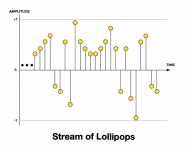
These samples colloquially are called "lollipops", because they look like Tootsie Pops; and they have the information required to tell a loudspeaker cone how to move forward and backward to push air and create sound waves.

For reference, each track in Studio One has 44,100 of these lollipops per second per channel; so if there are 10 stereo tracks, then this maps to 882,000 lollipops per second that Studio One is processing and managing, Add another 10 stereo tracks and it doubles.

If these are Instrument Tracks, then Studio One sends a MIDI request for each Instrument Track to the respective VSTi virtual instrument engine, which generates the audio for the requested samples indicated by the MIDI sequence or music notation and sends it to Studio One, which then transforms it into "lollipops" for recording and playing.

I refer to them as being "different" only because it avoids complexity. The VSTi virtual instrument engines generate and send lollipops to Studio One, as is the case with VST effects plug-ins, which also are what one might call "lollipop manipulators. enhancers, and transformers".

The literally are millions of lollipops being managed and processed every second, which is amazing,

The YouTube music video shows the MOTU FFT analysis of a grand piano part I composed and played in real-time on the fly when I was doing everything one time with real instruments, including a KORG Triton Music Workstation (88-weighted piano keys), which I used for the grand piano and was another of my experiments where I decided to determine whether I could teach myself how to play grand piano by thinking and dreaming about it, which took about 20 years and resulted in the fascinating ability to compose and play what sounds like total garbage until you discover Arnold Schoenberg's Twelve-Tone Technique, which is so atonal it's bad but in a good way. 🤪

The key was an epiphany I had after getting my first drumkit, where I realized that the keys of grand piano are like tiny drums, cymbals, and Latin percussion instruments and your fingers and thumbs are like drumsticks. Combine this with the ability to suspend nearly all conscious thought, and there you are--noting that I watched YouTube videos of Liberace, Floyd Kramer, Chico Marc, and John Lennon to learn motions for playing grand piano or synthesizer.

For reference, this is one performance but run through cascading echo units to make it sound like "Wall of Grand Piano", which is what it is.

The waves in the MOTU FFT Analysis window are lollipops, and 44.1-kHz or 48-kHz (if video sound) are sufficient to capture and recreate all the music--all the instruments and everything, including singing if there is singing.

From this, I think you can see how de-clickers like X-Click and iZotope RX De-click are able to identify clicks and noise.

To view this content we will need your consent to set third party cookies.
For more detailed information, see our cookies page.

To view this content we will need your consent to set third party cookies.
For more detailed information, see our cookies page.
 

Attachments

  • 5-SW-Stream-of-Lollipops.png
    5-SW-Stream-of-Lollipops.png
    96,3 KB · Views: 2
  • 7-SW-Lollipop-Stream-to-Loudspeaker.jpg
    7-SW-Lollipop-Stream-to-Loudspeaker.jpg
    115,7 KB · Views: 3
  • 22-SW-Tootsie-Pops.png
    22-SW-Tootsie-Pops.png
    188,5 KB · Views: 3
Last edited:
Back
Top