coro
Active member
hey all,
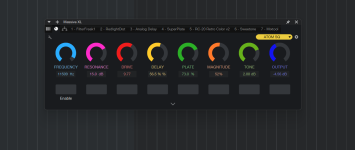
I made a multi-fx and need to automate these knobs the same way I automate everything else in SP
anytime I move one of these knobs it shows up in the upper left like any other parameter (wether is a plugin or a synth) but for some reason these do not get captured.
so far I've found a way but it involves waaay to many clicks
- right click on each knob and Enable Edit Automation (8 clicks)
- open up the automation lanes (1 click)
- selected them all (2 clicks)
- set all to Touch (1 click)
- set 'em all back to Read once I'm done (1 click)
13 clicks in total to be able to record automation.
doable, but compared to how smart SP is for anything else it feels like I'm going back to Nuendo
anyone found a macro to do it? or if it's even possible?
keep in mind, apparently, these are not the same as any other parameter
I made a multi-fx and need to automate these knobs the same way I automate everything else in SP
anytime I move one of these knobs it shows up in the upper left like any other parameter (wether is a plugin or a synth) but for some reason these do not get captured.
so far I've found a way but it involves waaay to many clicks
- right click on each knob and Enable Edit Automation (8 clicks)
- open up the automation lanes (1 click)
- selected them all (2 clicks)
- set all to Touch (1 click)
- set 'em all back to Read once I'm done (1 click)
13 clicks in total to be able to record automation.
doable, but compared to how smart SP is for anything else it feels like I'm going back to Nuendo
anyone found a macro to do it? or if it's even possible?
keep in mind, apparently, these are not the same as any other parameter