Hi everyone,
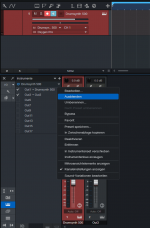
I’m having an issue using my Akai MPC Live 3 with Fender Studio Pro on macOS. When I select the MPC Live 3 as my audio device, Fender Studio Pro only shows 6 hardware outputs, even though the MPC should provide many more USB audio channels.
The strange thing is that everything works correctly in Logic Pro — Logic can see and use all the available MPC USB outputs without any problem. I also tried creating an Aggregate Device with my audio interface, but Fender Studio Pro still only shows the same limited number of outputs.
Has anyone experienced a similar problem with the MPC Live 3 and Fender Studio Pro/Studio One? If so, were you able to solve it or find a workaround?
Thanks!
I’m having an issue using my Akai MPC Live 3 with Fender Studio Pro on macOS. When I select the MPC Live 3 as my audio device, Fender Studio Pro only shows 6 hardware outputs, even though the MPC should provide many more USB audio channels.
The strange thing is that everything works correctly in Logic Pro — Logic can see and use all the available MPC USB outputs without any problem. I also tried creating an Aggregate Device with my audio interface, but Fender Studio Pro still only shows the same limited number of outputs.
Has anyone experienced a similar problem with the MPC Live 3 and Fender Studio Pro/Studio One? If so, were you able to solve it or find a workaround?
Thanks!