• Hi and welcome to the Studio One & Studio Pro User Forum!

    Please note that this is an independent, user-driven forum and is not endorsed by, affiliated with, or maintained by Fender. Learn more in the Welcome thread!

One day back and around 30 crashes so far....

redgazza

New member
It's not going well for me using Studio Pro 8 so far. I was a keen Studio One user up until version 6, then got into Reaper for the last couple of years. The difference in stability is really unbelievable.. Reaper just doesn't crash. Then I paid for the upgrade to FSP8 to keep up with developments..

What has happened to this program???!

Time has obviously been spent on making the corners of the parts rounded, and other Logic lookalike stuff, and integrating things we done need - Moises? What?

Whatever, but in terms of workflow, it's falling apart. The last 24 hours has been pathetic. I can't freeze a track and get back to the midi unless I keep the instrument active now? Complete lockup if I do that. I'm saving before loading any plugin now because it feels like Russian roulette otherwise. Crash after crash. The 8.2.1 update helped with the whole routing fiasco I was having initially (FX tracks just disappearing in the arrange page, but still there in the mixer, and no way to delete tracks etc...). I mean, come on! Who releases software which has such fundamental flaws. New problems, which were never there before. Who is testing this software????

Is it just me? I'm not a novice (mac user and producer for 35 years) - I'm regularly using Cubase, Logic and Reaper, which are all solid on my system. Not just to tinker, but full productions. Time is ticking before I forget Studio Pro for good. It's not worth the grief if this is going to be a constant battle.

Any help or advice appreciated - just don't tell me to restart my computer or check I'm not running in Rosetta etc..

Cheers
 
It's too bad there isn't some easy way for Fender to get crash reports. I'm sure that would help.
 
It's too bad there isn't some easy way for Fender to get crash reports. I'm sure that would help.

The app creates these on the fly and stores them.

Not exactly sure where that is on a Mac - but the OP needs to collect as many diagnostic reports as can be found and get a ticket started.

If there is really 30 crashes in a day - there are major issues over there.

VP
 
The app creates these on the fly and stores them.

VP

But then they just sit there.... I have a huge collection lol; it should be more of an automated process to get these to the devs.
 
But then they just sit there.... I have a huge collection lol; it should be more of an automated process to get these to the devs.

Agreed. But that's above my paygrade.

And if you have a huge collection - might be time for a ticket for you as well :)

VP
 
Thanks for the replies and info. I went round the houses with testing all manner of things, and noticed more stability dragging plugins from the browser, rather then choosing from a dropdown menu for starters, and in the end started a new project and imported all the session data to fresh tracks, but excluding busses and send effects. Seemed to be a glitch built in to the original project after a weird missing track situation (an 8.2.0 bug), so maybe track ID getting messed up for adding a plugin unless the mouse physically drops it on...? Or routing gone weird..? I also found out in my back-and-forth with diagnostic reports and Gemini that Slate VMR actually loads all the modules in to RAM, regardless of how many used... which is probably why they have separated them out into individuals now. Thats a bit of a shocker. Also Vocalign 5 and Spectralayers aren't the best idea in terms of screwing with ARA, apparently. Automation is a total mess. "Read" buttons in the arrange page flickering or just not lit when they should be, etc... And audio playback performance still crummy in comparison to at least one much cheaper competitor in my opinion. I'm gonna persist for a while, because when it works, the workflow is sweet.
 
Thanks for the replies and info. I went round the houses with testing all manner of things, and noticed more stability dragging plugins from the browser, rather then choosing from a dropdown menu for starters, and in the end started a new project and imported all the session data to fresh tracks, but excluding busses and send effects. Seemed to be a glitch built in to the original project after a weird missing track situation (an 8.2.0 bug), so maybe track ID getting messed up for adding a plugin unless the mouse physically drops it on...? Or routing gone weird..? I also found out in my back-and-forth with diagnostic reports and Gemini that Slate VMR actually loads all the modules in to RAM, regardless of how many used... which is probably why they have separated them out into individuals now. Thats a bit of a shocker. Also Vocalign 5 and Spectralayers aren't the best idea in terms of screwing with ARA, apparently. Automation is a total mess. "Read" buttons in the arrange page flickering or just not lit when they should be, etc... And audio playback performance still crummy in comparison to at least one much cheaper competitor in my opinion. I'm gonna persist for a while, because when it works, the workflow is sweet.
Yes, I have the green "Read" Automations going black, once i hover over with the mouse too, since v8.2.1. Whole Playback Performance since v8.0 with larger Project is a Nightmare compared to 7.2.3 and my system is a fresh install. 8.2.1 broke some things and i would bet on that it changed some of my automations on some tracks. I would bet on cause they were set right and yesterday they were not on some tracks. I could'nt believe that but i was. These have been old Automations and i know that for sure cause i am currently rebuilding and old broken track. On my Bassline i had old automation back on my Reverb and the on my FX they were slightly off the grid.
 
Last edited:
Hi redgazza,

welcome to the forum. Please stop ranting about the program ;-)

What has happened to this program???!

Who releases software which has such fundamental flaws. New problems, which were never there before. Who is testing this software????

I know that crashes are extremely frustrating. But ranting doesn't help anyone solve the problem.

The reality is that third-party plug-ins are responsible for a large proportion of DAW crashes. Studio Pro does not try to fix bugs in third-party plug-ins. This has been well-known for decades, and nothing has fundamentally changed about that.

DAWs run plug-ins in the same process as the host (unless they use plug-in sandboxing). This means that a crashing plug-in can take the entire DAW down with it. So just because Studio Pro crashes doesn't necessarily mean Studio Pro itself is at fault.

Plug-ins that don't fully conform to the relevant APIs, or haven't been properly tested with a particular host, are more likely to cause problems. And the fact that a plug-in works in another DAW doesn't automatically mean it's free of bugs.

For what it's worth, my last Studio Pro crash was in July, after installing some new iZotope plug-ins. Apart from that, Studio Pro has been extremely stable on my systems (and one of my production machines is actually a Windows 10 PC from 2011, on which I've scored five video games recently).

Anyway, let's get constructive:

Any help or advice appreciated

You haven't mentioned which plug-ins you're using when these issues occur. Are there any particular instruments or effects involved? Have you tried temporarily removing suspicious plug-ins from a copy of your session to see whether the crashes disappear?

If the problem really turns out to be a bug in a third-party plug-in, there's only so much Fender support can do. They can help identify the offending plug-in, but they can't fix someone else's plug-in code. That would be up to the plug-in developer.

Since you're on a Mac, are you using the AU or VST versions of your plug-ins? If a particular plug-in seems suspicious, it might also be worth testing the other format (especially if you're using the AU version).

As for the freezing issue: Does the lockup happen with every instrument, including Studio Pro's built-in instruments, or only with certain third-party ones?
 
So just because Studio Pro crashes doesn't necessarily mean Studio Pro itself is at fault.
It also doesn't necessarily mean that Studio Pro isn't at fault. For any DAW to automatically blame the plugins is a cop out. It serves no one to dismiss the possibility that the DAW may be at fault. That goes for any DAW and to be fair we see the same thing on other DAW forums and with their support.

I was also having crashes in FSP and support automatically blamed multiple plugins and refused to entertain the possibility that it could be Studio Pro at fault.

I have not had any more crashes recently using the exact same plugins in the exact same manner as before. Plugins that work without issue in other DAWs and yes that is a clue they are coded properly or the crashes would be consistent across multiple DAWs. Of course no plugin (or DAW) is 100% bug free but the idea is to make sure that only the most obscure bugs make it past rigorous testing.

I say that as someone who has been an alpha and beta tester for several DAWs and countless plugins.

So no telling for sure what was really at fault in my case but refusing to consider that it may not always be the plugin's fault is not sensible bug hunting for any DAW developer. Just as it would not be for a plugin developer to automatically blame a DAW.

Vocalpoint, please do not bother to respond. I am not addressing you.
 
I see it the same way for the most part, especially in a DAW that doesn't sandbox plugins, like Studio Pro. When this DAW crashes it is impossible for us users to say just from the crash, wether the cause is the plugin or the DAW.

I just can't agree to this:

yes that is a clue they are coded properly or the crashes would be consistent across multiple DAW
As an experienced alpha and beta tester you should know that DAWs approach plugin handling very differently. For example, Reaper goes many extra miles to make even the crappiest plugin, with code that doesn't properly follow the plugin protocol, like VST, to work. The same is true for some other developers.
So just because a plugin works in DAW X and Y but not Z, doesn't mean it was coded properly. It only means that DAWs X and Y handle it broader, over the limits of the protocol.

I say that as a plugin developer.
...but refusing to consider that it may not always be the plugin's fault is not sensible bug hunting for any DAW developer. Just as it would not be for a plugin developer to automatically blame a DAW.
And this is 100% true.

But I also think, that was not, what Lukas was trying to do here.
 
Have you tried installing your old Studio One 6 version and opening the project there to compare whether the same issues occur?
As far as I know, Studio One licenses are perpetual, so your old version should still be available and working. Depending on your license, you could also test version 7.

Also, what does the Safe Mode report after Studio Pro crashes? It can often identify a potentially problematic plugin and allows you to disable certain components to help narrow down the cause.
Would be interesting to see whether the crashes still occur with third-party plugins disabled.

I agree that it doesn't necessarily have to be a plugin issue. However, since no other Mac users in this thread have reported the same massive crash problems so far, third-party plugins seem like a reasonable place to start investigating.

So I agree with Lukas on this one, at least it is worth to check this out.
 
A few points to clarify my position...

I think I have the right to complain about the program if I have paid for the upgrade and it has bugs which were not there in previous versions. The alternative would be just stop using the program, and stop giving the company money.

As previously stated, if I could submit the diagnostics to Fender, I would. They will not accept the files, which, for a product support department, is astounding. (and this forum won't allow me to upload the diagnostics to this thread)

I use VST plugins only. Every single plugin I use is a legitimate paid-for version. I have NO cracked software installed whatsoever.

I have obviously tried multiple plugins initiated via multiple methods - there is no one particular plugin causing issues. It's a Studio Pro global issue with plugin initiation in general I am experiencing - especially when selecting plugins from a menu rather than drag and drop, and the point of crash has continually flagged up a mouse action. The diagnostic reports all point to the same final action before crash, regardless of plugin.

I have also tried all the usual graphic acceleration off/on, etc etc

I have already experienced the same issue today with a plugin selected in a completely empty project.

This should be at least investigated by someone paid to do just that. That would be constructive. For me at this point, using this software has been far from constructive.

Here's the last diagnostic report (one plugin selected in an empty project leading to total studio pro exit)
Gemini interpretation for what it's worth...

This crash was a memory access violation (EXC_BAD_ACCESS / SIGSEGV) triggered on the main UI thread when you clicked inside the Studio Pro 8 interface. [1]
Unlike many DAW crashes caused by an audio engine overload or a third-party plugin, the stack trace shows the crash happened inside Studio Pro's own application code and GUI framework (cclgui.framework) rather than a third-party VST/AU plugin. [1]

What Happened (Plain English Breakdown)

  1. The Trigger (A Mouse Click): Looking at the bottom of the crashed thread (Thread 0), macOS registered a mouse click (-[NSWindow(NSEventRouting) _handleMouseDownEvent:]). [1]
  2. The Action: Studio Pro's graphics framework (imageIndex: 6, which maps to cclgui.framework) passed that click through its interface hierarchy and called a function inside the main Studio Pro executable (imageIndex: 0). [1]
  3. The Failure: Studio Pro tried to read from an invalid memory address (KERN_INVALID_ADDRESS at 0x0000000100000340). In programming, this usually means the software clicked on or tried to reference a UI element, track, clip, or window object that had already been closed, deleted, or wasn't properly loaded in memory. macOS immediately terminated the program (Segmentation fault: 11) to protect system stability. [1]


As previously stated, if I could submit the diagnostics to Fender, I would. They will not accept the files, which, for a product support department, is astounding. (and this forum won't allow me to upload the diagnostics to this thread)
I've only had two crashes in the last two years, one was a plugin that wasn't updated, and one that was totally my fault by keying too fast.
Create a crash dump report and locate the zip file that contains all of the information about your environment and attach it to a support ticket. That will be accepted without issue.
If you attempt to read the *.dmp file with a debugger, even after kernel analysis, it may look partially verbose, but it contains alpha-numeric symbology that can only be fully deciphered by those with access to the source code.
You (and AI) would have better luck by dropping a can of alphabet soup into a blender on puree.
That said: since the issue is unique to your system environment, have you run Apple built-in hardware diagnostics? You may have bad/damaged RAM cells.
 
I think I have the right to complain about the program if I have paid for the upgrade and it has bugs which were not there in previous versions.
On a user forum that's not affiliated to Fender, but run by Lukas? Why do you think so?
 
As far as I can see, nobody here has accused you of using cracked software, so I'm not sure why you're bringing that up.

You originally asked for help, but if we are going to help you troubleshoot these crashes, we need you to cooperate and respond to the questions and suggestions people have made.
A short excerpt from Gemini's analysis isn't enough for us to determine what's actually causing the crashes.

Why not follow OutrageProductions' suggestion and use Studio Pro's built-in Help → Create Diagnostics Report function?

It generates a ZIP archive containing logs, plugin information and details about your system. You can submit that archive to Fender Support, which is exactly what the feature is intended for.
If you'd like us to investigate the problem here, you could also share the relevant logs from that archive. Just remove any personal or identifying information first, such as the contents of Systeminformationen.html.
And one more question: What exactly are you hoping to achieve in this independent user forum?
If the crashes are caused by a bug in Studio Pro itself, only Fender can fix the underlying code. Nobody here can do that.
What we can do is help you narrow down the cause, identify possible plugin conflicts, and find a reproducible test case.
But for that, we need actual diagnostic information and your cooperation.
 
On a user forum that's not affiliated to Fender, but run by Lukas? Why do you think so?
Apologies. I'm obviously in the wrong place.... Didn't mean to upset anyone. Best of luck! Thanks.

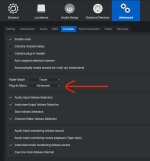
P.S. The problem would seem to be plugin menu preferences - "basic" versus "advanced". "Advanced" behaves perfectly. "Basic" crashes virtually every time a plugin load is attempted. If anyone would be so kind as to pass that info along, it may help other users.
 
Last edited:
P.S. The problem would seem to be plugin menu preferences - "basic" versus "advanced". "Advanced" behaves perfectly. "Basic" crashes virtually every time a plugin load is attempted. If anyone would be so kind as to pass that info along, it may help other users.
What exactly is this - and exactly "where" is it?

VP
 

Attachments

  • Screenshot 2026-11-15 at 13.17.38.png
    Screenshot 2026-11-15 at 13.17.38.png
    87,9 KB · Views: 18
Back
Top