• Hi and welcome to the Studio One & Studio Pro User Forum!

    Please note that this is an independent, user-driven forum and is not endorsed by, affiliated with, or maintained by Fender. Learn more in the Welcome thread!

Solved Note remapping?

tulamide

New member
I know that this is an odd one, but would there be any functionality that allows for quick note remapping in drum view or pattern view?

The reasoning behind is that I often start to create a drum groove, but at the time I'm done, I want to use another drum plugin, maybe a drum synth instead of a drum sampler, or one of the "real" drums. The problem: most of them have totally different mapping layouts, and while there are a few, like BFD or DrumComputer, that allow me to remap directly in the plugin with minimal effort, many other are fixed in their mapping. Currently, I need to switch to piano roll, manually transpose the individual drum lanes' notes and then convert back to a pattern, for example.

Is there anything, that could make this easier for me?
 
You can use Chorder (the NoteFX).
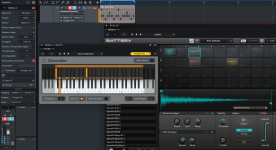
Unfortunately not. It uses a one note input to generate any chords. What I would need is a mulit-note input taken from the midi clip, and remapping each individual note. Example: In GM, the kick is always on C1, the snare on D1. I might have used that when building the groove. Now I switch to a plugin that needs the kick on B2 and the snare on F3. Chorder can't do that.
 
Looks like something a percussion instrument plugin should always allow you to do, remapping the pieces of the kit and saving that as a preset. Poor design if not. Commit to one mapping and eventually all your instruments should have a preset for it.
 
Last edited:
I found a few remapping plugins! The topic is obviously quite common. unfortunately, the ones that allow to create your own mappings are either old VST2s or incredibly ugly. And the ones that come with already defined mappings have a huge library, but the drums I use are not among them. Will look further. But in case someone might use thesearch function for the same issue, here are some names. All of them are free of charge.
MidiRemap
NoteMapper
Drum-Mapper
Mega Midi Mapper
 
Example: In GM, the kick is always on C1, the snare on D1. I might have used that when building the groove. Now I switch to a plugin that needs the kick on B2 and the snare on F3. Chorder can't do that.
So how did I do it if it can't do that? 🙃

chorder.gif
 
So how did I do it if it can't do that? 🙃

View attachment 3960
I might misunderstand, in which case I need a detailed instruction. The thing is that it needs to react to the midi notes that already exist in the clip on that track. I couldn't make it work.
 
The thing is that it needs to react to the midi notes that already exist in the clip on that track.
This is actually the default behavior, so it should work exactly that way.

There is also an Input Mode option (which is off by default) that will process the NoteFX when the MIDI data is recorded from a keyboard, so that the processed data is written to the instrument part. But that's something you would need to turn on explicitely. Maybe you did that accidentally when you tried it.

1788174641793.png
 
This is actually the default behavior, so it should work exactly that way.

There is also an Input Mode option (which is off by default) that will process the NoteFX when the MIDI data is recorded from a keyboard, so that the processed data is written to the instrument part. But that's something you would need to turn on explicitely. Maybe you did that accidentally when you tried it.

View attachment 3961
Eureka! That symbol was yellow in my project. I clicked it to be white as in your screenshot and successfully remapped GM to some random pad mixture in Battery! I'm glad you followed up on it, because it is a relief to be able to use a stock DAW plugin. I can save the presets, so it will only be a one-time-effort to create the maps.
 

Attachments

  • Screenshot 2026-08-31 165750.png
    Screenshot 2026-08-31 165750.png
    535,1 KB · Views: 4
Back
Top