• Hi and welcome to the Studio One & Studio Pro User Forum!

    Please note that this is an independent, user-driven forum and is not endorsed by, affiliated with, or maintained by Fender. Learn more in the Welcome thread!

Solved No Sound!

Barb

New member
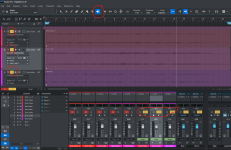
I bounced my midi tracks and modified the volumes on them (set to read). They played as intended.

Then I did a mixdown of the modified audio tracks--but there was no sound on them. After 30 frustrating minutes, I tried playing the tracks again--and now there's no sound at all.

I'M DESPERATE! I need to upload two songs tonight, but I can't finish my songs if I can hear them!
 

Attachments
  • 260914_Nightfall_no sound_markup.png
    260914_Nightfall_no sound_markup.png
    193,7 KB · Views: 18
Last edited:
Also, I can't figure out how to do a trombone slide up from C to F. I can only find down-up slides (Hollywood Brass).
 
Look at the lower left corner of your events. The events are muted (not the tracks or channels). I believe there's a shortcut for it (probably M), but I'm not behind the machine to check. A right click on the event should give a menu with the option to unmute.
 
To follow up on the above, it was [Shift]+[M] for 'Mute Event', or right click the event, Event > Unmute Event.
MuteEvent.png
 
Thank you so much! Just right clicking on the events (midi and audio bounces) brought up that drop-down with the "Unmute Events" option on it. It sure is simple when someone who knows what they are doing tells me how! LOL

(I also don't know how to attach the "Resolved" tag or whatever it is called.
 
I think you'll have to edit the first post, but I'm not sure...
 
Back
Top