• Hi and welcome to the Studio One & Studio Pro User Forum!

    Please note that this is an independent, user-driven forum and is not endorsed by, affiliated with, or maintained by Fender. Learn more in the Welcome thread!

New computer problems

Thathorsesass

New member
Hello,
I have a new Pc and I switched the hard drive from my old computer to the new one, saved every song one by one to a separate hard drive for good measure. For some reason the storage setting for Studio One was set to the internal hard drive under One Drive. Now studio one can't find the basic tracks at all. I switched everything back and it's all there. But if I move to my laptop with the external drive it won't open anything from that drive, the tracks are there but empty. Thanks for any help.
 
But if I move to my laptop with the external drive it won't open anything from that drive, the tracks are there but empty.
This is a bit confusing. Are projects opened or not? Either they don't, then there's no tracks, or they do, but the tracks are empty. That's a difference.

A project never is a file on its own. It is accompanied by other files in a folder structure. As long as the folder structure is intact, it should open the project. You may have issues with missing plugins and such, but the projects themselves should open with named tracks, audio clips, fader settings, etc.

There is not much else to say, at least not, until your description becomes a bit clearer.
 
The project will open. The tracks are there but blank, no sound is present the recording itself is gone. The plugins are there and listed, the music live instruments/vocals are gone.
 
Sounds like you copied song files but not their media folders ... or similar
 
Windows by default only copy files between drives. Looks like you cut and pasted the files.
Also the files were not fully transferred.
 
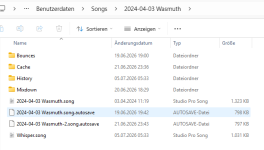
Here is an example project folder. All the sub folders contain data as well. For example, "Bounces" contains audio files from whenever you rendered in place, "Cache" contains audio files from clip cuts and crossfades, etc. Audio is never saved within the .song file itself. If your projects are just the .song files, that's what keeps the tracks empty.

In the example case of the screenshot, if you'd copied the complete "Songs" folder as is, it would open them just fine.
 

Attachments

  • Screenshot 2026-10-26 145944.png
    Screenshot 2026-10-26 145944.png
    27,2 KB · Views: 7
Thank you everyone for the responses, at some point my previous computer decided it was saving everything to Onedrive. I cannot open songs but the music files are not there. I have tried to download everything from Onedrive and still it won't open. I am just moving forward an re recording everything at this point. I uninstalled Onedrive so it doesn't happen again. Side question how difficult is Linux. I am done with Microsoft .
 
This is a bit confusing. Are projects opened or not? Either they don't, then there's no tracks, or they do, but the tracks are empty. That's a difference.

A project never is a file on its own. It is accompanied by other files in a folder structure. As long as the folder structure is intact, it should open the project. You may have issues with missing plugins and such, but the projects themselves should open with named tracks, audio clips, fader settings, etc.

There is not much else to say, at least not, until your description becomes a bit clearer.
The tracks are there but the files are on Onedrive somewhere but I can't access them
 
The tracks are there but the files are on Onedrive somewhere but I can't access them
Have you tried the pool? It may point to a location. open one of the projects with missing audio, go to the pool and right-click on a media item to choose "locate".
 
Have you tried the pool? It may point to a location. open one of the projects with missing audio, go to the pool and right-click on a media item to choose "locate".
Yes, it seems like everything is there but it requires clicking on 300+ files individually and after the first one that screen is gone.
 
Yes, it seems like everything is there but it requires clicking on 300+ files individually and after the first one that screen is gone.
Don't! Just look at the path it tells you! There you'll find all of the files and you can copy them to the media folder of the project folder.
 
I save all my sessions to my local OneDrive and occasionally opening them on another computer FSP fails to locate the audio files - which is indeed frustrating, but it’s probably because sometimes I’m getting stems from elsewhere and failing to save them within the project. It’s normally a simple matter of locating one stem from the new computer and then FSP will find all of them.

I’m going over to a server system so this should no longer be an issue. It can be a bit annoying!
 
I save all my sessions to my local OneDrive and occasionally opening them on another computer FSP fails to locate the audio files - which is indeed frustrating, but it’s probably because sometimes I’m getting stems from elsewhere and failing to save them within the project. It’s normally a simple matter of locating one stem from the new computer and then FSP will find all of them.

I’m going over to a server system so this should no longer be an issue. It can be a bit annoying!

When I still allowed OneDrive on the DAW - I removed the Documents folder from ALL possible vectors into my Studio One/Studio Pro activities:

1793449516049.png


Just turn off the these sliders - especially the one in yellow and all will be well.

OneDrive has it's place - but not for sticking it's syncing nose into your FSP User Data folder while you are working.

Best practice is to simply remove these "special folders" from the equation and IF you want to use OneDrive as a data backup point - use the actual local OneDrive folder on your local drive and build out a custom folder layout (including things you do want to back up) in there - that does not include your Fender user data folder

I use a cool tool called Hard Link Shell - to create a series of symbolic links IN the local OneDrive folder - and OneDrive does the rest.

The beauty of Hard Link Shell - is you can use it to seed your local OneDrive folder with folders scattered ANYWHERE on the machine and OneDrive will think all those folders it sees - are real - and just back them up to the cloud.

No limit here on how simple or how complex you want your backup folder structure to be. I even use HLS to link the Music, Videos, Desktop and Pictures folders as well - and then cherry pick the folders I want to back up out of the "real" Docs folder.

VP
 
Last edited:
Back
Top