
Sebastian Holtzer
Member
I’ve noticed some very unpleasant behavior when editing MPE data—something I dislike and find increasingly annoying. There are a few points regarding this that I’d like to share with you.
I am currently working on an older project in v8.0.3 that is undergoing a major overhaul, including changes to its swing settings.
Since the project relies heavily on MPE and features pads using legato—where the glidetime was precisely synchronized with the swing—a lot of fine-tuning is now required to get the slides sitting perfectly.
I am currently working on an older project in v8.0.3 that is undergoing a major overhaul, including changes to its swing settings.
Since the project relies heavily on MPE and features pads using legato—where the glidetime was precisely synchronized with the swing—a lot of fine-tuning is now required to get the slides sitting perfectly.
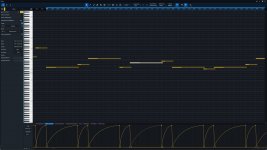
- When I click on a note in the Note Controller, the first thing I see is all three automation curve points and the note itself displayed brightly, while the selected curve for that specific note appears almost greyed out or faded. Logically, it ought to be the other way around: all other notes and their data should fade out. I find this confusing to look at, so I’d be interested to hear your thoughts on it.
- If I want to shift a point then just a tiny bit to the right, I first have to click in empty space to deselect the automation points that were automatically highlighted; otherwise, I’d end up moving the entire curve. The question is whether this behavior is intentional—perhaps based on the assumption that, after drawing the curve, the user would only ever want to move the curve as a whole?
- Since—unlike in version 7—all curves are now visible at once (though not necessarily selected for moving), I suggest adding an option to enable this functionality (edit all as once like with normal data) separately—either in the settings or, ideally, directly within the Note Controller—to avoid the workaround of using the Alt key plus selecting the specific note block.
- Furthermore, if I encounter a situation where two notes were accidentally stacked on top of each other due to a copy-and-paste error, and I delete one of them, I find I can no longer edit the curve. This seems to be a bug or a scenario that wasn't fully considered.
*translated with Google cause my english is limited
Edit: I think this one can be deleted now. It`s working as it should now. The solution was creating new Midi-Events.
Attachments
Last edited: