• Hi and welcome to the Studio One User Forum!

    Please note that this is an independent, user-driven forum and is not endorsed by, affiliated with, or maintained by PreSonus. Learn more in the Welcome thread!

Missing Plug-Ins error message

randyowens7

New member
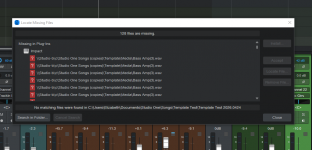
When I open a file in Studio One 7, I get this missing file error message: (see screen shot attached) "Locate Missing Files. 128 files are missing. Missing in Plug-ins: Impact: \\Studio-b\c\Studio One Songs (copies)\Template\Media\Bass Amp(3).wav". I've searched on line for a solution, but unable to find it. Can anyone out there shed some light on this? I to get this resolved, then create a clean template. Any help will be greatly appreciated.
 

Attachments

  • Missing Fill Error.PNG
    Missing Fill Error.PNG
    55,8 KB · Views: 7
When I open a file in Studio One 7, I get this missing file error message: (see screen shot attached) "Locate Missing Files. 128 files are missing. Missing in Plug-ins: Impact: \\Studio-b\c\Studio One Songs (copies)\Template\Media\Bass Amp(3).wav". I've searched on line for a solution, but unable to find it. Can anyone out there shed some light on this? I to get this resolved, then create a clean template. Any help will be greatly appreciated.

This means the drum kit you are trying to use in Impact - at one time - had it's samples saved here:

1777045011374.png


And this location:

\\Studio-b\c\Studio One Songs (copies)\

is no longer available.

If you want to rectify this - you need to address exactly what/where "\\Studio-b\c\Studio One Songs (copies)\" is.

To me - it appears to be a network location that is not connected.

Pro Tip: When loading ANY custom samples to Impact - after you get the kit the way you want it - save the entire "kit" as a soundset to the default Studio One soundsets location.

This way - if/when you go to load this in the future - only this single soundset file needs to be loaded - rather than having Impact try to locate 128 disparate samples that have a very high likelihood of not being where they should be - months or years after that first load.

VP
 

Attachments

  • 1777045001990.png
    1777045001990.png
    4,3 KB · Views: 4
  • 1777045026247.png
    1777045026247.png
    4,3 KB · Views: 4
Back
Top

