• Hi and welcome to the Studio One & Studio Pro User Forum!

    Please note that this is an independent, user-driven forum and is not endorsed by, affiliated with, or maintained by Fender. Learn more in the Welcome thread!

Midi note won't play on playback, but plays in piano roll

Kendomixes

Member
This is a new one for me - I have a note (drums) in piano roll. It's a cymbal hit. I click it in the piano roll and and I can hear it fine - I see it hitting in my instrument UI as well. I hit that same cymbal in the instrument and I can hear it. Everything sounds good. But the note on my piano roll doesn't play back when I'm playing in real time. I cranked the velocity up and of course clicking in piano roll reflects the velocity anyways. It's happening with two different instruments - EZ Drummer and Superior Drummer.

Any ideas what could be causing it not to play back? All the mixing and routing is fine considering I can hear it when I click it.
Thanks in advance.
 
A new clue to the problem. If I start playback right where that note is, the cymbal plays. but if I start it before that note, it won't play.
 
What's your Dropout Protection setting? If it's set to a higher value (like High or Maximum), does it make a different if you set it to a lower value or turn it off completely?

And you're referring to Studio One 6.6, correct?
 
Yes - 6.6. I sort of solved the issue by removing part automation in the midi event. Unfortunately that removed all my hihat articulations which reduced some of the natural feel of the song. I had previously looked at the CC4 and nothing seemed out of place and not sure why CC4 would impact cymbal hits. I was wondering if there was some other automations that I couldn't see that may have effected. I'd like to know how to solve with out killing all the CC4 envelope.

When you say drop out protection, are you referring to the audio device settings? I don't think I have any issue there - this is definitely something specific to the midi event.
 
I was going to suggest dragging the start of the event on the track to the right and make that event smaller, then drag it back. Do something similar to the end of the event.

Often that sorts things out for me like a note not playing or a note playing that I can't see, suddenly another note may appear from nowhere or something else. I have no idea what's going on when it happens, but that method seems to refresh or rerender something.
 
Hi,

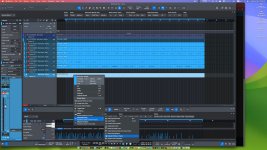
Just to add my experience to this thread: the only thing that actually fixed this exact issue for me was using the Instrument Parts -> Explode Pitches to Tracks function (as shown in the menu).

I tried other workarounds, but nothing else worked. This specifically solved the problem for EZ Drummer, where a note would play when clicked but wouldn't trigger during playback. It seems to completely rebuild the MIDI data and fix whatever was blocking it.
 

Attachments

  • Screenshot 2026-10-28 at 12.03.42.jpg
    Screenshot 2026-10-28 at 12.03.42.jpg
    364,3 KB · Views: 13
Last edited:
Just ran into this issue too, and though I can confirm that exploding pitches to tracks does make the notes work, if you are someone like me who blends kits then having a million tracks to manage for this is beyond annoying. Also, I still found that at times they were buggy and I ended up losing my CC automation which make it unusable anyways. Such an annoying bug. And to clarify I tried doing what Number6 said as well by dragging the event back and forth and it didn't help. It's not a refresh issue either because restarting doesn't fix it.

Weirdly enough too if I record on the same track just after the previous recording the midi hits (for me it was a cymbal G2) work fine. Only thing you can do really is rerecord.


EDIT: I had cut a part of my track and after replaying it to study what I had put down and add a part at the end, and I noticed the cymbal was clearly playing in the cut portion of the track. Thank god I give myself quite a bit of run room to start because I cut in there and sure as hell the cymbal started playing.
BIG caveat though: you have to start the song on the previous part of the event so do not delete it. I test this with exporting as well. if you export with the start point either not on an event, or only on the event with the notes, it wont play. It has to be on an event to the left of where you cut.

Couldn't tell you why for any of this but I hope this helps someone.
 
Last edited:
One thing that might be worth testing, since it only fails when you start playback before the note: the plugin may be reacting to the controller state it receives on the way in (e.g. a CC4 value sitting at an extreme right before the cymbal). Try adding a controller point at the very start of the part, or a fresh point just before that note, and set it to a mid value. Then compare playback from before the part against starting on the note. If that changes the result, the CC data is the cause, and you can adjust or thin the envelope rather than delete it.
 
So I guess there is no need for me to do that anymore @FatBerry_DSP . Low and behold, I booted up the project today and was messing around and for shits and giggle I checked my tabs again thinking that "well if cutting made a change and the event reacted to the change, then maybe I can make different note control edits of every kind and maybe they will force the notes to react in some way," and I go sifting through the tabs and now I am seeing that the "note control tab" is actually showing event edits. One point, at the beginning, right where I made the cut, ending right where I made the cut at the end originally.

I deleted them, and everything is running smoothly now. I still am completely perplexed by this bug but it seems that when I cut the event on the timeline, it maybe forced the DAW and EZD3 to recognize that new starting point? I wish I would have checked it before I shut it down last night after I made the cut and saved, because it could also be that shutting down after the cut made it appear. Either way, again I hope this is helpful.
 
I know that this wasn’t the case but when ever I get a silent note I grab it and move it up or down and Lo and behold there’s a duplicate note underneath.
 
Back
Top