
-
Hi and welcome to the Studio One User Forum!
Please note that this is an independent, user-driven forum and is not endorsed by, affiliated with, or maintained by PreSonus. Learn more in the Welcome thread!
You are using an out of date browser. It may not display this or other websites correctly.
You should upgrade or use an alternative browser.
You should upgrade or use an alternative browser.
I need help
- Thread starter giuhiyji
- Start date

yeah dude whats up
New member
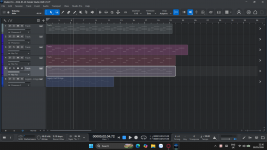
You see that speaker icon with the line through it on the toolbar at the top? That's your mute tool. Click on that. Now you should be able to click on each track event and unmute them.
If you hover over each of those icons in your toolbar, you can also see the hotkeys for them. For me, it's 6. I can't remember if that's the default.
If you hover over each of those icons in your toolbar, you can also see the hotkeys for them. For me, it's 6. I can't remember if that's the default.
OP
OP

giuhiyji
New member
Tried all of them and Can't....You see that speaker icon with the line through it on the toolbar at the top? That's your mute tool. Click on that. Now you should be able to click on each track event and unmute them.
If you hover over each of those icons in your toolbar, you can also see the hotkeys for them. For me, it's 6. I can't remember if that's the default.
yeah dude whats up
New member
Hmm...maybe something else is going on that I don't understand, then. To me, it just looks like the events are muted, which the mute tool should solve. Apologies if I've misdirected you.Tried all of them and Can't....
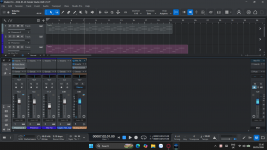
Have you popped open your mixer yet to see if the channels are muted there?
OP
OP
giuhiyji
New member
uhm.... I don't know where the problem, can u help me check this..?Hmm...maybe something else is going on that I don't understand, then. To me, it just looks like the events are muted, which the mute tool should solve. Apologies if I've misdirected you.
Have you popped open your mixer yet to see if the channels are muted there?
Attachments
yeah dude whats up
New member
Okay, it looks like the channels aren't muted in your mixer, so scratch that. I know you said you tried the icons at the top, and I believe you, but I just want to make sure you tried clicking on the events themselves after activating the mute tool. I've linked a gif to show exactly what I mean. If this isn't the problem, I'm going to shut up, bow out, and wait for someone more knowledgeable of the software to come by and help you figure it out.
Best of luck and sorry if I haven't been helpful!
Mute Tool
Best of luck and sorry if I haven't been helpful!
Mute Tool
OP
OP
giuhiyji
New member
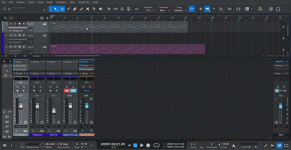
I attached a video below. I still not hearing sound lolOkay, it looks like the channels aren't muted in your mixer, so scratch that. I know you said you tried the icons at the top, and I believe you, but I just want to make sure you tried clicking on the events themselves after activating the mute tool. I've linked a gif to show exactly what I mean. If this isn't the problem, I'm going to shut up, bow out, and wait for someone more knowledgeable of the software to come by and help you figure it out.
Best of luck and sorry if I haven't been helpful!
Mute Tool
Attachments


OP
OP
giuhiyji
New member
and so.. how do I fix this..Bắt tuyệt vời! Jens nói đúng. Bạn đã kích hoạt Launcher. Đó là lý do tại sao các sự kiện được graied ra (và không phát lại) mặc dù tất cả các bản nhạc được kích hoạt.
OP
OP
giuhiyji
New member
How do I fix this..You might inadvertently activated the Launcher mode because the arrows on the right side of each track point to the right (and all tracks show muted colors).