I think the easiest way is to use 3 bend markers:
- bend marker 1 at the start of the note you want to stretch
- bend marker 2 right before the note you want to snuff
- bend marker 3 at the end of that note (right before the next one starts)
Then move bend marker 2 as far to the right as possible (onto bend marker 3), extinguishing the snuff note.
Splitting is not a viable option because bending works on file/clip level, not on event level. When you split an event then both parts are still bound to the same file/clip, so bending affects both parts. As proof you can split an event in a left and a right part, bend the left part, delete it, and stretch out (widen) the right part to where the left part started. That will reveal the content of the left part again, including the bending

This is very interesting!
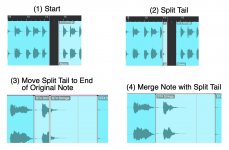
I knew about (a) the first technique in this topic--"stretching", which is done with the Arrow tool after the "bad" or "undesired" part of the audio is split and deleted or removed--and (b) the second technique in this topic--what I call the "split, copy, paste, merge" technique".
I use both of these; but my primary audio clip editing strategy is (b), where (a) is used to adjust the start and end of the audio clip once it's modified with (b).
For example, consider I have selected a female voice in 11ElevenLabs AI; copied the words I want the AI voice to speak; and then have downloaded the resulting audio clip that 11ElevenLabs AI generates, which for the script "Look over here!" will be an audio clip with the AI voice saying "Look over here!", possibly with an exclamation accent at the end, although not always.
What happens occasionally and at times more often is the timing and phrasing of the words will be different from what I want, where instead of "Look over here!", it might be more like "Look <long pause> over here!". The words are there, but instead of flowing naturally and smoothly, 11ElevenLabs AI uses different emphasis and timing, where the key to understanding this is that there is a virtual festival of ways to say the same phrase or set of words.
The words can be spoken rapidly or slowly, which are two ways; and there are other ways to say the words, where one way might be to syncopate the words like snare drum rimshots or a tom-tom riff. The ways phrases are spoken also depends on the primary language of the speaker, where for example a Chinese speaker might use a different phrasing style than an Indian speaker or a Spanish speaker. This is important when writing scripts for radio plays and movies; and the more you know about specific speaking and singing styles the better.
Putting this into perspective, I decided to discover how to write scripts in the late-1970's and after nearly half-century of having FUN with dialogue, it's becoming easier and more intuitive like playing Jazz saxophone for decades and becoming proficient. In particular, word timing and emphasis is a key aspect of the strategy for writing scripts--specifically dialogue for different characters--so when I have a specific character in mind, I also have a rather detailed concept of the way the character speaks, including vocal tone, textures, word timing, word emphasis, and so forth.
Combine all this, and it maps to needing to be able to adjust the various parts of an audio clip, which for AI voices--and my voice-overs, as well--nearly always requires a bit of audio clip editing, which usually includes running each AI voice or voice-over through a set of effects plug-ins that change the tone, texture, and other characteristics of each voice, which you can hear in the chapter of my old-time science-fiction radio play that I posted in my previous post.
There are a few effects plug-ins that are excellent for transforming and morphing human voices to make them be surreal, other-worldly, terrifying, disturbing, funny, and so forth. These effects plug-ins are (a) Vocal Bender (Waves), (b) Melodyne (Ceremony), (c) VocalSynth 2 (iZotope) (d) Bruce Vig Vocals (Waves), (e) Stutter Edit 2 (iZotope), (f) AmpliTube (IK Multimedia), and basically every other effects plug-in, since even reverb and echoes will change the tone and texture of voices. Making it all the more complex and elaborate, it's possible to enhance voices with (a) other voices and (b) instruments, which also can be run through the same set of morphing and transforming effects plug-ins.
[NOTE: After writing every day about something and generally going ADHD/OCD on minutiae, I tend to be a bit "chatty"; but (a) I like to touch-type and (b) writing and learning stuff is like playing golf or Jazz saxophone, where the primary rule is that you need to do it every day for hours at a time if you want to become proficient. As I grow older, I have to be a bit gracious about my "chattiness", and l usually give folks a clue by telling them I am "chatty" and apologizing in advance--something like "I'm chatty, and there's not much I can do about. It's not my fault, I was born this way, but so what." Most folks tell me "It's OK" and then add "If you need to sit down or want some fruit punch and a cookie, let us know" or something similar.

]
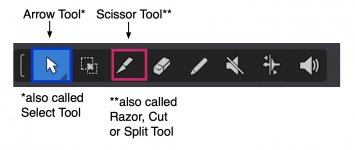
Moving forward, for what I am doing, the various techniques for editing audio clips are important; and I am very happy about learning there is a Bend tool in addition to the Arrow tool that I use for (a) stretching and (b) for the "split, copy, paste, merge" technique", which I suppose reduces to merging.
Another thing I learned today is that there are two flavors of this stuff, (a) merging and (b) bouncing, which you mentioned in your post at a high level which now make sense to me.
I knew about bouncing and merging as separate activities, but not so much as different ways to do audio clip editing at the moment; so this is another new bit of information for me. For reference, my understanding of bouncing was that it's a way to render audio to create a mix for posting to YouTube; so it's not something I considered to be a developmental tool or technique.
The key to understanding this is that instead of reading and studying official user guides, I tend to click on stuff in the graphic user interface (GUI) until whatever I want to happen occurs, which is based on doing GUI software engineering since the first version of Windows starting in early-1987, which as I recall was Windows 1.1 rather than the actual first version.
I click on GUI stuff and then observe what happens. If it's what I want to occur, then excellent; but otherwise I exit and start over where I then click on other stuff, and so forth. It's a variation of what I call "scouting around", where the key is that nobody actually knows everything but you can do experiments on computer stuff so long as you have backups and can restore and do more experiments. Do enough experiments and sooner or later what you want to do will be revealed.
I enjoy writing but not so much reading, at least technical information written by technical writers who tend not to be software engineers, hence mostly function as human Grammarly-bots for software engineers. Call it a "pet peeve" or "stereotype", but I tend to think (a) that software engineers are not so literate and (b) that technical writers usually have no actual idea what software engineers are trying to explain. This is not a very gracious perspective, but it's my observation after over half a century of reading user manuals and trying to make sense of them.
The practical aspect is a bit like mathematics when "smart" folks skip most of the intermediate steps based on thinking I know all that stuff, when actually I need to see all the intermediate steps if there is any possibility of it ever making sense to me.
Wandering back from the asides, I never have used the Bend tool and until today didn't know it existed, since I never clicked on it or took the time to look at it; but you mentioned it and then after watching a few YouTube videos, (a) it makes sense and (b) I am intrigued; so I plan to do a few experiments.
My current understanding, which matches your observations, is that (a) merging is non-destructive but (b) bouncing is destructive. This is important, because I thought merging was destructive, which is wrong.
Making sense of these strategies for editing, morphing, and transforming audio clips--(a) stretching, (b) merging, and (c) bending--is important, and while I understand them better with the addition ol understanding bouncing and merging, the question becomes a matter of which strategy works best, which I think depends on the goal of the editing, morphing, and transforming, at least for working with voice-overs (AI and real), although voice-overs generally are just flavors of instruments and singing, hence generally it's all the same--voice-overs, instruments, and singing.
Without doing any experiments, intuition suggests (a) bending is done automagically based on an algorithm while (b) stretching and merging its done manually.
In some respects, when voices (AI and real) are modified by editing, morphing, and transforming, it might not matter so much which of the three ways is used {stretching, merging, bouncing}; but I am intrigued by this and plan to do some experiments to get a better sense of what actually occurs, where as noted my current intuition suggests it might be a matter of the actions being algorithmic or manual, although ultimately it's all done by software engineering and algorithms, which one might suppose makes it a matter of being primarily (a) AI or (b) manual.
Connecting a few more dots and using Melodyne as an example, I can change the pitch, duration, and other characteristics of "blobs" easily in Melodyne; but there are what can be called "reasonable bounds or limits" for what sounds natural versus artificial or "auto-tuned".
Interesting conversation, and thanks for the information on the Bend tool.