Follow along with the video below to see how to install our site as a web app on your home screen.
Note: This feature may not be available in some browsers.
Hi and welcome to the Studio One & Studio Pro User Forum!
Please note that this is an independent, user-driven forum and is not endorsed by, affiliated with, or maintained by Fender. Learn more in the Welcome thread!
Hopefully Cubase improved their overall product since i left. I dumped Cubase at version 5 and what a relief. I can say tho, that cubase did have a clear advantage with midi. It probably still does? What midi stuff I have ever connected to Studio One over
the years worked for me and still works. Studio One was groundbreaking (drag & drop ect) for me and i have to Totally disagree with you that Studio One is an entry level DAW
I was a PreSonus user until Studio One 7.2, but with each development leap, it became worse and more expensive. When it comes to MIDI, Cubase is unbeatable. For example, Cubase offers modulations that Studio One still lacks. Plus, updates for Cubase are cheaper than for Studio One. You really get value for your money here.
Sort of a troll comment I’d say.
As I had said above. I tried 17 Daw’s and out of those I personally rate Sonar, Cubase and Studio one as being the most fully featured of the rest.
Of course that is based on my personal preferences for the features I require. Midi is a huge part of my workflow. Sonar is by far ahead of the rest but now Sonar is in the hands of a company that is only interested in selling memberships. It’s become a ghost town.
Problem I have with Cubase is to get the features I want it is around $ 800??. I got most of those features for $100 with Mixcraft.
Ya it is not really in the same league but it’s dang close.
So that brings me to S1 which is about half way between them both.
But not being able to use my keyboard is a huge
Problem. So Im using Mixcraft.
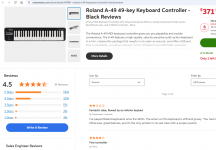
In the meantime, I read the customer reviews on my favourite dealer's website about the A49.
There are many complaints about the difficulties in getting the A49 to work. Problems occur on different computers and with different DAWs. In almost all of these complaints, authors mention that they never had such problems with other keyboards.
Besides that, I never had any problems getting all my MIDI devices (with no A49 among them, however) to work with Studio One, no matter whether I connected them via my audio interface's MIDI IN (currently Quantum HD 8, before Focusrite Saffire Pro40), my €10 USB MIDI interface cable (class-compliant with built-in Windows drivers) or USB directly from the keyboard. They all worked instantly out of the box.
So in my opinion it's the A49 and its drivers that cause problems. You can't blame Studio One for it.
Without knowing what situation the people complaining are in I can’t use that as a possibility. Example, did they install the Roland Midi driver or just let Windows use the generic driver. Possibly they are using a Mac.
And we are taking about Studio one not recognizing a USB midi device. Using an audio or midi interface via 5 pin connector is a completely different thing. I actually have that option as the A49 has both USB and Din.
That’s a hassle because I use 3 different interfaces and only one has midi.
I haven’t had time to troubleshoot this further and I have a few things I want to try. I need to dig out my Yamaha DTX module as well as I have a Yamaha digital piano with midi. It definitely needs the Yamaha driver or Windows won’t see it.
Another option is to completely remove the Roland driver and see what happens when I reconnect it with out the Roland driver installed.
But it’s still very odd that at least 4 other Daw’s as well as all my stand alone VST instruments recognized the keyboard.
It's important to understand that Studio One is an entry-level DAW primarily aimed at PreSonus products. Hardware support in Studio One is abysmal. It can't compete with Cubase 14.
My point was: that's not Studio One's fault. According to what I found out about the Roland A49, it's the Roland drivers that appear to be crappy. I read customer reviews of A49 owners who had problems getting their A49 to work, with all kinds of DAWs being affected, not only Studio One. On the other hand, there are owners of other keyboards than the A49 (like me) who never had the problem that their DAWs (including Studio One) didn't recognize their keyboards. In my case, I also never ran into problems with any type of MIDI connection, whether it's class compliant USB (keyboard or interface cable, with and without specific drivers) or 5pin MIDI IN of an audio interface. In all cases, it was simply plug&play.
I consider that a very strong evidence that the A49 drivers cause the problem rather than Studio One. You're lucky that Mixcraft appears to cope with it.
My point was: that's not Studio One's fault. According to what I found out about the Roland A49, it's the Roland drivers that appear to be crappy. I read customer reviews of A49 owners who had problems getting their A49 to work,
Could you please provide a link. Out of curiosity I Googled " Issues with Roland A49 drivers" and just as I suspected they were mostly in Logic on a Mac. For the most part it get 4.5 stars on most of the Music store sites.
@John Vere I did not use Google. Instead, I visited the websites of several popular retailers in Germany, such as Thomann. There I read customer reviews for the Roland A49.
Most of these reviews were good, though. But there are some reviews that stated driver problems with the A49.
I have 4 USB MIDI devices which all can act as class-compliant MIDI devices: a Nektar LX61+, a M-Audio Keystation 49, Native Instruments Maschine Mk. 1 and a USB-MIDI cable for connecting DIN (5pin) MIDI IN/OUT to the computer. My son uses a Native Instruments S61 keyboard. All of these devices don't require a specific driver to be recognized by DAWs, including Studio One. They are recognized out-of-the-box even with no driver installed. In fact, there are no specific drivers at all for the M-Audio keyboard and the USB MIDI cable, the class-compliant mode is the only mode they support. Only Native Instruments (S61 and Maschine) and Nektar (LX61+) provide specific drivers for their controllers enabling them to control a DAW or a plug-in. But at least basic MIDI recording and playing is always possible without any driver.
For me, it's completely incomprehensible why there is a USB MIDI keyboard that isn't recognized at all if there is no specific driver installed. All USB MIDI controllers I know (much more than the five mentioned above) can act as class-compliant MIDI devices, which don't require specific drivers at least for basic MIDI functions and - even more important - they are recognized by any DAW. Specific drivers are required only for special features such as controlling a DAW. But simple MIDI recording always works without specific drivers. The Roland A49 is the only USB keyboard I heard of that apparently can't act as a class-compliant MIDI device.
Thanks and I now understand what those people were possibly doing wrong.
if they had actually read the Roland instructions they would’ve found out that the A49 has an option for Class Compliance mode .
Function/Advanced/ +
So now you know that Roland does supply solutions and there is nothing wrong with the driver.
See my other thread for details
Re installing the driver using that’ll method worked. Issue solved but still a mystery why it didn’t work at first.
Note the OP has disappeared. Those Midi USB cables can be garbage.
@John Vere Thanks for the information. It was hard for me to believe that Roland would ignore such an important thing.
My MIDI USB cable works fine apart from the fact that after several hours of continous operation it sometimes is necessary to reset it by unplugging it from the PC for a few seconds. But this is no big problem, as it happens only approx. once a month.