• Hi and welcome to the Studio One User Forum!

    Please note that this is an independent, user-driven forum and is not endorsed by, affiliated with, or maintained by PreSonus. Learn more in the Welcome thread!

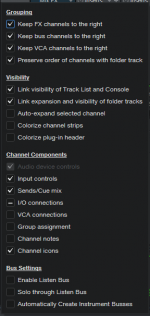
Grouping Options - Keep FX, Bus, VCA channels to the right

tonelabaudio

New member
Hello all. New S1 user and first time post.

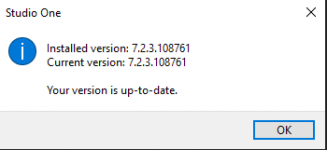
Studio One 7 Pro Version 7.2.3.108761
Windows 10 pro
Presonus Faderport 16
Universal Audio Volt 876

For the llife of me I cannot get "Keep FX, Bus, or VCA channels to the right" to function. I have checked the appropriate boxes in the configuration secton but to no avail. Your time and assistance will be greatly appreciated. Peter
 

Attachments

  • Studio One Version.png
    Studio One Version.png
    4,9 KB · Views: 7
  • Keep to the Right.png
    Keep to the Right.png
    25,8 KB · Views: 7
Welcome to the Forum!

Please post screenshot examples of the results you're seeing using these settings.

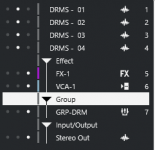
Here's what I get with those settings...

Those Settings.png
 
Welcome to the Forum!

Please post screenshot examples of the results you're seeing using these settings.

Here's what I get with those settings...

View attachment 2203

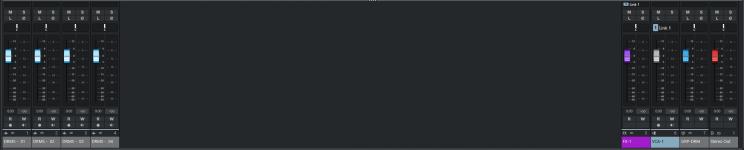
Good morning @Trucky I see what is happening now. I am getting the same results as you. I was hoping that I could send the FX, Bus, and/or VCA channels over to the complete right. As you are probably aware this is referred to as Zones in Cubase. However I have seen a similar thing done in a recent YT video that I watched presented by Joe Gilder whereby his FX channels automatically get shifted off to the right portion of the mix console upon their creation. This happens at around the 11:30 mark.

Presonus S1 - Joe Gilder
 

Attachments

  • CB-ZONES-1.png
    CB-ZONES-1.png
    6,5 KB · Views: 5
  • CB-ZONES-2.png
    CB-ZONES-2.png
    33,5 KB · Views: 4
Back
Top