• Hi and welcome to the Studio One User Forum!

    Please note that this is an independent, user-driven forum and is not endorsed by, affiliated with, or maintained by PreSonus. Learn more in the Welcome thread!

Funcion key (on Mac), stupified

lokeyfly

Well-known member
Good morning,
I am working with a friend to get him up to speed on his new M4 Mac Studio, with Studio One.

The current situation is his function keys do not operate in any Studio One related way that I'm used to. For example, when using functions on a PC, they obviously should be the same. So F2 does not open/close the edit pane, F3 the Mixer, etc. I havent found a way to even use the option or command key to operate function keys (as in some alternate manner). This puts me in a very clunky situation of being forced to click solely on the GUI to make such incredibly simple function use tasks. It is likely a change necessary within the global Mac settings itself, but not something I'm not seeing, or admittedly aware of how adjust for standard default settings.

Can one of you Apple peeps put me on a standard one touch function key process, so I dont feel like I'm stuck on a Romulan vessel unable to return home?
Thanks!
 
Last edited:
Not an i-guy, but a lot of kbds have alternate functions for function keys and use a Fn modifier or Fn lock. As an example, I keep my Fn lock on and use the Fn modifier to get standard F keys.

Not sure what i-KBDs use for this ...
 
Per default function keys on a Mac control a.o. screen brightness, audio transport and audio level. You can change that to standard F1, F2, ... function keys from System Preferences/Keyboard/Keyboard: Use F1, F2, etc. as standard function keys.
 
Not an i-guy, but a lot of kbds have alternate functions for function keys and use a Fn modifier or Fn lock. As an example, I keep my Fn lock on and use the Fn modifier to get standard F keys.

Not sure what i-KBDs use for this ...
Yeah, I'd want to at least at this point in time, work from his standard keyboard. I mean, not having function keys ooerate as standard issue isnt all that rare. Some PC's like HP, and Del have their own function protocol that can be changed from the bios. I'm gathering the Mac may have some preference adjustments. Beats me. (Shrug).
 
Per default function keys on a Mac control a.o. screen brightness, audio transport and audio level. You can change that to standard F1, F2, ... function keys from System Preferences/Keyboard/Keyboard: Use F1, F2, etc. as standard function keys.
I guess he inadvertently changed the standard preferences setting. I'm basically hunting and oecking to find this. : )
 
you can go to system settings, type "fn" in the search box and go to "Function Keys", you should see the option there

Screenshot 2026-04-12 at 10.45.47 AM.png
 
Per default function keys on a Mac control a.o. screen brightness, audio transport and audio level. You can change that to standard F1, F2, ... function keys from System Preferences/Keyboard/Keyboard: Use F1, F2, etc. as standard function keys.
I don't think I would like having to change settings to switchback and forth ... (see what I did? ;))
 
you can go to system settings, type "fn" in the search box and go to "Function Keys", you should see the option there

View attachment 3380
Cool, Ill send him this now to try. It looks like what I'm looking for. Ill report back if the fix is in. I cant get over to his Studio to do this myself. Thank you.
 
I don't think I would like having to change settings to switchback and forth ... (see what I did? ;))
Yeah, yeah... ;)

On a Mac the 'fn' key would normally invoke the F1, F2, etc. functionality but you can give that fn key a different function too. So changing the function keys to just that would be the quick fix for now. It's not a big deal on a Mac. Click the apple (top lefthand corner of the screen, select System Preferences/Keyboard and check the 'Use F1, F2, etc. as standard function keys.' checkbox. The change is instant and just as easy to reverse.
 
Yeah, yeah... ;)

On a Mac the 'fn' key would normally invoke the F1, F2, etc. functionality but you can give that fn key a different function too. So changing the function keys to just that would be the quick fix for now. It's not a big deal on a Mac. Click the apple (top lefthand corner of the screen, select System Preferences/Keyboard and check the 'Use F1, F2, etc. as standard function keys.' checkbox. The change is instant and just as easy to reverse.
In this case, even the F1 and F2 arent even responding in the S1 std manner. But I'll try your and ravez' suggestion. TY.
 
What brand of QWERTY keyboard is he using? It is simple actually. Just change the settings and all the function keys will trigger Studio One functions.
 
What brand of QWERTY keyboard is he using? It is simple actually. Just change the settings and all the function keys will trigger Studio One functions.
That's a good question. I have tried a non mac keyboard on a mac computer and have some commands / changes
not respond. Put back in the Mac Keyboard and computer responds. Could have just been me F ing it up :ROFLMAO: ✌️
 
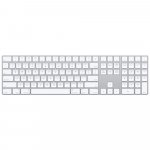
The extended white Apple QWERTY keyboard works the best. It feels great and all functions just work.
 

Attachments

  • APMQ052ZAA_apple_magic_keyboard_with_numeric_keypad.jpeg
    APMQ052ZAA_apple_magic_keyboard_with_numeric_keypad.jpeg
    53,2 KB · Views: 3
Last edited:
The extended white Apple QWERTY keyboard works the best. It feels great and all functions just work.
Yep, that is a great keyboard for sure. The Mac wireless ⌨️ does not have the extended number pad and
other functions
 
But you can get the extended version with the numeric keypad and wireless. I have got a cable one though. Not sure cable versions are even still available. It may be expensive but its well worth it though. Hate their mouse though. Its horrible.
 
It should work fine with most keyboards. For a new (unknown to the computer) keyboard you get a number of 'press this key' questions to make the Mac learn the layout. A mistake here will cause problems so you may have to rinse and repeat ('forget this keyboard', reconnect and do the test again).

And yeah, the Apple extended keyboard is nice. It also gives you two extra USB ports. No backlit keys though. And the Apple mouse is annoyingly erratic.

As for F1 and F2 not responding in the S1 standard manner: Note that this may be due to the Keyboard Shortcut preferences in S1/SP. Easy to pick a mapping scheme for another DAW and get unexpected results from the function keys...
 
Last edited:
Back
Top