• Hi and welcome to the Studio One User Forum!

    Please note that this is an independent, user-driven forum and is not endorsed by, affiliated with, or maintained by PreSonus. Learn more in the Welcome thread!

Fender Studio Pro 8 - Discussion Thread

I suspect they have internal surveys that show guitar players are underrepresented among DAW users

Maybe, but half the producers I know are guitar players, and remarkably enough about half the composers too 😂
Ramin Djawadi and HZ are a couple of high profile examples.

Fender has wanted to grow the market for some time. Those guitar players might be much more tempted by a DAW with Fender's imprimatur.

Of all the guitarists I know, the number of them who wear Fender T-shirts, apparel, or have a Fender bumper sticker is zero.
Just like Gibson and Marshall, they're well known to be corporate giants now and are thus firmly in the 'uncool' department for most musicians (This coming from a guy who owns a number of Teles and Strats).
Most guitarists are Reaper/Ableton/Logic/Pro Tools (also some S1) users and have a working knowledge of those DAWs...

I don't see them abandoning what they currently know just because there's a Fender tag on it, if anything quite the opposite, they'd probably actively avoid it, despite owning many of the amps and guitars like myself.

As for guitar players being underrepresented in the DAW market? I highly doubt it, pretty much all of them I know use one of the DAWs listed above... ten years ago maybe but not in '26. In fact I'd argue that modern guitarists tend to be among the MOST tech-savvy of players...

Maybe it's a generational thing?

Given that Fender Studio Pro is not a dumbed-down version of Studio One, those who want to continue using Studio One the way they did can do so.

Does refusing to develop or update features for the professional market (or 'aficianados' as the CEO calls them) not count as 'dumbing down'?

Studio One was always billed as a Cubase alternative in terms of feature set and that's where it largely succeeded, i.e.,
'Cubase but better and much less annoying'.
As a former Cubase user that philosophy certainly worked on me for over a decade as an early adopter of Studio One v1.
Our boys out of Hamburg had great work ethic, great passion for innovation, and by golly I think I was among the first to realize that they had actually bested Steinberg at the DAW-making game.

Fast forward to present day...given the dearth of feature-updates (sorely needed) and new features since v7 it's super obvious Fender have decided to abandon that creed along with its userbase and are instead remaking Studio One -- er, sorry -- 'Fender Studio', in their own image.

Incidentally, does anyone remember this little chestnut?

firefox_vuHILaSoYn.png


Back when Fender first acquired Presonus, we had the CEO yapping about stuff HE would like to see in Studio One and I quote:

"The simplest version of Studio One right now has a 150-page owner's manual, which I have said to the team is 149 pages too many,” he says. “Because you should be able to get out of the box, press one button and you're off to the races. So that's, again, a very easy brief, but very difficult to execute. But there has been a gravitational pull by aficionados to just keep jamming more and more features into DAWS when, in fact, I think you need to take away more features, make it simpler and more intuitive and less expensive." -Andrew P. Mooney, CEO Fender Musical Instruments inc., former chairman of Disney Consumer Products (DCP)

It reads like a textbook 'Boomer mad at technology' rant. The dude literally TOLD us he was going to do this and everybody pretended either not to hear him, or that he misspoke... but the first shot often lands the truest.

Anyway, I've read every jot of the release material, and the following items:
  • Arrangement Overview
    • (This is a genuinely nice QoL feature.)
  • Metronome subdivisions
  • "Transform to Rendered Audio" converts mono track into stereo track in certain situations
    • A nice bug fix.
  • [Score Editor] Note duration differs from Note Editor in certain cases
    • Another nice bug fix.
...are my four favorite changes.

15 months since v7 btw.

If we're at the point where we're celebrating merely because features aren't being removed, I think it's safe to say it's the end of an era.

JB
 
Hiya,
had a quick scan for a download. Any chance you could post a link please.

Best of regards

Studio One remote is primarily for mobile devices and can be found in the Apple App Store or Google Play. There was apparently a Windows version too (for ARM-based tablets), which was on the PreSonus website, but I can't find it now.
 
Honestly they haven't added the features many of us wanted/requested in the last 15 months, if they continue going down that road there will be 0 practical reason for me to upgrade.

Have always liked your style. v6.6.4 is the granite rock bed of this app (thus far) and more than once I have sat here thinking about a revisit.

Then again - Axiom 14c of the "How to get Work Done Handbook" clearly states - "It it ain't broke....".

Rock on.

VP
 
Studio One remote is primarily for mobile devices and can be found in the Apple App Store or Google Play. There was apparently a Windows version too (for ARM-based tablets), which was on the PreSonus website, but I can't find it now.
Yeah I have the old version up and running in ver 7.3 on a touch monitor, but from what Daw Stew said there is a New Studio Pro version 2.
I am trying to get it recognise the old version but is not connecting to FSP8 for some reason.
Not to worry I am still using SO1 7 untill I am hooked into the New "SO1 8" .

Kindest regards
 
Yeah I have the old version up and running in ver 7.3 on a touch monitor, but from what Daw Stew said there is a New Studio Pro version 2.
I am trying to get it recognise the old version but is not connecting to FSP8 for some reason.
Not to worry I am still using SO1 7 untill I am hooked into the New "SO1 8" .

Kindest regards
Scroll down 2/3rds of the site and click the +at Resources and you'll see downloads for Windows. There is the Arm and non Arm version
 
Hey guys, before I consider studio pro 8, I want to ask if on install version 8 will keep my studio one 7 configuration. I have spent a lot of time creating a custom view in the browser categorising all my plugins specific to how I like to seec them. I don't want to have to do that again.
Also anyone successful in importing your custom keyboard shortcuts to the new version
 
Hey guys, before I consider studio pro 8, I want to ask if on install version 8 will keep my studio one 7 configuration. I have spent a lot of time creating a custom view in the browser categorising all my plugins specific to how I like to seec them. I don't want to have to do that again.
Also anyone successful in importing your custom keyboard shortcuts to the new version
Install to a separate directory.

You can have many versions of S1/SP installed side-by-side.

VP
 
Thanks I'll try that, I'm assuming the V8 when installed will be the factory default. How would I go about importing my v7 settings so that V8 is exactly like v7
The installer will do all the work for you.

When you land in v8 after install - it should appear exactly as it did with v7 - settings and all

VP
 
Regarding the quote from the Fender Musical Instruments Inc. CEO, when you know enough about Graphic User Interface (GUI) designing and software engineering, it makes sense and is what the British call "spot on". :)

"The simplest version of Studio One right now has a 150-page owner's manual, which I have said to the team is 149 pages too many,” he says. “Because you should be able to get out of the box, press one button and you're off to the races. So that's, again, a very easy brief, but very difficult to execute. But there has been a gravitational pull by aficionados to just keep jamming more and more features into DAWS when, in fact, I think you need to take away more features, make it simpler and more intuitive and less expensive." -Andrew P. Mooney, CEO Fender Musical Instruments inc., former chairman of Disney Consumer Products (DCP)

What one might call the "traditional" perspective strongly suggests there need to be elaborate reference manuals; but (a) does anybody actually read them and (b) are they mostly the way technical writers interpret the often abstract information provided by software engineers who as a group tend to speak Jupiterian and have personal caches of plutonium? 🤪

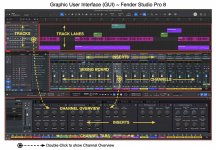
Consider the image I created earlier this morning to show the various significant parts of the Fender Studio Pro 8 GUI . . .

I searched the Reference Manual for about an hour and (a) didn't find much of anything presented in a clear way and (b) for a while just coined names for stuff based on the way recording studios in the 1960's were designed (real mixing boards, effects racks, and magnetic tape machines).

I know what I think are the proper names for all that stuff now; but a few hours ago, do you think I had any idea what a "Channel Overview" was and what it does?

To be more specific by providing an example, the way I read and understand ". . . take away more features, make it simpler and more intuitive" maps exactly to the "double-click and show the Channel Overview" behavior, which replaces a bunch of stuff (a) that was available separately but not in one place or required more clicking and navigating with (b) a straightforward solution that is easier for me to use,

Nothing went away!

It's just packaged in an elegant and intuitive way that does not require me to lose focus on the music due to having to mess with a bunch of computer stuff. (y)

When making sense of statements like the CEO made, it's important to consider the context and usage of words like "features", where as I read and understand, the relevant context of "features" is along the lines of my favorite bit of Windows GUI, which was a pop-up dialog box with only an "OK" button and read something like "Your computer has encountered an unrecoverable problem, press 'OK' to continue. All your data will be lost." 🤪

FACT: For those of us who have what I call the "touch"--which is the ability to fix electric stuff by banging on it--when that message appeared the smartest response what to unplug the power cord and then bang on the metal case a few times with a California framing hammer, because if you click on "OK", then it's like the classic computer saying:

If it's there and you can see it, it's real.​
If it's there but you cannot see, it's transparent.​
If it's not there but you can see it, it's virtual.​
If it's not there and you cannot see it, it's gone.​
 

Attachments

  • SW-Fender-Studio-Pro-8-GUI.jpg
    SW-Fender-Studio-Pro-8-GUI.jpg
    207 KB · Views: 33
Last edited:
Mojito bug: AMP Envelope adjustment is not possible. The ADSR pots works fine, but moving the AMP envelope points horizontally in the GUI always resets the value to 0.
Can you make a video? I don't see that here.
 
Great stuff. I'm hoping I can import my mixing template and then save it as version 8
It should all just come right in - been that way for me since S1v2

VP
 
Thanks Lukas. You're right, I'm referring to this issue. Now I understand why it's there and what it's good for. I just never noticed it in Studio One Pro 7, but maybe I have overlooked it.

But how about the solo button? Is the strange behaviour intentional too?
Now I tested mute and solo buttons with Studio One Pro 7.2.3. Both DAWs behave exactly the same regarding these buttons: mute buttons in track and channel act independently (now I know the reason for that), while behaviour of solo buttons in both DAWs is still a bit strange in my opinion (as described here). But maybe there's also a good reason for that.
 
It should all just come right in - been that way for me since S1v2

VP
Same here (since v5 that is for me). Just run the installer and even the new version opens in the custom windows size I use to accommodate for a vertical Level meter alongside the main view. That level meter loaded up with my songs.. ahem sessions just the same. Custom keyboard shortcuts work as wel... No interference from my side, all done automagically.
 
There is definetly something to the mentioned Plugin trouble and crash issues. Seems like some combination of plugins cause the noise issue before the crash.
To view this content we will need your consent to set third party cookies.
For more detailed information, see our cookies page.
 
Install to a separate directory.

You can have many versions of S1/SP installed side-by-side.
After having installed Studio Pro 8, I noticed that Pro 8 copied many settings from Studio One Pro 7, such as ASIO settings or the project history. In fact, I didn't have to configure much before I started working with Studio Pro 8.

This tells me that Pro 8 might use the same configuration data as Pro 7. But Pro 7 and Pro 8 could co-exist, if Pro 8 just reads the Pro 7 configuration once upon installation and then creates a copy for its own. However, if there is only one configuration database which is used by both DAWs, then changes made in one DAW will overwrite the settings of the other. I can't tell yet which is the case.
 
After having installed Studio Pro 8, I noticed that Pro 8 copied many settings from Studio One Pro 7, such as ASIO settings or the project history. In fact, I didn't have to configure much before I started working with Studio Pro 8.

This tells me that Pro 8 might use the same configuration data as Pro 7. But Pro 7 and Pro 8 could co-exist, if Pro 8 just reads the Pro 7 configuration once upon installation and then creates a copy for its own. However, if there is only one configuration database which is used by both DAWs, then changes made in one DAW will overwrite the settings of the other. I can't tell yet which is the case.

You can have 6 or 10 or 20 versions installed. They all have unique configuration data. There is nothing "shared" whatsoever between any of them.

Back in 2018-ish - the most I ever had was 7 installed side by side. Nary an issue between any of them.

And I would not expect any issues with v8 being installed beside anything else now either.

VP
 
Back
Top