Hi all,
I purchased an SSL UF1 and just received it a couple of days ago. I am using an SSL 18 interface.
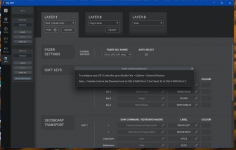
I had to download 360 from the website and reinstall it to be able to get it to recognize the UF1.
After setting up UF1 in 360 for use with Studio One, I tried to get it to work with Fender studio Pro 8.
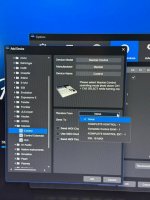
When I go to Fender studio Pro and try to add the UF1 as a Mackie control surface, I am not seeing "SSL V-MIDI Port 1", only "SSL 18 MIDI".
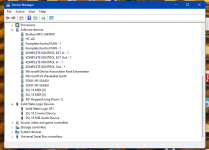
I uninstalled and reinstalled SSL 360 and it is still doing the same thing. I have the UF1 plugged into a USB port, not a USB hub.
I am using Windows 11. I am out of ideas, if anyone can help, I would appreciate it.
I purchased an SSL UF1 and just received it a couple of days ago. I am using an SSL 18 interface.
I had to download 360 from the website and reinstall it to be able to get it to recognize the UF1.
After setting up UF1 in 360 for use with Studio One, I tried to get it to work with Fender studio Pro 8.
When I go to Fender studio Pro and try to add the UF1 as a Mackie control surface, I am not seeing "SSL V-MIDI Port 1", only "SSL 18 MIDI".
I uninstalled and reinstalled SSL 360 and it is still doing the same thing. I have the UF1 plugged into a USB port, not a USB hub.
I am using Windows 11. I am out of ideas, if anyone can help, I would appreciate it.