
-
Hi and welcome to the Studio One & Studio Pro User Forum!
Please note that this is an independent, user-driven forum and is not endorsed by, affiliated with, or maintained by Fender. Learn more in the Welcome thread!
You are using an out of date browser. It may not display this or other websites correctly.
You should upgrade or use an alternative browser.
You should upgrade or use an alternative browser.
Fender Studio Pro 8.2 - Discussion Thread
- Thread starter Lukas
- Start date

Vocalpoint
Well-known member
Ken mentions in his sig he tracks straight into FSP and if he is smart with his outboard and the FSP's inbox Fx he should be able to a least track when his net connection craps out.
Do remember that for this to work 100% of the time - Ken would need to dump all third party plugins - forever.
I have plenty of network trace data here showing repeatable network outreach from a bunch of my plugins - occurring right when they are simply loaded up by FSP - but never actually used in a real session.
So even the act of simply installing a third party plug and having it initialized by FSP on some Tuesday in the future is already enough for a network requirement.
VP
Vocalpoint
Well-known member
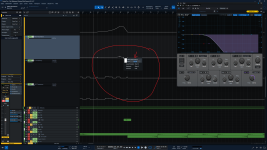
Pretty sure you cannot overwrite an automation value that is in Read mode. As your screencap indicates:Has anybody the same issue that automation values can`t be overwritten?
It´s only possible in v8.2 to change it with the Mousewheel.
In this Example I wanted to change the automations on Mojito.
VP
Sebastian Holtzer
Active member
You`re wrong. It was alyways possible that way.Pretty sure you cannot overwrite an automation value that is in Read mode. As your screencap indicates:
View attachment 4200
VP
Edit: I made a short test and disabling doesn`t make any difference. Automation is still resetting and can`t be overwritten.
Vocalpoint
Well-known member
You`re wrong. It was alyways possible that way.
Fair enough - I do not do enough automation.
VP
Last edited:
In 8.1.2 editing automations works as expected. Of course it can be edited also in Read Mode. Read is not a strict "read-only" mode, the only way to edit automations in Read Mode is, by doing it manually, changes made through the UI or a controller are not written into the automation data and will be resetted. The Write Mode is for writing automation data by interacting with the UI during playback and overwrites existing data.
Can't test in 8.2 cause I don't update yet.
Can't test in 8.2 cause I don't update yet.
That or staying on a version of familiar software that gets out of the way and allows you to make hay.But at the end of the day - it is the answer. It will be exactly what you do - when your limit has been reached.
VP
btw, the way it looks like things are heading in the "wonderful world" of AI, we'll all be able to dictate the programming for our own personal DAWs and never have to plead with existing companies to make theirs conform to the exact way we want it to work. Search on "morningdaw" for an illustration of what's not only coming down the pike but what is already here.
Vocalpoint
Well-known member
You know itThat or staying on a version of familiar software that gets out of the way and allows you to make hay.

VP
Vocalpoint
Well-known member
The way it looks like things are heading in the "wonderful world" of AI, we'll all be able to dictate the programming for our own personal DAWs and never have to plead with existing companies to make theirs conform to the exact way we want it to work.
Or search up Logic 13 and see what allowing AI too far into your world has people talking about.
Gonna be a lot of folks just loving Logic 12 very soon...
VP

Ken Morgan
Member
I see the head first dive into audio AI kind of like the push toward driverless automobiles…at some point human operation could become an afterthought-just tell it what you want, then step out of the way
Yup, "vibe-coding" existing software—you tell AI you want this from Logic, that from Cubase, and the other thing from Bitwig, and it whips it up for you, seems a lot like autonomous cars, as in what passes for "progress" in the year of our Lord 2026. Except it's a little easier to vibe-code software than to manufacture your own custom car!
VP, I'll take your word for it that Logic is going down an AI rabbit hole that'll make it unrecognizable, but what I was talking about (vibe coding) originates personalized software which someone could either just use themselves or sell as their own product offering.
As if running a DAW company wasn't challenging enough already! It takes a lot to get me to feel somewhat sorry for Fender, but while I'm not quite ready to say "the writing is on the wall" (for the demise of traditional DAWs), it's a clear and present danger for them moving forward.
VP, I'll take your word for it that Logic is going down an AI rabbit hole that'll make it unrecognizable, but what I was talking about (vibe coding) originates personalized software which someone could either just use themselves or sell as their own product offering.
As if running a DAW company wasn't challenging enough already! It takes a lot to get me to feel somewhat sorry for Fender, but while I'm not quite ready to say "the writing is on the wall" (for the demise of traditional DAWs), it's a clear and present danger for them moving forward.

An obvious difference being utility vs art/music. While there are certainly cases where fully AI-generated music could fill the need, it begs the question (to me), "What purpose or purposes does music serve?" There may be some that AI could easily fulfill. Others not so much.I see the head first dive into audio AI kind of like the push toward driverless automobiles…at some point human operation could become an afterthought-just tell it what you want, then step out of the way
There may be parallels in the way we listen to music today vs times past. Today being earbuds/phone speakers vs the HiFi gear of the past.
I'll take the HiFi gear of the past. In fact I'm looking for a working vintage boombox that accomplishes exactly one task: records my quick and dirty singer songwriter demos of a voice and an acoustic guitar. That's the simplicity of the past AI is driving me to, not some complex brave new world that changes every week.An obvious difference being utility vs art/music. While there are certainly cases where fully AI-generated music could fill the need, it begs the question (to me), "What purpose or purposes does music serve?" There may be some that AI could easily fulfill. Others not so much.
There may be parallels in the way we listen to music today vs times past. Today being earbuds/phone speakers vs the HiFi gear of the past.
That's a bit dramatic... all ?Do remember that for this to work 100% of the time - Ken would need to dump all third party plugins - forever.
(Cut for brevity)
Go to Device Manager disable your wifi and reboot windows.
Load up FSP then start dragging and dropping Vst's There are lot's that load without a net connection.
Plus if the net is working those plugins that balk are not lost forever. It's a work around for when the net is not working.
It shouldn't cause any permanent loss of any Vst's?
I never said it was a perfect solution it was an offer for him to look into it see if it would give Ken a get out of jail card whilst having no network service available.
Anyway as always best of regards
Last edited:
Sebastian Holtzer
Active member
Why is that? Rock music uses automation too, doesn't it?Fair enough - I do not do enough automation.
VP
Ken Morgan
Member
Look at it this way… occasionally I would get called for remote recording gigs. I mean REMOTE. 30 miles from a town with populations over 100, 10 miles from pavement. Cowboy gatherings, bands wanting to be away from every distraction. Electric service either from a generator 200 yards away, or a couple of times solar. This IS west Texas,ya know.
Anyway when I was doing these things I’d load up a MacMini, a small video screen, keyboard and mouse, a Presonus 824c and an RME 8 channel preamp bank, do my work. Haven’t been able to do this since dongles went away completely in favor of online license checks…at some point I remembered my Cubase 10.5 was still on their abandoned eLicense system, so it could work, but I had to turn down enough calls that I kind of dropped out of consideration.
All I was doing was capturing raw tracks…no effects, no cue sends, nothing
Anyway when I was doing these things I’d load up a MacMini, a small video screen, keyboard and mouse, a Presonus 824c and an RME 8 channel preamp bank, do my work. Haven’t been able to do this since dongles went away completely in favor of online license checks…at some point I remembered my Cubase 10.5 was still on their abandoned eLicense system, so it could work, but I had to turn down enough calls that I kind of dropped out of consideration.
All I was doing was capturing raw tracks…no effects, no cue sends, nothing
Doing this often and I don't have a problem with it. My important licences are on a physical iLok. I have an older perpetual V7 installed just for saftey and do a quick internet connection before departure. For the absolute case I can open a hotspot.Haven’t been able to do this since dongles went away completely in favor of online license checks…
Tons of.Why is that? Rock music uses

Vocalpoint
Well-known member
Go to Device Manager disable your wifi and reboot windows. Load up FSP then start dragging and dropping Vst's There are lot's that load without a net connection.
Yes - good plan. But until you actually know which items have network checks and which don't - it's a futile exercise.
But now that I know what Ken is leaning toward with not being connected - why am I suddenly getting visions in my head about some other obscure version of Studio One (circa v4-v5) that did this exact thing.
All that version did was act as a recorder - where all you could do was capture tracking with little to no need for anything else?
Am I dreaming? No! It was this:
VP
Last edited:
Vocalpoint
Well-known member
Why is that? Rock music uses automation too, doesn't it?
Who said I recorded "rock" music? But even if I did - still have little use for automation.
VP