• Hi and welcome to the Studio One User Forum!

    Please note that this is an independent, user-driven forum and is not endorsed by, affiliated with, or maintained by PreSonus. Learn more in the Welcome thread!

Fender Studio Pro 8.1 - Discussion Thread

Hey Freunde,
Ich nehme normalerweise mit einer niedrigen Puffergröße (64) auf, aber manchmal muss ich eine höhere Einstellung verwenden, um ein CPU-intensives Plugin zu testen, und umgekehrt.
Wenn die Puffergröße in einem v8.1-Projekt geändert wird, reagiert Fender Studio nicht mehr auf die Wiedergabe.
Nach dem Wechsel zurück zu Version 8.03 gibt es keine Probleme mehr, wenn man die Puffergröße mitten in einem Projekt ändert.
Wo könnte ich dieses Verhalten melden?
You can report this issue to the AI chatbot newly integrated by Fender. It will certainly be able to help, debug the system, and send a problem report to the developers if the problem still persist. 😁
 
You can report this issue to the AI chatbot newly integrated by Fender. It will certainly be able to help, debug the system, and send a problem report to the developers if the problem still persist. 😁
Didn't know about the bot, thanks!
 
Anyway, the chatbot won't debug the system or send a report to the developers - neither of those. The official way is to submit a ticket in your account at https://my.fender.com.
 
Anyway, the chatbot won't debug the system or send a report to the developers - neither of those. The official way is to submit a ticket in your account at https://my.fender.com.
It will be the future. I`m sure it will one day.😃
 
Hi everyone,

Studio Pro 8.1 is now available!

See all release notes in the official announcement:

You can also access the latest release notes using this link:

Happy discussion!

Lukas
First off, I will not use another DAW period. But, even though I am sure it is some stupid driver issue, I cannot count how many times I had to spend at least a week, searching and moaning, and pulling my hair out because when there is an update my interface will betray me. Using the Studiolive 16.0.02 USB and always ensure everything is up to date, and do every dam thing ppl online
say worked, and I now recall last year I just got the legacy drivers and everything was peachy. Bout to try that now. Fingers crossed.

Oh and not that my opinion is worth a hill of caca, but you will NEVER have my full respect until you add a live video recording feature within the DAW like Logic has had for like 20 years?!?! "Then use Logic" um no. I have a six core mac mini as well as my PC but,... no
Peace
 
First off, I will not use another DAW period. But, even though I am sure it is some stupid driver issue, I cannot count how many times I had to spend at least a week, searching and moaning, and pulling my hair out because when there is an update my interface will betray me. Using the Studiolive 16.0.02 USB and always ensure everything is up to date, and do every dam thing ppl online
say worked, and I now recall last year I just got the legacy drivers and everything was peachy. Bout to try that now. Fingers crossed.

Oh and not that my opinion is worth a hill of caca, but you will NEVER have my full respect until you add a live video recording feature within the DAW like Logic has had for like 20 years?!?! "Then use Logic" um no. I have a six core mac mini as well as my PC but,... no
Peace
May i guess please? You trying to load a song but it does`nt open and if you click on it for the second time it opens but your Audio Device is missing and the song crashes once you try to select it?
 
Installed Studio Pro 8.1.1 Build 113103 today. Tonalic and Scratchpad still not working together. Tried it on a fresh new session. created some tonalics on a track, alongside a regular midi track. everything fine until I copied the sections to a scratch pad. several regions didnt play in the scratchpad, and it screwed up several regions in the regular time line as well. Undid it and the original was fine. repeating any copy to the scratch pad with similar result though different affected regions each time. Just doesn't work, period...
back to it, boys...
 
Unfortunately the Scratchpad has a long history of not working well and screwing up all sorts of things. I recommend avoiding it, if you want to keep your session files stable and intact. I use the Launcher for parking events with ideas and keep arrangement variations in the main workspace at the end of the song.
 
Hey friends,
I use to record with a low buffer size (64) but sometimes I need to use a higher setting to test a heavy CPU plugin and vice versa.
Changing the buffer size on a v8.1 project, makes Fender Studio not responding on Play.
Switching back to v8.03, no problem when change the buffer size in the middle of a project.
Where could I report this behaviour?
Version 8.1.1. solves this problem. Thanks Fender
 
Unfortunately the Scratchpad has a long history of not working well and screwing up all sorts of things. I recommend avoiding it, if you want to keep your session files stable and intact. I use the Launcher for parking events with ideas and keep arrangement variations in the main workspace at the end of the song.
Thanks for that. I’ve been using Studio Pro recently after not using it for a long time. Part of my interest is the scratch pad, really like that idea. didn’t know it had a long history of problems. achhh… life’s not perfect, i keep forgetting that…
 
until it got broken it was awesome
 
I was unfortunate enough to start using the scratchpad right at the point when it was screwing up. So I'm never using it again, regardless of how many folks reassure me it is now fixed! Once bitten and all that.
 
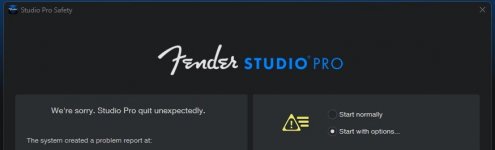
Is anyone else experiencing unexpected FSP crashes on Windows? I’m experiencing about one per day, so far, only when I am away from my computer while its sitting idly.

I have 8.1.1 (Built on Jul 13 2026) and have not experienced this level of instability before. I have no problems with my other programs.
 

Attachments

  • Screenshot 2026-07-20 143635.jpg
    Screenshot 2026-07-20 143635.jpg
    18,2 KB · Views: 5
Is anyone else experiencing unexpected FSP crashes on Windows? I’m experiencing about one per day, so far, only when I am away from my computer while its sitting idly.

I have 8.1.1 (Built on Jul 13 2026) and have not experienced this level of instability before. I have no problems with my other programs.
Suggest you dig into the crash reports generated and also check Event Viewer.

It will hopefully record some clues as to why the crash.

VP
 
Yep, I sort of suspected this. Scaler 3 is the culprit.
Which version of Scaler? V3.3 just dropped on Thursday July 16

VP
 
I have 3.3, and the funny thing is that I had no problems with 3.0
I don't use it much so it's low-priority. I'm happy to just uninstall it if it fixes my problem.
The Scaler crew would be interested to hear more on this.

Are you saying Studio Pro crashes - after you walked away - and I assume the app was idle - and out of the blue - Scaler v3.3 caused it to crash? T

That seems a tad odd - if no one doing anything on the machine at the time of crash.

Can you share anymore detail?

VP
 
I have 3.3, and the funny thing is that I had no problems with 3.0
I don't use it much so it's low-priority. I'm happy to just uninstall it if it fixes my problem.
I too have crashes and hangs with Scaler 3.3. I've have problems in S1/SP with Scaler 3 since the beginning of the version (none with Scaler 2). (and also in Ableton Live, so maybe not salient here)
 
Back
Top