• Hi and welcome to the Studio One & Studio Pro User Forum!

    Please note that this is an independent, user-driven forum and is not endorsed by, affiliated with, or maintained by Fender. Learn more in the Welcome thread!

EZ Cam

Gray Wolf

Active member
EZ Cam is a - free - full featured screen recorder and video editor for windows. Inspired by Camtasia and Vegas. It's screen capture and annotations are on par with Camtasia, and it's audio editing and mixing far surpasses Camtasia and most screen recorders. It also has pre-render like Vegas to help performance on slower systems.

If you have an ElevenLabs account, EZ Cam can connect to it and drop high quality narration directly to it's timeline.
  • Mac version coming later. Electron can do that easily, but I just haven't bothered to build a mac installer yet.

This tutorial video was created during testing to flesh out workflow and features.

To view this content we will need your consent to set third party cookies.
For more detailed information, see our cookies page.
 
Last edited:
Looks great - Thank you for sharing 👍 Nice vid too (as are all your videos.):)
 
EZ Cam is a - free - full featured screen recorder and video editor for windows. Inspired by Camtasia and Vegas. It's screen capture and annotations are on par with Camtasia, and it's audio editing and mixing far surpasses Camtasia and most screen recorders. It also has pre-render like Vegas to help performance on slower systems.

If you have an ElevenLabs account, EZ Cam can connect to it and drop high quality narration directly to it's timeline.
  • Mac version coming later. Electron can do that easily, but I just haven't bothered to build a mac installer yet.

This tutorial video was created during testing to flesh out workflow and features.

To view this content we will need your consent to set third party cookies.
For more detailed information, see our cookies page.
That download website has no contact information, it looks like the software is vibe coded and there is no way of telling if it will still exist in about 5 years. Please do yourself the favour and include a proper imprint on your page if people give you money for this.
 
I have not found any free program yet that can even come close to OBS Studio.
 
I haven't had time to try it yet but as a Camtasia power user who has a ton of feature requests (that are never going to be implemented) I'm extremely interested in this app. Especially audio editing is very tedious in Camtasia (missing crossfades or even proper fade-ins/fade-outs).

Does it support freezing frames (extending the beginning or end of a clip/event/...)?

Can sections be exported as separate video files?

Are there commands (keyboard shortcuts) to select all clips left or right of the cursor? (I need this all the time to move everything to the right)

Looking forward to check it out!
 
Hi Lukas,

It's intended to be exactly that, a replacement for Camtasia. I think you'll find audio editing in EZ Cam better than Camtasia. For example, you can't get this level of audio detail zooming in Camtasia if you need cut out something really small.

1795077630496.png


And of course, Camtasia doesn't have EQ, or De-Essing, or De-Clicking.
  • Does it support freezing frames (extending the beginning or end of a clip/event/...)?
Yes. Extend Frame.
  • Can sections be exported as separate video files?
If you mean exporting only the selection range instead of the entire video, yes.
  • Are there commands (keyboard shortcuts) to select all clips left or right of the cursor? (I need this all the time to move everything to the right)
Not currently, but I can add that. But it does already have an arranger track to move entire sections.

1795077072977.png


It also records MIDI, which is handy for musical tutorials, teachers, etc.
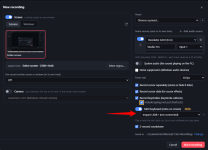
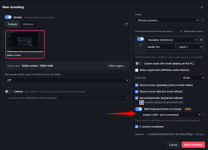
  • Record it: in New Recording, switch on MIDI keyboard (notes on screen) and pick your keyboard. The dot lights up when it hears a note. When you stop, the notes become a MIDI clip on its own track, in time with the recording. Your music software (Studio Pro, EZ Keys…) can stay open and keep using the keyboard on an up-to-date Windows 11.
  • Or import a .mid file: File → Import MIDI File…, or drag one onto a track.
  • Four looks: a keyboard with the keys lighting up, a keyboard with chord names above it, chord or note names on their own, or falling notes.
  • Chord names like C, Am7, G/B and Cmaj9, with sharps or flats, and middle C as C4 or C3 (as in Studio One / Studio Pro).
  • Choose how many keys show, the colours, names on the keys, softer notes lighting up less, and a Delay notes by slider to line the keys up with the sound.
  • Move, resize, fade and animate it like any other object. Trimming or splitting the clip never shifts the notes.
  • New User Guide section: MIDI notes on screen.
1795097860233.png


Try it out and let me know anything else you need for your workflow. I will add your "Select everything before or after the cursor" feature if the arranger track doesn't fit the bill for you.

Actually, outline your major feature requests for Camtasia here. If EZ Cam doesn't already do it, I'll add it.
 

Attachments

  • 1795077463631.png
    1795077463631.png
    98,1 KB · Views: 24
  • 1795097784539.png
    1795097784539.png
    226,3 KB · Views: 11
Last edited:
That download website has no contact information, it looks like the software is vibe coded and there is no way of telling if it will still exist in about 5 years. Please do yourself the favour and include a proper imprint on your page if people give you money for this.
I don't understand the concern? Gray Wolf provided EZ Cam as a free software application for Studio One/Pro users. (It is great, by the way). For clarification - I don't believe he has any affiliation with Eleven Labs, which offers on-line (AI based) Text to voice tools, including free or pay versions. As a user of Eleven Labs for his own videos, he has integrated this capability directly into his free application - great for teachers, content creators, etc and also optional. Yes, while there is no way of knowing if EZ Cam will exist in 5 years, (or 5 months), if you are accustomed to Camtasia, it would be an easy adjustment, including having the option to go back if you wanted to. Very generous IMO., and much appreciated.
 
I have not found any free program yet that can even come close to OBS Studio.
OBS Studio is purely screen recording software. It has no video editor capabilities at all, and it can't even record the cursor separately for later editing. You clearly haven't made the slightest effort to take even a quick look at what EZ Cam actually is.
 
There are really great video editing softwares out there, but barely any free altnerative for people like me who don't need to spend 10 hours a day on it.
 
There are really great video editing softwares out there
Actually, for my needs there's only Camtasia and Davinci Resolve (which isn't really good for screen videos and tutorials). I've been looking for an alternative to Camtasia for years but never found one.
 
To anyone using it, feel free to send feedback via the app from menu Help > Send Feedback. I do want to hear about any issues or dislikes or requests.

1795199599002.png
 
Back
Top