• Hi and welcome to the Studio One User Forum!

    Please note that this is an independent, user-driven forum and is not endorsed by, affiliated with, or maintained by PreSonus. Learn more in the Welcome thread!

Deactivate phantom +48v power or another solution?

Shadowplay

New member
Hi,
I am really hoping someone can help.
I have a presonus studio live 32 iii desk connected to a windows 11 laptop with studio one 6 professional version.

All of the combo dlr/jack sockets are connected and I would really like to connect one or 2 other instruments using a jack connection.
I have jack 6.3” to xlr connectors however I have read that if you switch on phantom power +48v that you can seriously damage you equipment.
It is possible to probably add phantom blockers but is costly if eventually I want to use all of the XLR connectors.
I am thinking of buying a mic preamp for my 2x condensator mics so I would not need the phantom on the studio mixer or daw. And seeing as I only have 2 devices using +48v this is probably easier.

Is there any way I can disable the +48v completely from the live mixer so that phantom is switched off completely and cannot be turned on by accident?
If that isn’t possible is there any way that I can hide the +48v button in the studio one daw?

Thanks ever so much for any possible ideas or suggestions.
 
I don't know of a way to completely disable phantom power on Series III mic inputs, so you need another solution.

Note that on mic or combo inputs the XLR part is for microphone signals (level and impedance) only. The jack part of combo inputs is for line signals (level and impedance) and sometimes for instrument signals too (level and impedance) if stated by the equipment/manual. These different signals don't mix well so you can't simply use XLR (part) inputs for line level outputs.

The proper solution is DI boxes, active or passive, to convert line signals to microphone signals. Passive DI's don't need phantom power but block it all the same. Active DI's actually need phantom power, and block it too.
 
Oh perhaps I wasn’t clear.
Apologies.
I want to be able to use the XLR sockets for jack plugs or non phantom equipment.
All of the combo jacks are used.

So basically, lines 1 thru to 16 to be used for a jack
The mic/lines 17 thu to 32 are connected including some of the mix and subs

As all of the xls are not used I was hoping that would be an option

IMG_0160.jpeg
 
So yes, that's what I explained. To connect line output equipment to mic inputs 1-16 you need DI boxes, both for converting line signals to mic signals and to keep phantom power away from those line outputs (and cause damage). And you can use both active and passive DI boxes for this.
 
I'm pretty sure the StudioLive mixers turn switch phantom power on a per channel basis. I don't own one, but nearly all digital consoles I've worked with require to press and hold the +48V for a few seconds before it actually engages. Next to that, the preamps are bypassed iirc when using the jack I puts, so I think phantom power won't travel through that circuit, but I'd want to check that first...
And as Switchback explained, DI boxes are designed for the specific task of converting line signal to mic signal..
 
I'm pretty sure the StudioLive mixers turn switch phantom power on a per channel basis. I don't own one, but nearly all digital consoles I've worked with require to press and hold the +48V for a few seconds before it actually engages. Next to that, the preamps are bypassed iirc when using the jack I puts, so I think phantom power won't travel through that circuit, but I'd want to check that first...
And as Switchback explained, DI boxes are designed for the specific task of converting line signal to mic signal..
Yes they do.
I have the possibility to turn on the +48v per channel via the mixer and the daw (the daw sends a signal to the mixer). But I want to make sure that there is no possibility of switching it on by mistake and that is why I want to disable this in the daw and/or on the mixer
Surely, if the +48v is not switched on then I would be able to use an adapter/converter on these channels?
 
You could log on to the mixer under a user profile which doesn't have access to the preamps, as that locks you out from changing phantom power too.

You can't just use adapters on the mic inputs, as they do nothing for signal conversion or phantom power blocking. And on Series III mixers the phantom power button acts instantly. Nice for fast setup but yeah, a press-and-hold would be safer.
 
You could log on to the mixer under a user profile which doesn't have access to the preamps, as that locks you out from changing phantom power too.

You can't just use adapters on the mic inputs, as they do nothing for signal conversion or phantom power blocking.
That’s a good idea. I haven’t explored that option.
I will look into that. Thanks for the tip.
 
The main thing to understand is line level equipment is safe from harm if you use the correct connector. A cheap adapter is asking for trouble.
Either use the correct inputs or use a professional DI box.
You are wise to ask about this topic because myself I have seen a lot of damage done by improper use of 48 volt power. Mostly fried pre amps on the board itself.
I often put tape over the switch.
My live condenser drum mikes use batteries. My DI boxes are passive and battery.
 
The main thing to understand is line level equipment is safe from harm if you use the correct connector. A cheap adapter is asking for trouble.
Either use the correct inputs or use a professional DI box.
You are wise to ask about this topic because myself I have seen a lot of damage done by improper use of 48 volt power. Mostly fried pre amps on the board itself.
I often put tape over the switch.
My live condenser drum mikes use batteries. My DI boxes are passive and battery.
Surely if I deactivate the possibility to use +48v on the mixer by using the user profile that would be sufficient?
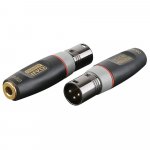
I have purchased these adapters so not the cheapest but good adapters
 

Attachments

  • IMG_0161.jpeg
    IMG_0161.jpeg
    52,8 KB · Views: 8
No, not good. jou need this. And they really don't have to be that expensive. You can find DI boxes for $20-$50 too. Stereo models can be even cheaper per channel.

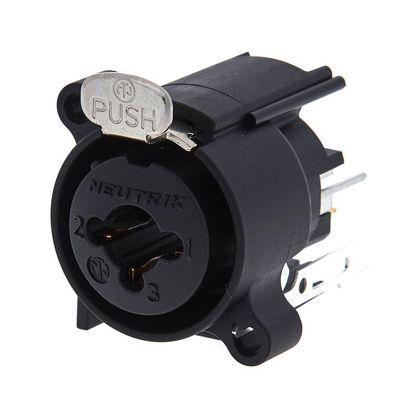
And the combo inputs on the mixer are more than just inputs that accept both XLR and jack. Depending on the plug you're using you connect to a mic preamp (XLR) or a line preamp (jack) inside the mixer. Replacing the socket doesn't give you that.
 
Passive DI boxes are OK except they have an insertion loss of about -18 dB. Which means you will have to make up the gain in the Mic Pres. Active DI's are better in that respect for line level signals as the Mic Pres will be turned down. Also there will be more gain available.

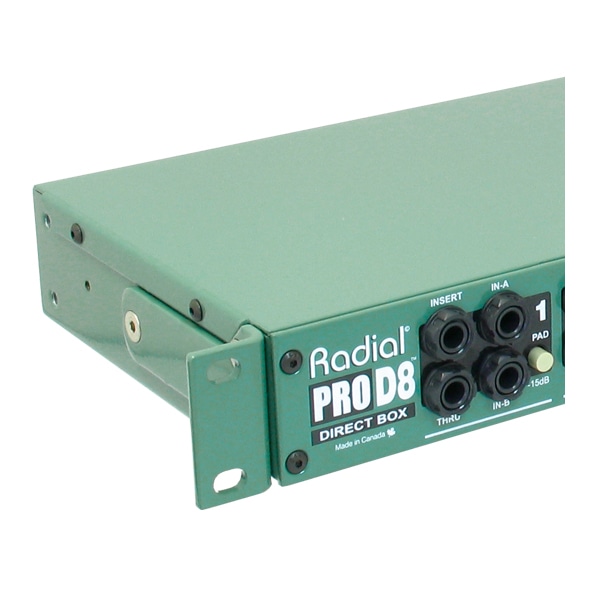
There are also rack mounted passive units like this also for multiple DI connections. The ART unit is quite affordable.


Do not use those adapters. They short out one side of the balanced XLR to ground and this will damage the phantom supply inside the mixer if the +48V supply was accidentally turned on. Even if the socket is TRS the moment you plug a mono lead into them you will also be shorting out one side to ground. Also the input impedance for the XLR will be low and some line level signals may not appreciate that.

Watch out also connecting line level sources such as some synths that are balanced TRS out direct to the XLR inputs. If you also accidentally send +48V to the synth you will almost certainly damage the output stages of the synth.
 
Last edited:
As has been pointed out by several people now, please, use DI-boxes, or a rack-mounted 8xDI-array. It wil save you a lot of all sorts of trouble..
(And as an added bonus, you can Direct Input (no coincidence) a (bass) guitar or other HiZ instrument into a DI)
 
Passive DI boxes are OK except they have an insertion loss of about -18 dB. Which means you will have to make up the gain in the Mic Pres. Active DI's are better in that respect for line level signals as the Mic Pres will be turned down. Also there will be more gain available.
That's not a loss really because impedance is converted down too, as required for a mic input. Line level is way too hot for a microphone input anyway, and that Radial ProD8 is a passive DI box too.
 
Passive DI boxes are OK except they have an insertion loss of about -18 dB. Which means you will have to make up the gain in the Mic Pres. Active DI's are better in that respect for line level signals as the Mic Pres will be turned down. Also there will be more gain available.

There are also rack mounted passive units like this also for multiple DI connections. The ART unit is quite affordable.


Do not use those adapters. They short out one side of the balanced XLR to ground and this will damage the phantom supply inside the mixer if the +48V supply was accidentally turned on. Even if the socket is TRS the moment you plug a mono lead into them you will also be shorting out one side to ground. Also the input impedance for the XLR will be low and some line level signals may not appreciate that.

Watch out also connecting line level sources such as some synths that are balanced TRS out direct to the XLR inputs. If you also accidentally send +48V to the synth you will almost certainly damage the output stages of the synth.
Thanks for this info.
What makes the d8 better than other passive DI rack mount boxes like this one?

 
Internal circuitry and components. It's a bit like the preamp component on a mic signal, it has a lot of influence on the colouration an clarity of the recorded signal.
I don't know the Palmer you linked to. I do know the single chanal Radial boxes, those are pretty decent.
 
Internal circuitry and components. It's a bit like the preamp component on a mic signal, it has a lot of influence on the colouration an clarity of the recorded signal.
I don't know the Palmer you linked to. I do know the single chanal Radial boxes, those are pretty decent.

Seems an extreme difference in price. Don’t want to cut corners but on the other hand didn’t think the solution would be that expensive. And considering the palmer is also a passive DI just was curious to know what the difference would be.
 
I understand your concerns, and indeed there's a steep difference in price. Sorry I can't help you with the choice ..
 
Back
Top