• Hi and welcome to the Studio One & Studio Pro User Forum!

    Please note that this is an independent, user-driven forum and is not endorsed by, affiliated with, or maintained by Fender. Learn more in the Welcome thread!

Solved Controlling/adjusting volume on recorded midi tracks

Barb

New member
(Fender Studio Pro 8, Windows 11, KeyStation 88)

I've recorded midi tracks for an instrumental song. I can't adequately control volume in the tracks to get a proper balance by manually modifying the keystroke hits.

I understand this needs to be done via CC11...but how do I add that via my keyboard...and how do I access the lane where I can tweak it?

I'm clueless, obviously, and would dearly love to learn how to do this. Thanks in advance for any assistance.

Barb
 
If you're simply trying to balance the volume of your instruments against each other, why not use the volume faders in the mixer?
1795759500679.png


MIDI velocity can also affect the sound and articulation of an instrument, so changing individual note velocities is not necessarily the best way to balance your mix.

CC11 (Expression) is useful for shaping the dynamics within a musical phrase, depending on the virtual instrument you're using.

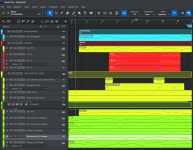
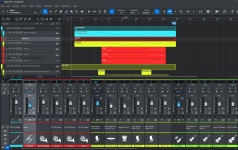
Could you post a screenshot of your arrangement and mixer and tell us which virtual instruments you're using? That would make it much easier to understand what you're trying to achieve.
 
I do need to shape the dynamics within musical phrases, as the melody moves between instruments. (EastWest)

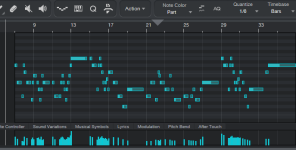
As you can see by the solo oboe clip, I tried adjusting the strength of the key strikes to manage the volume, but it wasn't sufficient. And...it wasn't the way to do it! And, as stated in my previous post, I understand this needs to be done via CC11...but how do I add that via my keyboard...and how do I access the lane where I can tweak it?

Barb
 

Attachments

  • Heartache_session view.png
    Heartache_session view.png
    103 KB · Views: 6
  • Heartache_mixer controls.png
    Heartache_mixer controls.png
    162,2 KB · Views: 6
  • Heartache_OB KS Master_attempt to control volume.png
    Heartache_OB KS Master_attempt to control volume.png
    20,1 KB · Views: 6
I get you're looking to shape, or re shape the dynamics. That will depend on your keyboard controller, or some MIDI override function, via software. It is (as far as I still have found), not available to set those limits within Studio One/Pro.

Some VST mfr's like BlueCat have some really great MIDI remap offerings. Try there. Guillaume Jeulin is the heart and soul of BlueCat Audio and is very approachable. Or you'll find the right plugin right from their website. I think "Patchwork" is the one as I recall. Most all of his plugins have deep MIDI integration.
Blue Cat Audio https://share.google/afA9AfOzmb2jPphmF

As to "access lane to tweak it", lanes are a layered part of the track itself. As in comping. Those lanes can be promoted, but not edited note by note, unless you edit off of the main (top) track itself. Hope that's clear without having to go into the whole track lane speak. I usually, just drop out of [Takes to Layers], and re record or edit at those locations from the main track.
 
Last edited:
Thanks for the screenshots, Barb. Now I understand what you're trying to achieve.
You can add a CC11 Expression lane directly in the Note Editor. No additional plugins are required.
I'm using HALion 7 for this example, but the procedure should be the same for EastWest Opus.

Step 1: Click the three dots (...) next to the Velocity tab at the bottom of the Note Editor.
1795776800597.png

Step 2: Search for "11", select Expression (CC11) for the appropriate MIDI port/channel, click Add and close the window.
1795776817662.png

Step 3: You should now have a new Expression tab in your Note Editor. Select it and use the Paint Tool to draw your desired expression curves.
1795776832037.png

You don't even need to use your MIDI keyboard to create or edit these curves manually.
Hope this helps!


You can also assign CC11 directly to your Keystation's ModWheel as in the manual on page 12:

You should now be able to record Expression (CC11) using your modulation wheel and edit the recorded controller data afterwards in the Expression lane.
1795777152230.png


I don't have the EastWest software you're using, but there may also be an option for MIDI controller mapping within the software. If you can assign your volume slider to Expression instead, your modulation wheel remains available for other functions, such as CC1.
 
Thanks for the screenshots, Barb. Now I understand what you're trying to achieve.
You can add a CC11 Expression lane directly in the Note Editor. No additional plugins are required.
I'm using HALion 7 for this example, but the procedure should be the same for EastWest Opus.

Step 1: Click the three dots (...) next to the Velocity tab at the bottom of the Note Editor.
View attachment 4368
Step 2: Search for "11", select Expression (CC11) for the appropriate MIDI port/channel, click Add and close the window.
View attachment 4369
Step 3: You should now have a new Expression tab in your Note Editor. Select it and use the Paint Tool to draw your desired expression curves.
View attachment 4370
You don't even need to use your MIDI keyboard to create or edit these curves manually.
Hope this helps!


You can also assign CC11 directly to your Keystation's ModWheel as in the manual on page 12:

You should now be able to record Expression (CC11) using your modulation wheel and edit the recorded controller data afterwards in the Expression lane.
View attachment 4371

I don't have the EastWest software you're using, but there may also be an option for MIDI controller mapping within the software. If you can assign your volume slider to Expression instead, your modulation wheel remains available for other functions, such as CC1.
Thank you so much! That’s exactly the information/help I needed. Now I can hardly wait to get back to my song this afternoon. :)

(I am using Studio Pro 8 and EastWest instrumental samples. They sound great, but I was lacking the ability to add the expression to make it musical and breathe.)
 
Barb, you neednt search for any CC. Simply click on a parameter and the Control Link in Studio Pro will show that parameter. Wh3n that gappens, simply drag the hand down to the editor window (bottom) and the CC will show up there. Just another way is all. I was using der the impression you were looking to set min or max limits to those parameters. Gotcha.
 
Back
Top