• Hi and welcome to the Studio One User Forum!

    Please note that this is an independent, user-driven forum and is not endorsed by, affiliated with, or maintained by PreSonus. Learn more in the Welcome thread!

Control Plus - Free advanced Mackie Control device template (Editor)

Cypher

Member
Hey guys,

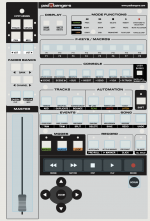
if you have a Mackie Control and want more features, feel free to test my new device template "Mackie Control Plus".

It comes with
- 16 users functions / macros slots
- 8 Pages of Midi Controls making all Mixer controls (V-Pots, Faders, Rec, Solo, Mute, Select) mappable in Studio One
- Autoscroll to selected channel
- Advanced marker, nuding and loop controls
+ a web app that allows to change buttons of my template the way you want

check it out on my site: https://www.padbangers.com/mackie-control-plus.html

Edit:
Now supports all Fender Studio Pro 8.1 shortcuts
 

Attachments
  • CleanShot Google Chrome - 2026-07-20 - 001124.png
    CleanShot Google Chrome - 2026-07-20 - 001124.png
    149,6 KB · Views: 5
Last edited:
Oooh, this looks cool! The scroll to track is particularly interesting for me. I assume this would also work with an SSL UF8 in MCU mode?
 
Just tried it with the SSL UF8 controller. The main thing for me is that the scroll to track function works with it, which is great :) thanks for taking the time to make this 👍
 
Hello Cypher.. i have been wrestling with my x touch and extender for years and have got them working ok but not ideal..
Idid this by hacking away at the supplied surfacedata file and some files i downloaded from a youtube guy
...and those files are kept in users/appdata/roming/presonus/s7/SurfaceData
where your one goes in User Devices.. and the presonus supplied files are called surfacedata files
where your ones are java and xml etc ...
what i dont want to do is lose my old capabilities...
how (can i?) preserve the ability to switch between what i already have and your new capabilities
or at least be able to go back if i want to?
Also i came from Cakewalk and on that i could get 2 things from my x touch that i have not been able to replicate in S7
1. touch an x touch fader and have the corresponding fader in S7 console view or main page become active
2. move the fader bank on x touch and have the S7 console/main view move as well..right now i have
two seperate buttons (x touch) that move the banks 8 at a time... used together with the x touch Fader Bank buttons( tedious)
Does your implementation do either of these?
Of course please feel free to completely ignore any and all of my questions
as you have already been very generous sharing your work with us..
Thanks
 
Hi,

I assume your changes apply to the default Mackie Control device while mine adds a new device and keeps the default device untouched.
Running them side by side should work, just not at the same time. To switch you'd have to enable /disable the midi channels in the device options to switch back and forth.
Please backup your files first, just in case!

If your device only added studio one functions you might be able to port them into my template via the web editor. Probably not exactly the same layout though, since some buttons are not editable.

1784699665858.png


Regarding your two questions: I'm working on this just in this moment
1.) Is already partially working. I can select a channel via the fader but touching another fader doesn't deselect the first fader... which is a happy accident because this makes me confident I can get shift+select button working to select multiple tracks from the device
2.) is working but not released yet
 
Nice work, lovely presented site and the configuration editor is really thoughtful!

I had a custom script for my MCU and I was going to add X-Touch scribble strip colouring to it but I just can't find the time. Don't suppose you have any plans to add colouring do you?

Look forward to trying this out later.
 
I don't own an x-touch and MCU only has a fixed color screen, so I can't test this.
Just seen you had a look at my original script in the credits at the end of that webpage lol

If I get time to get the coloured strips running, i'll send you across the code needed as maybe you could include for other people to use. Fantastic work though, you've put so much thought into this project, love it!
 
oooh that's you. I didn't realize the username! yes, your work was very helpful making all the faders and banking in midi mode work! I tried it before and almost gave up on it. Thanks for sharing it!

If I can get my hands on an x-touch I might create a dedicated template for it. I like the idea...
 
@bassface I just pushed an update.
  1. The mixer now follows the MCU when banks are shifted.
  2. Fadertouch can now be activated by pressing Shift + "Name / Value" (in the display section).
    There could possibly be conflicts when Tracks out of the current bank get selected, so it is disabled by default.Maybe you wanna give it a test.
  3. Multi-Track selections are now working as well.
 
Back
Top