I've been on Studio One and now Fender Studio Pro for years. In the last twelve months I've noticed (maybe it's always been there, but I haven't seen it) a lack of synchronicity between the arranger and console view - specifically I can mute something in the arranger window, but the mute button doesn't show in the console view, and vice versa - this just makes more work checking what's being payed and what is being muted. Also - I have noticed when I create an instrument track a separate Out Channel is also created in console view - this is not helpful if I don't want multi-output and just causes confusion on which channel effectively mutes the track. I'm certain this behaviour didn't happen a couple of years ago. Is there any way to turn it off, or are my instruments enabling multi-output by default?

-
Hi and welcome to the Studio One User Forum!
Please note that this is an independent, user-driven forum and is not endorsed by, affiliated with, or maintained by PreSonus. Learn more in the Welcome thread!
You are using an out of date browser. It may not display this or other websites correctly.
You should upgrade or use an alternative browser.
You should upgrade or use an alternative browser.
Confusing Relationship of arranger and console tracks
- Thread starter Mdnolan
- Start date
This was introduced in Version 7, you can easily turn if off by disabling this option:Also - I have noticed when I create an instrument track a separate Out Channel is also created in console view - this is not helpful if I don't want multi-output and just causes confusion on which channel effectively mutes the track. I'm certain this behaviour didn't happen a couple of years ago. Is there any way to turn it off, or are my instruments enabling multi-output by default?
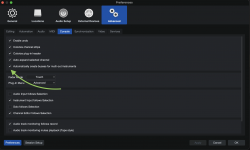
If your other question refers to instrument tracks, this might also be the solution for that.

OutrageProductions
Active member
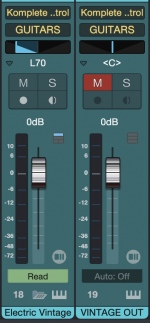
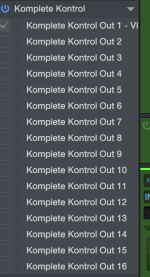
Thanks - but I understand all that - I have "automatically create busses" turned off. As you can see from the screenshot my Komplete Kontrol instrument has created two console channels, even though there is only one channel ticked in the multi-outs. If it was just another out it would be grey. I'm quite confused.THIS may be useful as an explanation of the difference between Channels <Mixer> and Tracks <Arrangment>.
Attachments
Are you really sure you turned it off and applied the changes before you created a track with Komplete Kontrol?I have "automatically create busses" turned off.
I've worked it out - these tracks come from a template I created some time ago when the create busses option must have been ticked when I upgraded studio one - since then I've noticed it and turned it off, but forgot to replace the instrument tracks in the template. Thanks.