• Hi and welcome to the Studio One & Studio Pro User Forum!

    Please note that this is an independent, user-driven forum and is not endorsed by, affiliated with, or maintained by Fender. Learn more in the Welcome thread!

Can't cut/copy & paste any names

AudioGuy

New member
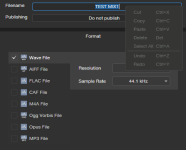
Is anyone else having trouble cutting/copying & pasting info into the meta data box?

I can copy but when I right click to paste the choices are all greyed out and it will not let me click on any of them...

Same thing happens when I start a new song and try to paste a title of a song...

I just downloaded the latest version of SP8 and that's when I started having trouble...

I am also running win10pro...

Any/All help will be appreciated...
 
No problem here on a Mac, can you show some screenshots or a video of what's not working with the paste options?
 
is Ctrl + V working?
 
Is anyone else having trouble cutting/copying & pasting info into the meta data box?

I can copy but when I right click to paste the choices are all greyed out and it will not let me click on any of them...

Same thing happens when I start a new song and try to paste a title of a song...

I just downloaded the latest version of SP8 and that's when I started having trouble...

I am also running win10pro...

Any/All help will be appreciated...
Happened to me as well several times, also in the export window - couldn't paste the track name and when right-clicked in the name field the cut/copy/paste were greyed out, unavailable. Neither CTRL-V nor right-click didn't work. This seems to happen completely random.
 
Is happening here as well and it's random.
 
Three things to check:
  1. What do you have in the buffer (Ctrl-C)? Is it text, or an object, or a file, ...?
  2. Is the intended destination field/area compatible with what you have in the buffer?
  3. Did you properly select that destination field/area?
 
Three things to check:
  1. What do you have in the buffer (Ctrl-C)? Is it text, or an object, or a file, ...?
  2. Is the intended destination field/area compatible with what you have in the buffer?
  3. Did you properly select that destination field/area?
1. Text (copied from a text file, can paste it anywhere else, like in a browser or a text editor).
2. Yes, trying to paste text field in the export window.
3. Yes, obviously.

Sometimes, randomly, it just doesn't work. Haven't had that issue ever before in Studio One/Studio Pro, it has started since v8.2.0.
 
Text copied from other apps may contain metadata which prevents it from being pasted into 'plain text' fields. Some apps are smart in treating such a paste as a 'paste unformatted text' or a 'paste and match style'. Maybe SP isn't smart that way.
 
Three things to check:
  1. What do you have in the buffer (Ctrl-C)? Is it text, or an object, or a file, ...?
  2. Is the intended destination field/area compatible with what you have in the buffer?
  3. Did you properly select that destination field/area?
1. Text (copied from a text file, can paste it anywhere else, like in a browser or a text editor).
2. Yes, trying to paste text field in the export window.
3. Yes, obviously.

Sometimes, randomly, it just doesn't work. Haven't had that issue ever before in Studio One/Studio Pro, it has started since 8.2.0.
Text copied from other apps may contain metadata which prevents it from being pasted into 'plain text' fields. Some apps are smart in treating such a paste as a 'paste unformatted text' or a 'paste and match style'. Maybe SP isn't smart that way.
Even the Windows Notepad? If so, why it was working before?
 
I would concentrate on the randomness. Is it really random (as in try again and eventually it works) or is a particular copy simply not working no matter how many times you try? Because in that case there must be something in that copied text which is incompatible with the text field in SP.

One issue may be line breaks. The two most common operators to move to a next line are CR (carriage return) and EOL (end of line) but there are more. One may be a hard return and another the result of running out of space on the previous line. One may just start at new line and another may start a new paragraph too. Copying text with a line break in it can cause unexpected results, depending on the type of line break and the app the text was copied from. We all know that copying text from websites may highlight much more that just the intended lines. Some destinations will interpret that some way or another, and other destinations will flat refuse the copy. SP may do the latter.

So when you hit a copy snag again then copy the snippet to an app that allows you to inspect hidden characters. It may be the same character(s) blocking the copy every single time. And of course try to copy that text to a previous version of SP too, to see if something really changed between versions. That would help the developers too.
 
Last edited:
I would concentrate on the randomness. Is it really random (as in try again and eventually it works) or is a particular copy simply not working no matter how many times you try? Because in that case there must be something in that copied text which is incompatible with the text field in SP.

One issue may be line breaks. The two most common operators to move to a next line are CR (carriage return) and EOL (end of line) but there are more. One may be a hard return and another the result of running out of space on the previous line. One may just start at new line and another may start a new paragraph too. Copying text with a line break in it can cause unexpected results, depending on the type of line break and the app the text was copied from. We all know that copying text from websites may highlight much more that just the intended lines. Some destinations will interpret that some way or another, and other destinations will flat refuse the copy. SP may do the latter.

So when you hit a copy snag again then copy the snippet to an app that allows you to inspect hidden characters. It may be the same character(s) blocking the copy every single time. And of course try to copy that text to a previous version of SP too, to see if something really changed between versions. That would help the developers too.
So if I can't cut/copy/paste the text from Studio Pro into Studio Pro, does that count or not?
 

Attachments

  • SP8 filename.png
    SP8 filename.png
    13,9 KB · Views: 9
Sure. Still check the content.
The content in his picture doesn't seem to include something strange.
It's pure words.
And this happens also to me randomly.
Sometimes I m trying to copy the name of a track to a another track and happens the same.
 
The content in his picture doesn't seem to include something strange.
It's pure words.
And this happens also to me randomly.
Sometimes I m trying to copy the name of a track to a another track and happens the same.
Cut, copy & paste are system functions. They are maintained by the system. Therefore it doesn't matter, wether you copy/paste within an application or between different ones, the process is exactly the same.

The only way to stop them from working is by trying to paste the wrong type of data. Since you hand over text to the system, there might be something that alters the text, once it left Studio Pro.

"doesn't seem to include something strange" is not helping, as many data that can be added to text, is not human readable (the obvious ones you might know being tab and newline)

When Studio Pro greys out the paste function, as an example, it got informed by the system of the type of data it wants to hand over and Studio Pro doesn't recognize it as valid.

The suspicion that the type or content of the data might have changed is valid, and one issue was even described in detail by Switchback. All that is left to do, is to trying to find out, wether the data changed and what the system tries to hand over. Inspecting the copied data is the next step.

you could paste it here: https://evercoder.github.io/clipboard-inspector/
but it is a simplified test that only checks the type, but doesn't show any non-human-readable data. That needs software specializing on that data. Notepad++ can show a lot of those, and hex editors show everything.
 
Hey tulamide, I understand what you say and I agree with the theory.
The subject is that I'm using Studio One and Fender Studio Pro every single day for the last 5 years.
This problem appeared in my system only after the latest update.
 
Cut, copy & paste are system functions. They are maintained by the system. Therefore it doesn't matter, wether you copy/paste within an application or between different ones, the process is exactly the same.

The only way to stop them from working is by trying to paste the wrong type of data. Since you hand over text to the system, there might be something that alters the text, once it left Studio Pro.

"doesn't seem to include something strange" is not helping, as many data that can be added to text, is not human readable (the obvious ones you might know being tab and newline)

When Studio Pro greys out the paste function, as an example, it got informed by the system of the type of data it wants to hand over and Studio Pro doesn't recognize it as valid.

The suspicion that the type or content of the data might have changed is valid, and one issue was even described in detail by Switchback. All that is left to do, is to trying to find out, wether the data changed and what the system tries to hand over. Inspecting the copied data is the next step.

you could paste it here: https://evercoder.github.io/clipboard-inspector/
but it is a simplified test that only checks the type, but doesn't show any non-human-readable data. That needs software specializing on that data. Notepad++ can show a lot of those, and hex editors show everything.
It's actually very simple: it worked fine and now it doesn't. The same with UAD plugins (described in another thread, also affected my work). The common denominator is the latest update of Studio Pro (8.2.0 and 8.2.1). Everything works as expected in 8.1.2.
 
It's actually very simple: it worked fine and now it doesn't. The same with UAD plugins (described in another thread, also affected my work). The common denominator is the latest update of Studio Pro (8.2.0 and 8.2.1). Everything works as expected in 8.1.2.
If it only were that simple. If it were, every user of Studio Pro would have the same issue. Since that's not the case, it is a specific issue, related to settings on certain computers, that don't exist on all.

If you already know that it is Studio Pro and not a combination of the DAW and your system, the nwhy do you post here in a community support forum that has nothing to do with Fender, instead of creating a ticket at Fender?

I feel pranked for having tried to help.
 
Hey tulamide, I understand what you say and I agree with the theory.
The subject is that I'm using Studio One and Fender Studio Pro every single day for the last 5 years.
This problem appeared in my system only after the latest update.
Yes, and I never said that Studio Pro is innocent. But it is not a simple DAW makes bubu issue, as only a few experience this instead of all. We wonT' be able to find out the cause, if nobody reacts to the suggestions of tracking this issue down.
 
If it only were that simple. If it were, every user of Studio Pro would have the same issue. Since that's not the case, it is a specific issue, related to settings on certain computers, that don't exist on all.

If you already know that it is Studio Pro and not a combination of the DAW and your system, the nwhy do you post here in a community support forum that has nothing to do with Fender, instead of creating a ticket at Fender?

I feel pranked for having tried to help.
I did create a support ticket. I also did it for the UAD plugins issue. Anyway, I'm back on 8.1.2, where the simple things do work.

Thanks for your help.
 
I did create a support ticket. I also did it for the UAD plugins issue. Anyway, I'm back on 8.1.2, where the simple things do work.

Thanks for your help.
Don't forget to provide Fender with everything they ask of you. Good luck.
 
Back
Top