• Hi and welcome to the Studio One & Studio Pro User Forum!

    Please note that this is an independent, user-driven forum and is not endorsed by, affiliated with, or maintained by Fender. Learn more in the Welcome thread!

Anyone tried this new macro from Gregor? (Insert Channel Strip)

Vocalpoint

Well-known member
To view this content we will need your consent to set third party cookies.
For more detailed information, see our cookies page.

Very cool little macro - but for reasons yet unknown - if I click Install on this thing from the Exchange Area - the macro does seem to find it's way into my macros folder - but is a no-show - anywhere in the Studio Pro UI.

Cannot find it anywhere.

Anyone else confirm?

VP
 
If you check the comments under the YouTube video, nobody on Windows has got it to work!
 
If you check the comments under the YouTube video, nobody on Windows has got it to work!

Yes - it appears to be fine on Mac and not fine on Windows - which is very odd..

Also a VERY slippery slope if FSP is suddenly not allowing base macros to be used - cross platform.

VP
 
A shot in the dark: try to re-install it by dragging the Macro file onto the Studio Pro app again. I had some similar strange results when installing macros from Craig onto my Mac (on v7). As I said: no guarantee, but I got the impression that drag & drop in this case is the most robust approach.
 
To view this content we will need your consent to set third party cookies.
For more detailed information, see our cookies page.

Very cool little macro - but for reasons yet unknown - if I click Install on this thing from the Exchange Area - the macro does seem to find it's way into my macros folder - but is a no-show - anywhere in the Studio Pro UI.
Same here! Was going to report the same.
Anyone else confirm?

VP
Yup.
 
When I update from the exchange, (gray on Gregors as he explains his is loaded already).
My Macro Organizer then opens. It's not there.
It is however a part of your transfers now shown (Transfer window). Right click on it to show in Explorer. Its in your Studio One/Songs/Macros folder. Only it wont drag from there.
Of course typing "default channel" in the Macro list wont reveal it either. doesnt reveal where it is in our keyboard shortcuts.

So then I figured, just make my own channel strip, save and make as a macro, and make my own button from the Track Visability bar. Only after making the three FX used, I cant seem to save my channel overview.

I wouldnt need Gregors from the exchange. Only that isnt happening as yet. I could surely use this nice channel strip.

Fortunately, we have Lukas to assist and lay into Gregor for not proofing his process (joking).

Preferably, I'd like to simply create this myself, than go to the exchange server.
But I'd still use Gregors Default Channel Strip GBY. ONLY, I want to make my own custom channel strip presets.
 
Last edited:
Hi Lukas.Best case scenario for many could be if you provided details on how we could save on the track visibility bar, and create our own channel strips. Of course this on the side of VP's OP request. I dont wish to step on the request, but hey..... while we're under the hood. 👍
 
There are several issues with the macro shown in the video. We are currently investigating and fixing the problem that prevents the macro from being installed correctly.

However, I suspect that the macro will not work unless the FX Chain used in the video is also available on the target system.
 
There are several issues with the macro shown in the video. We are currently investigating and fixing the problem that prevents the macro from being installed correctly.

However, I suspect that the macro will not work unless the FX Chain used in the video is also available on the target system.
Thanks for checking this out for us.

VP
 
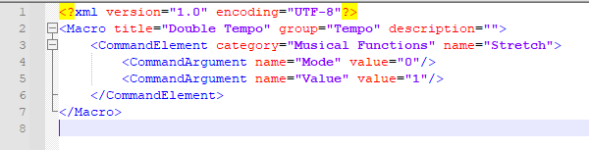
The file itself is already corrupted. Makro1 shows the XML of a working macro (Double Tempo). Makro2 shows the content from Gregor's file.
 

Attachments

  • makro1.png
    makro1.png
    12,2 KB · Views: 15
  • makro2.png
    makro2.png
    10,1 KB · Views: 14
Unitl thats done, it wouldnt hold anyone up. You can save your own channel overviews instantly by creating the preferred plugins anyway.

Simply save and load them how you like in your track presets.
 
Last edited:
Unitl thats done, it wouldnt hold anyone up. You can save your own channel overviews instantly by creating the preferred plugins anyway.

Simply save and load them how you like in your track presets.
You are right, you can do it for yorself. But that's not the point. Gregor made the macro, because people asked him to. It's for those people.
 
You are right, you can do it for yorself. But that's not the point. Gregor made the macro, because people asked him to. It's for those people.
Well then, they can surely wait for it. Lol.
Channel strips come in many shapes and sizes. Even arranging the order of EQ/comp/lim/gate, etc. Making one's own ch strip, saving, and creating a shortcut for it is largely the point. If Gregor was looking to respond to those asking for his very own, only. Then it looks like he screwed the pooch. The exchange area location he provided was purely a convenience.
As I see it, I'm glad Gregor provided the basic concept for others to base their own preference. Not wait for it.
But for those waiting, help is on the way.
 
Last edited:
Has this macro been updated yet? Kinda thought it would be a 5 minute fix?

VP
 
The upload/download from macro files in Exchange has been fixed.

However, this macro can't work because you would need Gregor's FX Chain. So by design, this macro can't work without sharing the additional preset.
 
This is the point I made separately about sharing toolbars that have instruments, FX, or macros in them - it is better to explain what they do and people can (easily) make them themselves.
 
This is the point I made separately about sharing toolbars that have instruments, FX, or macros in them - it is better to explain what they do and people can (easily) make them themselves.
Indeed. Sharing toolbars, exchange, whatever. Only (as I see it), show the user how to fish, using the actual steps involved.

I get that Gregor has his own unique effects chain. I've purposely avoided sharing my own macros because I have my own unique key commands, or macros. The onus is on the person sharing the information or lesson, and either displaying a default path, or their process differences. I get it was an oops on his behalf. Hey, thats why pencils have erasers. Only, this has been my point in the past where Gregor shows something such as "Hi Guy's, here's what I had fun doing (to meet my lesson quota)", than the really capable instruction oriented people who commit to doing the same in a more professional way. I agree with VP and thought that this was a 5 minute fix. Still, its probably a good sign (as we're always positive, right?) that the guys are working steadfast on a new Studio Pro release! Woooh-hooo. Thanks Gregor, for letting us know! 👍
 
Back
Top