• Hi and welcome to the Studio One User Forum!

    Please note that this is an independent, user-driven forum and is not endorsed by, affiliated with, or maintained by PreSonus. Learn more in the Welcome thread!

8.1 big problem with neural Dsp plugins ...

absu

Member
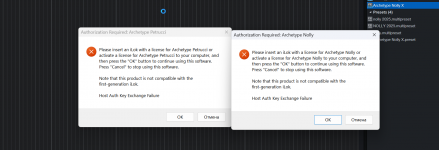
Studio One 8.1 on Windows 11 fails to open existing projects with multiple Neural DSP iLok machine-activated plugins. Studio One 7 opens the same projects correctly. Standalone Neural DSP apps work, new S1 8.1 projects with Neural DSP work, but existing projects fail after ~10–12 instances with PACE “Host Auth Key Exchange Failure / ExcessiveDelayOpeningChannel”. and "audio engine error "

all NDSP plugins up to date , ilok too ..

and it all started after upgrading to 8.1, the situation is sad for me, because I use ndsp in so many projects, and s1 can’t even open the project after these errors, it just hangs...
 

Attachments

  • Studio_Pro_c1z6ujwSqe.png
    Studio_Pro_c1z6ujwSqe.png
    108,9 KB · Views: 12
found out experimentally that 8.1 does not like a large number of plugs (or bypassed plugs) it is not yet clear.... I cleared one project manually) - everything opened)) In short, I created a utility that batch cleans s1 projects from bypassed plugins and makes clean copies of them)) you launch Exe, select a folder (asks whether to search in subfolders) then clears it) saves copies to the selected folder) displays a log of how many projects have been cleared and how many plugins have been deleted)) I think it will be useful for someone)) For me personally, for sure - I always forget to remove plugs))

 
Exactly that`s what preventing me to load a project. Only 1 of 10 trys i guess happily loaded so far, so i had to rollback. Project has huge Number of Plugins and some have iLok Activation. This release is totally bugged an shoulkd`nt be promoted. Is really frustrating because the compressors gone and don`t load after rolling back cause they changed something in compressor. The worst.
 
Excuse me for not understanding or having any info to what trouble shooting you folk have gone through.
This is a bit of a concern if the problem is FSP8.

I have iLok stuff and have in the past had issues where the Pace iLok manager has stalled or at times not even loaded.
Whilst this might not be the issue you have. It does look as tho' Pace is not happy.

Just as quick check load in "Task Manager" Process tab, is Pace running OK and is it active. Then run FSP., does Pace balk or stall in anyway?

Kindest regards.
 
I have iLok stuff and have in the past had issues where the Pace iLok manager has stalled or at times not even loaded.
Whilst this might not be the issue you have. It does look as tho' Pace is not happy.

I've learned the hard way that the iLok license manager gets updated often. I check for updates regularly, which may be why I haven't had issues with loading projects that have lots of iLok-protected plug-ins...at least not yet.

Someone who integrated computers once told me that installing PACE was like voluntarily installing a virus in your computer :ROFLMAO:
 
Someone who integrated computers once told me that installing PACE was like voluntarily installing a virus in your computer :ROFLMAO:
🤣

Brilliant, this cracked me up, sounds like a T-shirt for all occasions.

All the best.
 
But this does`nt explain to me why a rollback to 8.0.3 works fine. So i don`t think it`s a missing license or the loader. The Problem is with the Build of 8.1 itself and this should`nt be the case. It`s bugged on Win11 with larger amount of plugins.
 
But this does`nt explain to me why a rollback to 8.0.3 works fine. So i don`t think it`s a missing license or the loader. The Problem is with the Build of 8.1 itself and this should`nt be the case. It`s bugged on Win11 with larger amount of plugins.
It might not explain it, but if it was an FSP issue there would possibly be a lot more folk raising this problem.

Also,
Don't forget as updates get installed they collect or update your Pref's files. Something there might be a mismatch?
You could try renaming your preferences folder to say REMprefrences then update.
FSP should create a clean fresh set of Pref's.... I am not saying this will solve the issue but you can then rule out any issue due to an install error.

You could always submit a ticket to see if support can guide you toward a solution.

Just trying to help. Kindest regards.
 
It might not explain it, but if it was an FSP issue there would possibly be a lot more folk raising this problem.

Also,
Don't forget as updates get installed they collect or update your Pref's files. Something there might be a mismatch?
You could try renaming your preferences folder to say REMprefrences then update.
FSP should create a clean fresh set of Pref's.... I am not saying this will solve the issue but you can then rule out any issue due to an install error.

You could always submit a ticket to see if support can guide you toward a solution.

Just trying to help. Kindest regards.
If you check here People having the same issue like me.

Your help of course is welcome but i am quiete here now because it`s a bit offtopic now cause OP has trouble with Neural DSP.
 
I think I found a problem that broke everything for me, it’s Package_for_RollupFix~31bf3856ad364e35~amd64~~26100.8655.1.20, damn Windows update, and the most unpleasant thing is that it can’t be removed using standard tools, I’ll have to restore the system from an image from a month ago
 
I think I found a problem that broke everything for me, it’s Package_for_RollupFix~31bf3856ad364e35~amd64~~26100.8655.1.20, damn Windows update, and the most unpleasant thing is that it can’t be removed using standard tools, I’ll have to restore the system from an image from a month ago
Sounds nasty.

I've never tried to un-install a windows package always rolling back, like you are to a previous image.

If you want something with a more teeth than the Windoze uninstaller maybe this might be of use...cut to 1-30 min and watch, it's a 12 min vid.

To view this content we will need your consent to set third party cookies.
For more detailed information, see our cookies page.

I use it all the time when I want to uninstall standard programs, whether it can remove a Win package I couldn't say if it will work, I have never used it for that sort of task.

Best regards.

PS. Be very careful you do not end up uninstalling your whole system... Reevo is very powerful, but also can be dangerous!!!
 
Last edited:
I confirm Windows 11 Security Update / Cumulative Rollup Fix 26100.86, it broke all my work with the DAW, caused a lot of problems with the audio driver rme, ilok, and s1 itself, freezes, abnormal driver behavior and hard freezes, be careful..

After rolling the system back a month, everything was cured, this update itself cannot be removed after installing it
 
Back
Top