• Hi and welcome to the Studio One User Forum!

    Please note that this is an independent, user-driven forum and is not endorsed by, affiliated with, or maintained by PreSonus. Learn more in the Welcome thread!

Solved Windows Audio Recording

Rikiditch17

New member
Hi Folks, I am a newcomer to Studio One ,I have a Windows 11 AMD Computer , I want to record the Audio from YouTube Video straight to my recording track on studio one. I am Playing already to my TV monitor with HDMI .
Please tell me how i can set this up in Studio One.
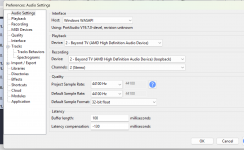
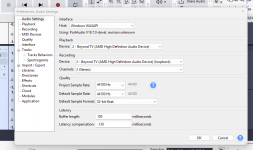
I can do it on Audacity by choosing WASAPI and AMD Speakers loopback selection.Enclose Picture of set up in Audacity that works.
Best Regards,
 

Attachments

  • Screenshot 2025-12-27 211305.png
    Screenshot 2025-12-27 211305.png
    124,4 KB · Views: 17
Far as I know the best way to do this is by using an audio interface that has the Loopback feature. That’s what I do.
Audacity doesn’t support ASIO so is more integrated into Windows audio.
Most Daw’s use ASIO for proper recording.
 
Hi John, I have a NUX UC-2 Interface,but I'm not using any input from this box,only selecting Windows Audio on Studio 1 for Input.
I only want to record the YouTube audio from the computer out to the monitor on to a recording stereo channel on Studio One.
Can you share what your arrangement is with this interface, and how your settings are to record YouTube if any ,thanks Paul.
 
Which driver did you install for the NUX? The WDM driver or the Asio driver? The latter probably gives better options.

Under window you're allowed only 1 audio interface, so in your case that should be the NUX for all audio and audio apps. The UC-2 is said to have a loopback channel, which is must. It's a stereo output which comes back as a stereo input. So set system audio/YouTube to use the loopback output, and all other apps should be able to pick up that signal from the loopback input. I don't know if it's possible to make the HDMI port use the loopback input too. If not then you'll have to wire audio from the UC-2 to the TV monitor directly.
 
I have been using 4Kvideodownloader for years and it will download YouTube videos or extract and download only the audio from those videos as MP3. Once downloaded you can just drag the MP3 file to a track on S1.
 
Last edited:
Your interface doesn’t have loopback. It is also not supported by W10 or 11. It looks like it is very old judging by the driver support for Windows XP.
So looks like a new interface that supports loopback might be in your future.

When the audio interface supports loopback it becomes one of the inputs for your audio tracks in your Daw. I have 3 different interfaces that have loopback because I also need it to make tutorial videos.

It was introduced a while ago due to the high demand for needing it for podcasts, video screens capturing as well as people wanting to capture the audio from the internet.
 
Last edited:
Which driver did you install for the NUX? The WDM driver or the Asio driver? The latter probably gives better options.

Under window you're allowed only 1 audio interface, so in your case that should be the NUX for all audio and audio apps. The UC-2 is said to have a loopback channel, which is must. It's a stereo output which comes back as a stereo input. So set system audio/YouTube to use the loopback output, and all other apps should be able to pick up that signal from the loopback input. I don't know if it's possible to make the HDMI port use the loopback input too. If not then you'll have to wire audio from the UC-2 to the TV monitor directly.
Hi Switchback, it's not possible for me to use cable from TV headphone socket as it blocks TV speakers when in use and is not practical.
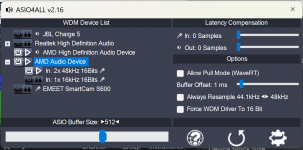
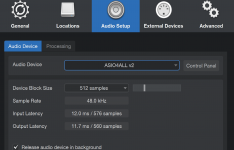
I downloaded ASIO4ALL today and i can see it on my Studio Audio Interface selection.
When opened it allows me to select Mic input, I enclose picture but have not been successful yet in recording direct to Studio One,
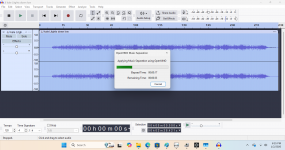
Note: I can record in Audacity and save Wav file and import to Studio 1. This is what i am doing now.
Thanks for help, note it appears I have loopback on the NUX as it comes up in Audacity Windows selection
 

Attachments

  • Screenshot 2025-12-29 170653.png
    Screenshot 2025-12-29 170653.png
    103,5 KB · Views: 12
  • Screenshot 2025-12-29 170801.png
    Screenshot 2025-12-29 170801.png
    205,3 KB · Views: 9
  • Screenshot 2025-12-29 171248.png
    Screenshot 2025-12-29 171248.png
    78,3 KB · Views: 9
  • Screenshot 2025-12-29 171403.png
    Screenshot 2025-12-29 171403.png
    98,2 KB · Views: 13
Thanks for help, note it appears I have loopback on the NUX as it comes up in Audacity Windows selection
It's just how Audacity writes it for itself, it doesn't mean your audio interface has it. It also says that mine has it even though it doesn't.
Loopback is a rerouting in real time, which isn't the case here.
 
Hi Switchback, it's not possible for me to use cable from TV headphone socket as it blocks TV speakers when in use and is not practical.
I downloaded ASIO4ALL today and i can see it on my Studio Audio Interface selection.
When opened it allows me to select Mic input, I enclose picture but have not been successful yet in recording direct to Studio One,
Note: I can record in Audacity and save Wav file and import to Studio 1. This is what i am doing now.
Thanks for help, note it appears I have loopback on the NUX as it comes up in Audacity Windows selection
A few remarks:
  1. Your NUX interface has a proper ASIO V2 driver you should download and install. With that driver installed Studio One does not need to go through ASIO4ALL (which is an extra shell rather than the leaner/faster/better driver protocol ASIO constitutes vs. WDM).
  2. Can you confirm that your interface offers loopback yes or no, as that is essential for porting audio from your web browser (which uses the same interface as Windows system audio, i.e. the NUX) to Studio One (also using the NUX).
  3. In your current setup your laptop's HDMI port sends video and audio to your TV monitor. Once you select the NUX as your system's audio interface, audio from the HDMI port may stop. In that case you must provide your TV monitor with audio from the NUX (your monitor should have extra audio inputs for this). This has nothing to do with the monitor's headphone socket.:)
 
You have now gone down the rabbit hole. Asio4all is as @SwitchBack says is a wrapper for WDM mode which like your audio interface is from a time long ago. It is totally obsolete as far as drivers go.

You can continue waisting time fighting with hobbling together an audio system using 3rd party apps and using stuff from 15 years ago or— you have been given the solution.

Your audio interface has gone past its life cycle which ended with W7.
When that happens it’s a simple matter of replacing it.

Audacity is not really a Daw. It doesn’t even support ASIO. It is a wave editor and recorder. It is designed specifically for all those tasks and so is integrated into Windows.

Studio One is a professional grade Daw which is designed to be used with an ASIO audio interface. At best you can get buy with your computer audio system for playback but it is not advisable to record audio unless you use ASIO of which is only available when you use an audio interface.
 
Your interface doesn’t have loopback. It is also not supported by W10 or 11. It looks like it is very old judging by the driver support for Windows XP.
So looks like a new interface that supports loopback might be in your future.

When the audio interface supports loopback it becomes one of the inputs for your audio tracks in your Daw. I have 3 different interfaces that have loopback because I also need it to make tutorial videos.

It was introduced a while ago due to the high demand for needing it for podcasts, video screens capturing as well as people wanting to capture the audio from the internet.
Hi John. Yes, thanks for that, I will upgrade soon to new interface with USB3.0 and loopback capability, but for the moment I'm happy just using WAV file of YouTube song from Audacity into Studio One as an Audio Import. Because I'm just using this Audio to be as a backing track, and to use Chord detection sometimes, then I'm putting it through a free Vocal remover, and I can play with my Guitar live practice for performance.
So, it's the cheap way out for now, plus that old NUX box does everything else I ask it,
Best Regards
 
A few remarks:
  1. Your NUX interface has a proper ASIO V2 driver you should download and install. With that driver installed Studio One does not need to go through ASIO4ALL (which is an extra shell rather than the leaner/faster/better driver protocol ASIO constitutes vs. WDM).
  2. Can you confirm that your interface offers loopback yes or no, as that is essential for porting audio from your web browser (which uses the same interface as Windows system audio, i.e. the NUX) to Studio One (also using the NUX).
  3. In your current setup your laptop's HDMI port sends video and audio to your TV monitor. Once you select the NUX as your system's audio interface, audio from the HDMI port may stop. In that case you must provide your TV monitor with audio from the NUX (your monitor should have extra audio inputs for this). This has nothing to do with the monitor's headphone socket.:)
Hi Switchback . Yes, thanks for that, I will upgrade soon to new interface with USB3.0 and loopback capability, but for the moment I'm happy just using WAV file of YouTube song from Audacity into Studio One as an Audio Import. Because I'm just using this Audio to be as a backing track, and to use Chord detection sometimes, then I'm putting it through a free Vocal remover, and I can play with my Guitar live practice for performance.
So, it's the cheap way out for now, plus that old NUX box does everything else I ask it,
Best Regards
 
It's just how Audacity writes it for itself, it doesn't mean your audio interface has it. It also says that mine has it even though it doesn't.
Loopback is a rerouting in real time, which isn't the case here.
Hi Sombreuil. Yes, thanks for that, I will upgrade soon to new interface with USB3.0 and loopback capability, but for the moment I'm happy just using WAV file of YouTube song from Audacity into Studio One as an Audio Import. Because I'm just using this Audio to be as a backing track, and to use Chord detection sometimes, then I'm putting it through a free Vocal remover, and I can play with my Guitar live practice for performance.
So, it's the cheap way out for now, plus that old NUX box does everything else I ask it,
Best Regards
 
I have been using 4Kvideodownloader for years and it will download YouTube videos or extract and download only the audio from those videos as MP3. Once downloaded you can just drag the MP3 file to a track on S1.
Hi Huertaaj . Yes, thanks for that, I will upgrade soon to new interface with USB3.0 and loopback capability, but for the moment I'm happy just using WAV file of YouTube song from Audacity into Studio One as an Audio Import. Because I'm just using this Audio to be as a backing track, and to use Chord detection sometimes, then I'm putting it through a free Vocal remover, and I can play with my Guitar live practice for performance.
So, it's the cheap way out for now, plus that old NUX box does everything else I ask it,
Best Regards
 
If you’re using Audacity to record then why not use it to create the stems?
I found it was the best out of all the stem separation apps I tested ( see attached video)

You get Drums, Bass. Other and Vocals.
Other is generally guitar and piano which is a good choice for chord detection.

You first need to install a free plug in which is called Open vino. One reason I prefer it is that you can select a higher quality format for the audio. None of the others do that.

To view this content we will need your consent to set third party cookies.
For more detailed information, see our cookies page.
 
Studio One's own stem separation isn't bad at all. If you need more granularity, Moises will do better. Spectralayers 12 is probably the best - at a price.
 
At the time I made the video I didn’t have Studio one. It seems like most of them used the same coding because they all come out with the same 4 track names in the same order.
 
Hi John, amazing information and Video explanation, I have grasped some of it and have downloaded both programs Open vino and UVRS , I had a very successful voice removal and stem separation. I have subscribed to your channel, and I will pop onto it now and again when I'm free to listen to your songs also.
My email paulsshowcase@gmail.com.
Again, thanking you for your support.
I also write and compose my own songs, some of which I will be using Studio One to record initial soundtracks.
Best Regards,
Paul.
 

Attachments

  • Screenshot 2026-01-02 183611.png
    Screenshot 2026-01-02 183611.png
    578,9 KB · Views: 9
  • Screenshot 2026-01-02 175829.png
    Screenshot 2026-01-02 175829.png
    647,6 KB · Views: 6
Back
Top