• Hi and welcome to the Studio One User Forum!

    Please note that this is an independent, user-driven forum and is not endorsed by, affiliated with, or maintained by PreSonus. Learn more in the Welcome thread!

Windows Audio Recording

Rikiditch17

New member
Hi Folks, I am a newcomer to Studio One ,I have a Windows 11 AMD Computer , I want to record the Audio from YouTube Video straight to my recording track on studio one. I am Playing already to my TV monitor with HDMI .
Please tell me how i can set this up in Studio One.
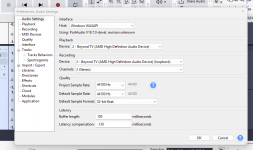
I can do it on Audacity by choosing WASAPI and AMD Speakers loopback selection.Enclose Picture of set up in Audacity that works.
Best Regards,
 

Attachments

  • Screenshot 2025-12-27 211305.png
    Screenshot 2025-12-27 211305.png
    124,4 KB · Views: 13
Far as I know the best way to do this is by using an audio interface that has the Loopback feature. That’s what I do.
Audacity doesn’t support ASIO so is more integrated into Windows audio.
Most Daw’s use ASIO for proper recording.
 
Hi John, I have a NUX UC-2 Interface,but I'm not using any input from this box,only selecting Windows Audio on Studio 1 for Input.
I only want to record the YouTube audio from the computer out to the monitor on to a recording stereo channel on Studio One.
Can you share what your arrangement is with this interface, and how your settings are to record YouTube if any ,thanks Paul.
 
Which driver did you install for the NUX? The WDM driver or the Asio driver? The latter probably gives better options.

Under window you're allowed only 1 audio interface, so in your case that should be the NUX for all audio and audio apps. The UC-2 is said to have a loopback channel, which is must. It's a stereo output which comes back as a stereo input. So set system audio/YouTube to use the loopback output, and all other apps should be able to pick up that signal from the loopback input. I don't know if it's possible to make the HDMI port use the loopback input too. If not then you'll have to wire audio from the UC-2 to the TV monitor directly.
 
I have been using 4Kvideodownloader for years and it will download YouTube videos or extract and download only the audio from those videos as MP3. Once downloaded you can just drag the MP3 file to a track on S1.
 
Last edited:
Your interface doesn’t have loopback. It is also not supported by W10 or 11. It looks like it is very old judging by the driver support for Windows XP.
So looks like a new interface that supports loopback might be in your future.

When the audio interface supports loopback it becomes one of the inputs for your audio tracks in your Daw. I have 3 different interfaces that have loopback because I also need it to make tutorial videos.

It was introduced a while ago due to the high demand for needing it for podcasts, video screens capturing as well as people wanting to capture the audio from the internet.
 
Last edited:
Back
Top