• Hi and welcome to the Studio One User Forum!

    Please note that this is an independent, user-driven forum and is not endorsed by, affiliated with, or maintained by PreSonus. Learn more in the Welcome thread!

Tuner issue

scottyo7

New member
I've searched this topic in a few different forums and all over the internet and cannot find an answer.

A couple of months ago, I noticed the Tuner was always wrong compared to my Line 6 Helix.
I then downloaded a tuner app to verify which was correct.
The tuner in Studio One is about 50 cents off.
This matters because I use MP3s for church worship practice and transpose them to the key for that week.

After starting S1, it appears the Tuner is set to standard ('default' & 440) and not to one of the alternate tunings in its' update.
I've adjusted the "Cal" from 440 to 455 to 'hack' it but I'd rather know why the Tuner is acting this way in the first place.
  • I updated to version 7.2.3 shortly after it came out. Is there a Tuner bug I didn't read about?
  • It doesn't appear I fat-fingered the initialization/preference file when moving it from the previous version to this new version?

Any ideas?

Thnx, Scott
 
Last edited:
I have a number of different tuners that I use within Studio One, including the Studio One tuner plugin. They all read exactly the same, so I can't understand why you're seeing something different.

There's a bunch of free tuner plugins that you can download, including my favorite "LockOn", which is free if you don't mind the nag notice. Try one of those to help narrow down your issue.

The other suggestion is to put in the Tone Generator before the tuner, set it to 440, and see where the needle is. Curious to hear the results.
 
Last edited:
I've adjusted the "Cal" from 440 to 455 to 'hack' it but I'd rather know why the Tuner is acting this way in the first place.

The established standard for any tuner IS 440 as long as I having been tuning instruments (1975).

If your stuff is actually at 455 - not sure how this is an S1 tuner problem - its a problem with whatever you guys are tuning to at the church there.

I have a host of tuners here - and S1 is not "off" as far as my guitars (or my Line 6 POD HD) are concerned.

VP
 
I have a number of different tuners that I use within Studio One, including the Studio One tuner plugin. They all read exactly the same, so I can't understand why you're seeing something different.

There's a bunch of free tuner plugins that you can download, including my favorite "LockOn", which is free if you don't mind the nag notice. Try one of those to help narrow down your issue.

The other suggestion is to put in the Tone Generator before the tuner, set it to 440, and see where the needle is. Curious to hear the results.

All of my amp, clip-on and plug-in tuners agree within a cent or two of each other. Including the SO tuner
 
I have a number of different tuners that I use within Studio One, including the Studio One tuner plugin. They all read exactly the same, so I can't understand why you're seeing something different.

There's a bunch of free tuner plugins that you can download, including my favorite "LockOn", which is free if you don't mind the nag notice. Try one of those to help narrow down your issue.

The other suggestion is to put in the Tone Generator before the tuner, set it to 440, and see where the needle is. Curious to hear the results.
Thank you js1 for your reply.

Using the S1 Tone Generator is a great idea which I'll try tomorrow. I did successfully use my Helix tuner today which kept me in tune with the band during four church services. 😉

As stated in my original post, I downloaded a (Fender) tuner which also agreed with my Helix tuner.

So the issue is definitely within Studio One and is a mystery to me, because the tuner has flawlessly worked since 2010 when I first purchased Studio One Pro. 🤗

Over the years, I've read about a Preference or Setup file and wondered if somehow that's the issue but I haven't messed with that for years, so I doubt that's the case. 🤔
 
Thank you js1 for your reply.

Using the S1 Tone Generator is a great idea which I'll try tomorrow. I did successfully use my Helix tuner today which kept me in tune with the band during four church services. 😉

As stated in my original post, I downloaded a (Fender) tuner which also agreed with my Helix tuner.

So the issue is definitely within Studio One and is a mystery to me, because the tuner has flawlessly worked since 2010 when I first purchased Studio One Pro. 🤗

Over the years, I've read about a Preference or Setup file and wondered if somehow that's the issue but I haven't messed with that for years, so I doubt that's the case. 🤔
It took a while, but after doing a few experiments, I think this is all about the way you tune your guitar.:rolleyes:

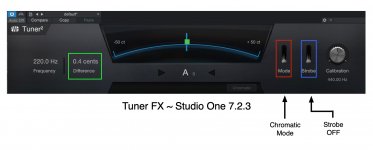
Based on the experiments I conducted, it appears that Tuner FX in Studio One 7.2.3 does not work correctly when Mode is set to "Custom" and "Standard Guitar" is selected. When configured this way, Tuner FX produces garbage.

However, when Mode is set to "Chromatic", Tuner FX works correctly.

EXPERIMENT

I added the Tuner FX in Studio One as in Insert on an Addictive Keys (XLN Audio) grand piano track and then configured Tuner FX correctly for use as an instrument tuner, in this case the instrument is a VSTi virtual instrument Grand Piano, which has been set to use "Concert A" (440-Hz) as its reference tuning pitch. I did another experiment with an electric guitar from SampleTank (IK Multimedia) with the same result.

Then I added music notation to play a series of whole notes, specifically A3 (220-Hz) and hit play to observe what the Tuner FX native Studio One effect control does.

For reference, previously I had tried different settings and left Tuner FX configured in the last way I tried, which reproduced the same incorrect behavior you experienced, including the Tuner FX "Difference" consistently showing "50 cents" with no variation.

Now it makes sense; and because the way Tuner FX was configured, the results were complete and total nonsense.

It was showing something, but what it was showing was illogical; and this led me to do a few more experiments to determine how Tuner FX works as an instrument tuner.

The attached image shows the correct way to configure Tuner FX to work as a guitar tuner; and it verifies that the Tuner FX in Studio One 7.2.3 (a) is working nicely and (b) is very accurate when configured this way.

However, when you set the Mode to "Custom" and then select "Standard Guitar", the Tuner FX shows nonsense; so from this I infer that it is not working correctly and has a bug when configured this way.

Tuner FX works correctly when the Mode is set to "Chromatic" and Strobe is "OFF".

Otherwise, it produces what looks to me to be garbage; hence is not working correctly when Mode is set to "Custom" with "Standard Guitar" selected from the drop-down list.

[NOTE: I had never used Tuner FX and mistakenly mapped it to another topic in the Lounge where the focus is on setting the reference tuning frequency for instruments, not on tuning instruments, per se. I thought Tuner FX was used the way a reference tuning frequency control is used in SampleTank and Opus to set the reference tuning pitch for a specific instrument; but apparently this is not what Tuner FX does. It looks like Tuner FX literally is a tool for tuning rather than setting the reference tuning tone; so my bad.:oops: ]

SUMMARY AND SOLUTION

There is a gnarly bug in Tuner FX in Studio One 7.2.3 when Mode is set to "Custom" and "Standard Guitar" is selected.

However, Tuner FX works correctly when Mode is set to "Chromatic" and "Strobe" is "OFF".

So the solution is to set Tuner FX as shown in the attached image.
 

Attachments

  • SW-Tuner-FX-Chromatic-Strobe-OFF.jpg
    SW-Tuner-FX-Chromatic-Strobe-OFF.jpg
    171,2 KB · Views: 15
Last edited:
Back
Top