joe.loduca
New member
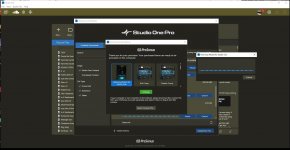
Greetings all, Hoping someone can help me. I purchased Harmony wizard as well as Studio one v7 pro. now when I originally tried to install harmony wizard, I didn't have S1 V7 installed. I originally installed harmony wizard under S1 V6.. seemed to install ok, I launched S1 V6 and it wanted to authorize the wizard, but it got stuck in that screen for about 10 minutes.. No way would it take that long.. internet connection is good. System rebooted (this is under windows 10 64 by the way) So anyway, I was looking for a uninstall (not there i guess) and . . . anyway, I was considering upgrading to S1 V7 pro anyway - so I pulled the trigger and did that.. THinking a reinstall of v7 pro might be the closest thing to a fresh install of harmony wizard.. but nothing helped.. results I get are attached as a jpg. Still not authorizing..
This is a bit strange: Things did get installed on my system because I notice a new macro tool bar of those things. But NOTHING within that toolbar works. In S1, you *should see some additional "Actions" attributed to HW - I get none of that.
anything any of you know that I can try? did many attempts to authorize. I also have keys and such emailed to me that the software DID NOT ask me for if thats a hint to what went wrong.
Much appreciated!! JOE
This is a bit strange: Things did get installed on my system because I notice a new macro tool bar of those things. But NOTHING within that toolbar works. In S1, you *should see some additional "Actions" attributed to HW - I get none of that.
anything any of you know that I can try? did many attempts to authorize. I also have keys and such emailed to me that the software DID NOT ask me for if thats a hint to what went wrong.
Much appreciated!! JOE