• Hi and welcome to the Studio One User Forum!

    Please note that this is an independent, user-driven forum and is not endorsed by, affiliated with, or maintained by PreSonus. Learn more in the Welcome thread!

No audio levels, no sound after recorded tunes.

Bluesmoods

New member
I've been a Studio One user since version 2 ( Now version 7.2) and have a complete Presonus studio using various interfaces and Studio Live 32SC. I've recorded many even having one tune from an artist chart #1 in Country and an actor / author's audio book recording go #1 on Amazon. I thought I knew my way around pretty darn well until this....

As of recent, It seems to record normally with all levels and channels showing up as they normally would. However, when playing back, there are no levels showing up. the tracks play with no sound. Nothing showing up in any of the channels not even the main out. Has me baffled. ( tracks are not muted) . Songs that were previously recorded play fine. Only anything new. The bar moves across but no audio. Also, after mixdown, message is "file type unsupported or may be corrupt". I've never seen this.. ?? d Any ideas??

Windows 11 , Studio One 7, Studio Live 32SC
Thanks!
 
Last edited:
Drive full? Or something with file permissions? A virus? Or worst of all: ransomware?
it would be good if the OP could unpack some of SO1's settings.

Just guessing as well .... never come across it myself !

Maybe start with the Song tab in settings and check that the in and out channel settings are all set correctly?

If old songs play ok something may have got corrupted in the preferences folder affecting file names?
You may have to trash your pref's folder.
If you have a lot of customizations Back it up first and put stuff back piecmeal. Others might have a better suggestions as to how to go
about this and will hopefully chime in.

Best regards
 
Sounds like possible sample rate issue.
As said check all your audio settings including the audio interface control panel and make sure that they are all using the same sample rate.

Check that all tracks and buses are going to the correct outputs.
 
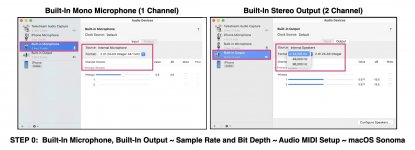
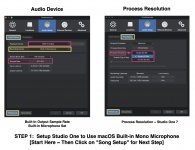
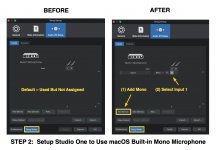
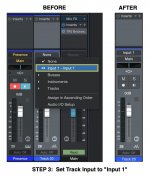
As has been suggested, the first thing to check is that the sample-rates are consistently the same everywhere they are configured and set, which on the Mac is done as shown in the attached images for configuring a monaural microphone, which is at least somewhat similar to the way it's done in Windows. It is similar for a stereo microphone and is just a matter of selecting stereo input rather than monaural input. :)

This applies equally for both Input and Output.

Another possibility that I have encountered occurs when ScreenFlow (Telestream) is configured to capture the sound from Studio One but either (a) Studio One does not know about it or (b) the sequence of starting ScreenFlow and Studio One is inconsistent, which usually is resolved by rebooting macOS. However, ScreenFlow is only for the Mac, but the concept might apply--something started or configured out of sequence.
 

Attachments

  • SW-Studio-One-Step-0-Configure-macOS.jpg
    SW-Studio-One-Step-0-Configure-macOS.jpg
    189,2 KB · Views: 12
  • SW-Studio-One-Step-1-Mono-Microphone.jpg
    SW-Studio-One-Step-1-Mono-Microphone.jpg
    184,6 KB · Views: 12
  • SW-Studio-One-Step-2-Mono-Microphone.jpg
    SW-Studio-One-Step-2-Mono-Microphone.jpg
    154,4 KB · Views: 13
  • SW-Studio-One-Step-3-Mono-Microphone.jpg
    SW-Studio-One-Step-3-Mono-Microphone.jpg
    184,2 KB · Views: 13
Disk drive errors?
 
As of recent, It seems to record normally with all levels and channels showing up as they normally would. However, when playing back, there are no levels showing up. the tracks play with no sound. Nothing showing up in any of the channels not even the main out.

Do you actually "see" waveforms being created on screen as the cursor tracks by and data is written during record?

Would be helpful to see a sample screen showing recorded data, the cursor tracking through it and a view of the actual mixer faders etc.

If you are seeing zero meter activity - something is either hard muted or not routed correctly here.

And that error on mixdown is curious - almost sounds like a format being laid down that cannot be mixed. Or conflicts with the hardware.

VP
 
Two things come to mind--other than configuring the OS and sample-rate correctly--and both of them occurred due to my temporarily zoning-out and forgetting the most basic aspects of using Studio One.

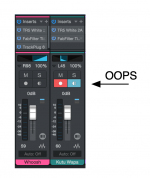
(1) I was getting no sound from an Instrument Track even though the volume LED in the VSTi virtual instrument engine indicated there was activity. Yet, there was no audio getting to Studio One from OPUS, UVI Workstation, or one of the players.

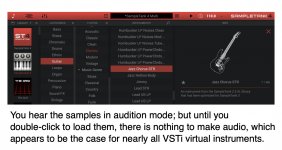
(2) I was getting no sound from a SampleTank (IK Multimedia) guitar.

The first bit of absent-minded forgetfulness was due to having the Record and Monitor buttons set, which took me a while to discover as the cause.

The second occurrence was due to forgetting actually to load the samples for the guitar.

Stuff like this usually has a simple explanation and can be corrected easily, but it's not always so obvious.

P. S. I have been doing this stuff for 15 years on the VSTi virtual instrument side but occasionally zone-out and forget key steps. These days I can attribute it to having a "senior moment". 🤪
 

Attachments

  • SW-OOPS.png
    SW-OOPS.png
    112,3 KB · Views: 6
  • SW-Load-To-Have-Audio.jpg
    SW-Load-To-Have-Audio.jpg
    142,5 KB · Views: 6
Last edited:
Could be Tape Style monitoring is selected in Options>Advanced>[Audio track monitoring mutes playback (Tape style)]
 
Back
Top