Hello together
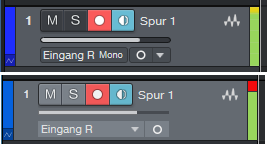
Since I updated from StudioOne 6 to 7, I'm missing the red Clipping-Flag in the input and output section... Is there any option to activate this? or a plugin or something?
Why i need this:
I'm not a professional. I would say, i'm an absolute noob in using a DAW.
For my Records i ask the band to play their loudest song. If i see the red clipping-flag in StudioOne, i reduce the Input-Level of the mic, reset the flag and ask the band to repeat. until the flag didn't go red, we repeat this procedure...
maybe you will ask me to use limiter and compressors for this, but here are 3 reasons against:
1. I'm a noob. I don't know how to use these plugins. I don't have the time or the will to learn it. And ultimately, I don't charge for the recordings.
2. My hearing is bad. I need an optical indicator for this.
3. The band wants it that way. The recordings should reflect exactly what resonates with the audience. They will hear their full dynamic range...
So you see, what i'm able to do, matches the requirements of the band...
Thanks in advance!
Since I updated from StudioOne 6 to 7, I'm missing the red Clipping-Flag in the input and output section... Is there any option to activate this? or a plugin or something?
Why i need this:
I'm not a professional. I would say, i'm an absolute noob in using a DAW.
For my Records i ask the band to play their loudest song. If i see the red clipping-flag in StudioOne, i reduce the Input-Level of the mic, reset the flag and ask the band to repeat. until the flag didn't go red, we repeat this procedure...
maybe you will ask me to use limiter and compressors for this, but here are 3 reasons against:
1. I'm a noob. I don't know how to use these plugins. I don't have the time or the will to learn it. And ultimately, I don't charge for the recordings.
2. My hearing is bad. I need an optical indicator for this.
3. The band wants it that way. The recordings should reflect exactly what resonates with the audience. They will hear their full dynamic range...
So you see, what i'm able to do, matches the requirements of the band...
Thanks in advance!